FaceFind and BibTrack are the two AI capabilities that make 9Pic galleries usable at scale. Participants don’t browse 5,000 race photos linearly — they upload a selfie or punch in a BIB number and get just their photos in seconds. On Pro you get production-grade accuracy on both, so the operator’s job is mostly about turning them on at event creation and knowing how to debug when something looks wrong.
You’re on Pro and have at least one event created.
For FaceFind: every photo needs a recognisable face crop. Wide-angle crowd shots still work, but the closer the face, the better the match score.
For BibTrack: every BIB number needs to be readable in the photo. If your event uses non-standard BIBs (very small, on the back only, partial obstruction), test with 50 sample photos before processing the full set.
Both features are per-event toggles, set when you create the event (and editable later from the event’s Configuration tab):
Toggle
Where
What it does
Selfie Search
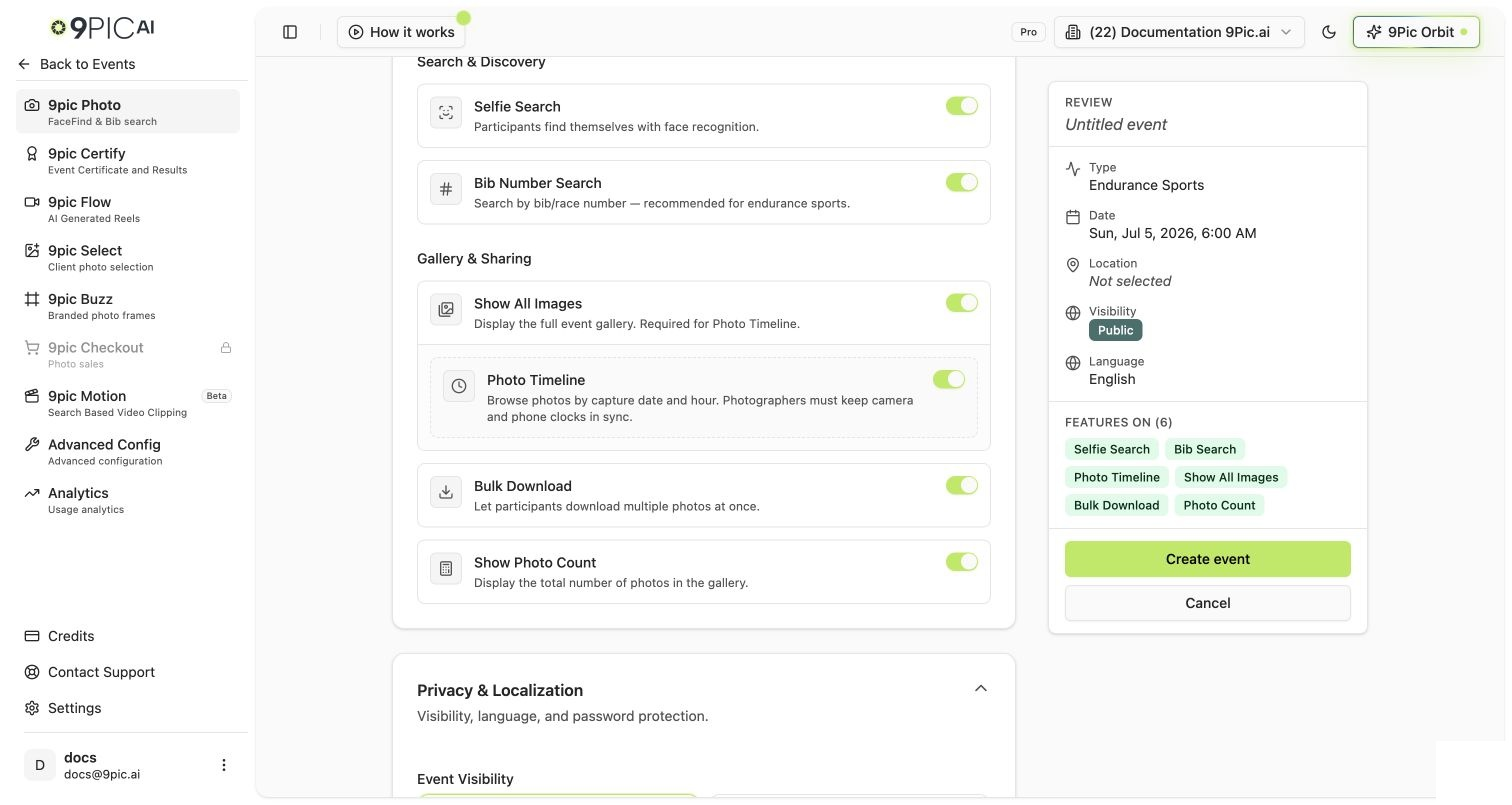
Create New Event → Photo Memories card
Turns on FaceFind. Each processed photo runs face detection and indexing.
BIB Search
Create New Event → Photo Memories card (Running event types)
Turns on BibTrack. Each processed photo runs BIB OCR.
You can flip both on, both off, or just one — and you can change your mind later from the Configuration tab. Toggling a feature on after some photos are already processed will queue those photos for re-processing.For the underlying pipeline reference, see AI Analysis.
Toggle Selfie Search and BIB Search at event creation
On Create New Event → Photo Memories, flip on the searches you need. You can change these later — they’re not one-way switches.
Photo Memories search toggles
2
Run a small test batch first
Add 30–50 sample photos to the event’s image source and click Sync Images. Once processing finishes, search by:
A teammate’s selfie (FaceFind).
A known BIB number from one of the test photos (BibTrack).
If both return the right photos, scale up to the full set.
3
Process the full set
Add the remaining photos to the source folder and click Sync Images again. Only the new photos consume credits — already-processed photos are skipped automatically.
For events over 10,000 photos, sync in waves of ~2,000–3,000 so you can spot-check results between batches. If something looks off in batch 1, you can fix it before paying for batch 2.
4
Verify the participant search experience
Open the public event page (use Open Link from the event header) and run a search as a participant would:
Upload a selfie → confirm a clean set of matching photos comes back.
Type a BIB number → confirm the right photos surface.
If results are off, see the troubleshooting section below.
Standardise photographer briefs. Photographers who shoot for 9Pic galleries get noticeably better results when they’re told: “wide enough to capture the BIB or face clearly, but not so wide the face is < 100 px.”
Batch your processing per source. If you have three photographers dropping into three different folders, process each source separately so you can spot-check per-source quality.
Never re-process for “fun.” Re-processing already-processed photos doesn’t consume new credits, but it does add load. Only re-process when you’re toggling FaceFind or BibTrack on for an event that previously didn’t have it.
Watch credit consumption mid-event. If you’re at 80% of your credit balance, top up before the next sync. Processing pauses partway through is the most common operator pain point. See Credits & Top-ups.
Is FaceFind / BibTrack accuracy on Pro the same as Enterprise?
Yes. The model and the indexing pipeline are identical across all paid plans. Pro and Enterprise differ on platform features (Checkout, custom gateways, SLAs), not on AI quality.
Does each photo cost extra credits if both FaceFind and BibTrack are on?
No. 1 processed photo = 1 credit, regardless of how many AI indexes are applied. Toggling both searches on does not double-charge.
Can I turn BibTrack on after processing has already finished?
Yes. The dashboard will queue the existing photos for BIB indexing on the next Sync. No extra credits are charged for re-indexing photos already processed for the photo pipeline.
Can a participant search by both selfie and BIB number?
Yes — they’re independent search modes. The participant gallery shows both options when both are enabled on the event.
Does FaceFind store participants' selfies?
Selfies uploaded for search are used only to compute a temporary face embedding for the search query and are not retained as gallery photos. For specifics, see the API Reference: Face Search.