Configure your branded gallery site in one sitting
Why This Matters
The Setup Wizard is the single highest-leverage thing you can do on day one of your Pro plan. It walks you through every website-customisation step in the right order, with the right Settings tab opened automatically. Skipping the wizard is the most common reason Pro customers feel like they’re “missing” features that are actually waiting on a five-minute config.
Before You Begin
You’re on the Pro, Business or Enterprise plan. (On Trial or Pay As You Go, the Setup Guide shows “The setup guide is available for Pro, Business and Enterprise plans” and is read-only.)
You’ve decided on:
A brand color (a hex code, e.g. #2E6F40).
A logo (transparent PNG, ≤ 300 KB).
A favicon (32×32 PNG, ≤ 100 KB).
Your social media profile URLs.
(Optional) A custom domain you want to connect — see Domain.
Block out 30–45 minutes the first time. Repeat the wizard later only if you want to dismiss it once everything is green.
Steps
1
Open the Setup Guide
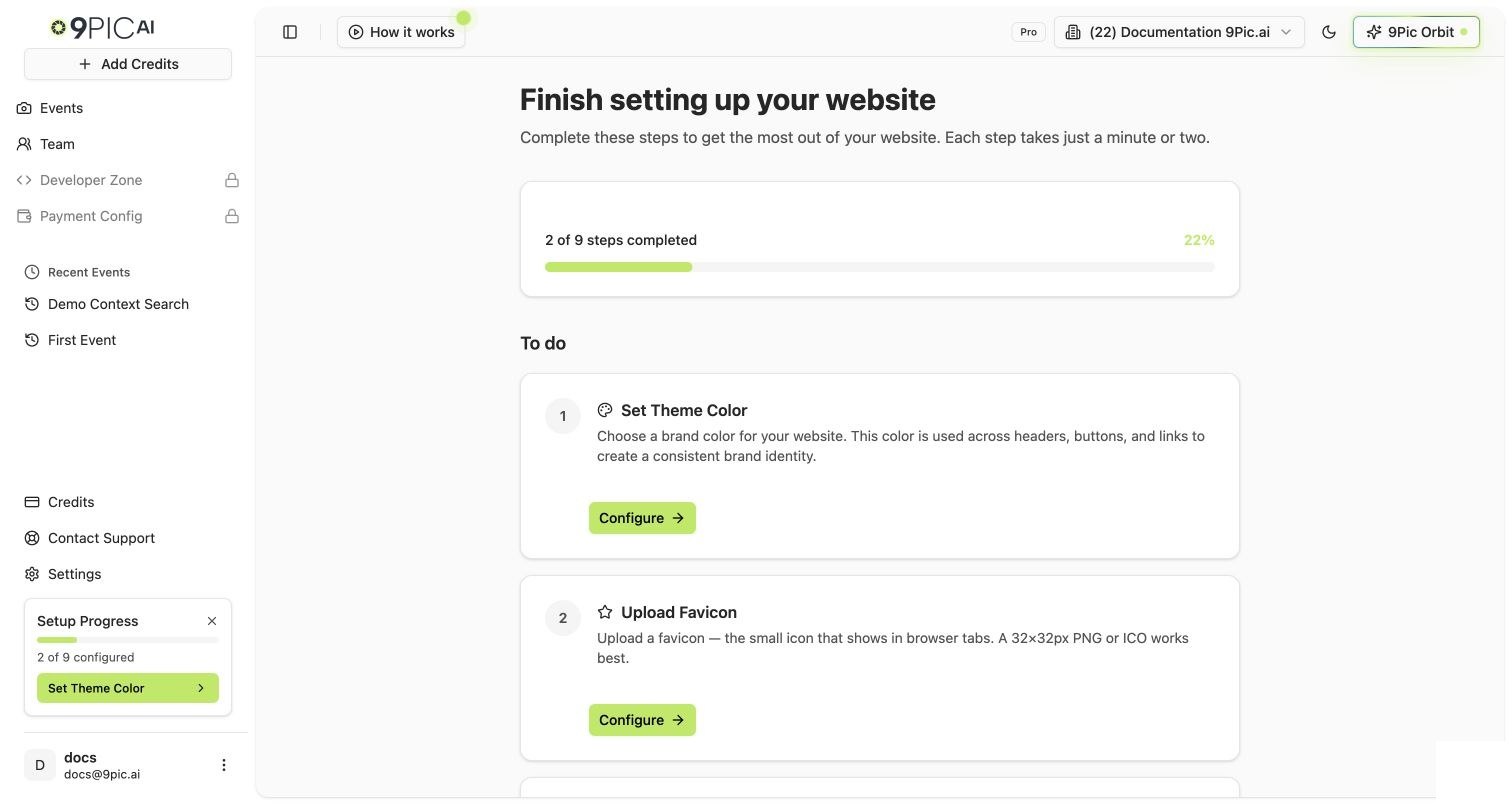
From the sidebar, click Setup Guide. On Pro, the page header reads “Finish setting up your website” with a progress bar showing how many of the website-customisation steps you’ve completed.
Pro Setup Guide
2
Work through the To-do list in order
The Setup Guide groups steps into To do and Completed. Click Configure on any pending step — the wizard navigates you to the right Settings tab and pre-selects the matching field.Recommended order (matches the order the wizard typically lists them in):
Theme color → Branding & Theme tab.
Logo → Branding & Theme tab.
Favicon → Branding & Theme tab.
Header CTA → Branding & Theme tab. (Optional but high-impact — see Advanced Settings.)
Footer text → Footer & Social tab.
Social media → Footer & Social tab.
Contact form → Contact tab.
Google Tag Manager → Advanced tab. (Optional, has a tradeoff — read the warning below.)
Each Settings tab saves on its own: when you change something, a bar with Save changes and Discard appears at the bottom of the page. Settings are not auto-saved across tabs — if you switch tabs with unsaved changes, the dashboard shows an “Unsaved changes” dialog so you don’t lose your work.
4
Connect a custom domain (optional but recommended)
Open the Domain & Region tab from Setup Guide or directly via Settings. You can either:
Add a yourname.9pic.ai platform subdomain (instant).
Connect a photos.yourbrand.com custom domain (requires a CNAME record at your DNS provider; SSL provisioning takes up to 48 hours).
From the Setup Guide, click Invite member on the Invite team member step. You’ll be taken to the Team page where you can invite an admin or operator.Why this is in the wizard: a single-person account is a single point of failure on event day. See Team Setup.
6
Dismiss the wizard when everything is green
Once all steps show Completed, the wizard shows an “All done!” confirmation. Click Dismiss setup guide to hide the progress card from your sidebar. You can still change any setting from the Settings page anytime.
Dismissing is optional. Most Pro customers leave the wizard visible until they’re confident they won’t add a new social link or footer note in the next week.
What Each Step Does
Wizard step
Settings tab opened
What it controls
Theme color
Branding & Theme
Brand color used across buttons, links, and accents on your gallery.
Logo
Branding & Theme
Logo image shown in the website header. Transparent PNG works best.
Favicon
Branding & Theme
The small icon that shows in browser tabs.
Header CTA
Branding & Theme
Optional call-to-action button in the header (registration, donations, “Book Now”).
Footer text
Footer & Social
Footer copy on every page (copyright, tagline, legal).
Social media
Footer & Social
Links to your Facebook, Instagram, X, YouTube, etc.
Contact form
Contact
Embedded contact form so participants can reach you directly.
Google Tag Manager
Advanced
Your own GTM container (advanced — see the warning below).
Invite team member
Team
Add an admin or operator.
Google Tag Manager replaces 9Pic’s built-in analytics. If you turn on a custom GTM container, you stop seeing data in the 9Pic Analytics dashboards and you become responsible for setting up your own Google Analytics property, dashboards, and event tracking. Only enable this if you have the expertise to manage your own analytics. The full warning is shown inline in the wizard. Details: Advanced Settings.
Common Questions
The Setup Guide says 'unavailable' for me. Why?
The Setup Guide is gated to Pro, Business and Enterprise plans. If your current organisation is on Trial or Pay As You Go, the page intentionally shows “The setup guide is available for Pro, Business and Enterprise plans.” Switch to a Pro organisation from the sidebar (or upgrade) to see the wizard.
I dismissed the wizard. Can I bring it back?
The Setup Guide page itself is always available from the sidebar — dismissing only hides the progress card, not the page. Click Setup Guide in the sidebar to re-open the wizard at any time.
Can I skip social media or contact form if I do not need them?
Yes. Wizard steps marked Optional can be left unconfigured. The “All done!” state still triggers when all required steps are complete.
Do my Setup Wizard choices apply to every event?
Yes. Theme color, logo, favicon, footer, social, contact form, header CTA, and GTM all apply globally to your gallery website. Per-event overrides happen on the event’s own settings tabs, not in the global Setup Wizard.
What if I change my mind on a setting later?
Open Settings in the sidebar and pick the tab you want. Edit any field, then click Save at the bottom of that tab. Your change goes live on the gallery within seconds.
Next Steps
Branding & Theme
Logo, favicon, theme color, header style, and CTA button.
Custom Domain
Connect a platform subdomain or your own apex domain.
Footer & Contact
Footer copy, social links, and embedded contact form.
Advanced Settings
Google Tag Manager and advanced toggles.
{"docsConfig":{"theme":"mint","$schema":"https://mintlify.com/docs.json","name":"9Pic AI Documentation","colors":{"primary":"#155DFC","light":"#3080FF","dark":"#0B4AD2"},"logo":{"light":"https://mintcdn.com/9picai/S5EcjfSqjwpORHEo/logo/light.png?fit=max\u0026auto=format\u0026n=S5EcjfSqjwpORHEo\u0026q=85\u0026s=a14647e1552cad86363bd3dfe32ec208","dark":"https://mintcdn.com/9picai/S5EcjfSqjwpORHEo/logo/dark.png?fit=max\u0026auto=format\u0026n=S5EcjfSqjwpORHEo\u0026q=85\u0026s=025984d2e88c0cccd1a0567ad7488357"},"favicon":"https://mintcdn.com/9picai/S5EcjfSqjwpORHEo/favicon.svg?fit=max\u0026auto=format\u0026n=S5EcjfSqjwpORHEo\u0026q=85\u0026s=65125317ce120b5f2cb637eaa6cde837","navbar":{"links":[{"href":"mailto:support@9pic.ai","label":"Support"}]},"footer":{"socials":{"x":"https://x.com/9picai","linkedin":"https://linkedin.com/company/9pic-ai"}},"integrations":{"clarity":{"projectId":"vahau6obj9"}},"contextual":{"options":["copy","view","chatgpt","claude"],"display":"header"},"styling":{"latex":false},"navigation":{"global":{},"pages":[]}},"deployment":{"deploymentMetadataValue":{"subdomain":"9picai","hasAudioNarration":false,"actualSubdomain":"9picai","customDomains":["docs.9pic.ai"],"gitSource":{"type":"github","owner":"theargofactory","repo":"bhaago_india","deployBranch":"master","contentDirectory":"9pic-docs","isPrivate":true,"mountPath":"","label":""},"entitlements":{},"buildId":"6afd4d39edadaaf94a621dad","clientVersion":"0.0.4177","searchFilterCounts":[{"language":"default","tag":"API Reference","count":37},{"language":"default","tag":"Products","count":37},{"language":"default","tag":"Account \u0026 Billing","count":31},{"language":"default","tag":"Get Started","count":23},{"language":"default","tag":"Troubleshooting","count":14},{"language":"default","tag":"Events","count":12},{"language":"default","tag":"AI \u0026 Automation","count":11},{"language":"default","tag":"Events \u0026 Photos","count":11},{"language":"default","tag":"Plans","count":8},{"language":"default","tag":"AI Assistants","count":8}]},"assistantConfig":{"enableAskAiButton":false,"enableStarterQuestions":false,"enableAskAiSearchBar":true},"basePath":"","hasChatPermissions":false,"hasWebMcpPermissions":false,"toggles":[{"name":"kill-isr","enabled":true,"variant":{"name":"disabled","enabled":false,"feature_enabled":true},"impressionData":false},{"name":"custom-rbac-roles","enabled":true,"variant":{"name":"disabled","enabled":false,"feature_enabled":true},"impressionData":false},{"name":"agent-mintlify-slack","enabled":true,"variant":{"name":"disabled","enabled":false,"feature_enabled":true},"impressionData":false},{"name":"agent-integrations-settings","enabled":true,"variant":{"name":"disabled","enabled":false,"feature_enabled":true},"impressionData":false},{"name":"rbac-expansion","enabled":true,"variant":{"name":"disabled","enabled":false,"feature_enabled":true},"impressionData":false},{"name":"automations-pr-grouping","enabled":true,"variant":{"name":"disabled","enabled":false,"feature_enabled":true},"impressionData":false},{"name":"custom-prefix","enabled":true,"variant":{"name":"disabled","enabled":false,"feature_enabled":true},"impressionData":false},{"name":"analytics-v7","enabled":true,"variant":{"name":"disabled","enabled":false,"feature_enabled":true},"impressionData":false},{"name":"user-flows-analytics","enabled":true,"variant":{"name":"disabled","enabled":false,"feature_enabled":true},"impressionData":false},{"name":"no-publish-flow","enabled":true,"variant":{"name":"disabled","enabled":false,"feature_enabled":true},"impressionData":false},{"name":"workos-onboarding","enabled":true,"variant":{"name":"disabled","enabled":false,"feature_enabled":true},"impressionData":false},{"name":"snapshot-serving-live","enabled":true,"variant":{"name":"disabled","enabled":false,"feature_enabled":true},"impressionData":false},{"name":"stripTemperatureMiddleware","enabled":true,"variant":{"name":"disabled","enabled":false,"feature_enabled":true},"impressionData":false},{"name":"support-platform-pylon-zendesk","enabled":true,"variant":{"name":"disabled","enabled":false,"feature_enabled":true},"impressionData":false},{"name":"snapshot-serving","enabled":true,"variant":{"name":"disabled","enabled":false,"feature_enabled":true},"impressionData":false},{"name":"instant-rollback","enabled":true,"variant":{"name":"disabled","enabled":false,"feature_enabled":true},"impressionData":false},{"name":"granular-notifications-server","enabled":true,"variant":{"name":"disabled","enabled":false,"feature_enabled":true},"impressionData":false},{"name":"granular-notifications","enabled":true,"variant":{"name":"disabled","enabled":false,"feature_enabled":true},"impressionData":false},{"name":"automations-fable","enabled":true,"variant":{"name":"disabled","enabled":false,"feature_enabled":true},"impressionData":false},{"name":"fixed-ai-action-pricing","enabled":true,"variant":{"name":"disabled","enabled":false,"feature_enabled":true},"impressionData":false},{"name":"automation-resolve-merge-conflict","enabled":true,"variant":{"name":"disabled","enabled":false,"feature_enabled":true},"impressionData":false},{"name":"scoped-publishing","enabled":true,"variant":{"name":"disabled","enabled":false,"feature_enabled":true},"impressionData":false},{"name":"mintql","enabled":true,"variant":{"name":"disabled","enabled":false,"feature_enabled":true},"impressionData":false},{"name":"page-level-analytics","enabled":true,"variant":{"name":"disabled","enabled":false,"feature_enabled":true},"impressionData":false},{"name":"editor-version-history-v2","enabled":true,"variant":{"name":"disabled","enabled":false,"feature_enabled":true},"impressionData":false},{"name":"billing-page-v2","enabled":true,"variant":{"name":"disabled","enabled":false,"feature_enabled":true},"impressionData":false},{"name":"full-page-search","enabled":true,"variant":{"name":"disabled","enabled":false,"feature_enabled":true},"impressionData":false},{"name":"workspace-projects","enabled":true,"variant":{"name":"disabled","enabled":false,"feature_enabled":true},"impressionData":false},{"name":"assistant-v5","enabled":true,"variant":{"name":"disabled","enabled":false,"feature_enabled":true},"impressionData":false},{"name":"fork-pr-previews","enabled":true,"variant":{"name":"disabled","enabled":false,"feature_enabled":true},"impressionData":false},{"name":"revalidation-jwt","enabled":true,"variant":{"name":"disabled","enabled":false,"feature_enabled":true},"impressionData":false},{"name":"workos-sso-scim","enabled":true,"variant":{"name":"disabled","enabled":false,"feature_enabled":true},"impressionData":false},{"name":"hobby-abuse-scan","enabled":true,"variant":{"name":"disabled","enabled":false,"feature_enabled":true},"impressionData":false},{"name":"dashboard-inbox","enabled":true,"variant":{"name":"disabled","enabled":false,"feature_enabled":true},"impressionData":false},{"name":"workos-signup","enabled":true,"variant":{"name":"disabled","enabled":false,"feature_enabled":true},"impressionData":false},{"name":"turbopuffer-dual-write","enabled":true,"variant":{"name":"disabled","enabled":false,"feature_enabled":true},"impressionData":false},{"name":"workos-enabled","enabled":true,"variant":{"name":"disabled","enabled":false,"feature_enabled":true},"impressionData":false},{"name":"approve-review-flow","enabled":true,"variant":{"name":"disabled","enabled":false,"feature_enabled":true},"impressionData":false},{"name":"editor-metadata","enabled":true,"variant":{"name":"disabled","enabled":false,"feature_enabled":true},"impressionData":false},{"name":"sso-setup-deadline-banner","enabled":true,"variant":{"name":"disabled","enabled":false,"feature_enabled":true},"impressionData":false},{"name":"turbopuffer-serve","enabled":true,"variant":{"name":"disabled","enabled":false,"feature_enabled":true},"impressionData":false},{"name":"live-agents","enabled":true,"variant":{"name":"disabled","enabled":false,"feature_enabled":true},"impressionData":false},{"name":"starter-pricing","enabled":true,"variant":{"name":"control","enabled":true,"payload":{"type":"string","value":"control"},"feature_enabled":true},"impressionData":false},{"name":"llms-txt-v2","enabled":true,"variant":{"name":"disabled","enabled":false,"feature_enabled":true},"impressionData":false},{"name":"wildcard-email-auth","enabled":true,"variant":{"name":"disabled","enabled":false,"feature_enabled":true},"impressionData":false}],"googleFontsInlined":false},"customCss":[],"page":{"pagePath":"account/site/setup-wizard","slug":"/account/site/setup-wizard","pageMetadata":{"title":"Run the Setup Wizard","description":"Configure your branded gallery site in one sitting","icon":"wand-magic-sparkles","href":"/account/site/setup-wizard"},"description":{"compiledSource":"\"use strict\";\nconst {jsx: _jsx} = arguments[0];\nconst {useMDXComponents: _provideComponents} = arguments[0];\nfunction _createMdxContent(props) {\n const _components = {\n p: \"p\",\n ..._provideComponents(),\n ...props.components\n };\n return _jsx(_components.p, {\n children: \"Configure your branded gallery site in one sitting\"\n });\n}\nfunction MDXContent(props = {}) {\n const {wrapper: MDXLayout} = {\n ..._provideComponents(),\n ...props.components\n };\n return MDXLayout ? _jsx(MDXLayout, {\n ...props,\n children: _jsx(_createMdxContent, {\n ...props\n })\n }) : _createMdxContent(props);\n}\nreturn {\n default: MDXContent\n};\n","frontmatter":{},"scope":{}},"pageType":"default","mdx":{"mdxSource":{"compiledSource":"\"use strict\";const{Fragment:_Fragment,jsx:_jsx,jsxs:_jsxs}=arguments[0];const{useMDXComponents:_provideComponents}=arguments[0];function _createMdxContent(props){const _components={a:`a`,code:`code`,em:`em`,li:`li`,ol:`ol`,p:`p`,strong:`strong`,tbody:`tbody`,td:`td`,th:`th`,thead:`thead`,tr:`tr`,ul:`ul`,..._provideComponents(),...props.components},{Accordion,AccordionGroup,Card,CardGroup,Frame,Heading,Note,OptimizedImage,Step,Steps,Table,Tip,Warning}=_components;if(!Accordion)_missingMdxReference(`Accordion`,true);if(!AccordionGroup)_missingMdxReference(`AccordionGroup`,true);if(!Card)_missingMdxReference(`Card`,true);if(!CardGroup)_missingMdxReference(`CardGroup`,true);if(!Frame)_missingMdxReference(`Frame`,true);if(!Heading)_missingMdxReference(`Heading`,true);if(!Note)_missingMdxReference(`Note`,true);if(!OptimizedImage)_missingMdxReference(`OptimizedImage`,true);if(!Step)_missingMdxReference(`Step`,true);if(!Steps)_missingMdxReference(`Steps`,true);if(!Table)_missingMdxReference(`Table`,true);if(!Tip)_missingMdxReference(`Tip`,true);if(!Warning)_missingMdxReference(`Warning`,true);return _jsxs(_Fragment,{children:[_jsx(Heading,{level:`2`,id:`why-this-matters`,children:`Why This Matters`}),`\n`,_jsx(_components.p,{children:`The Setup Wizard is the single highest-leverage thing you can do on day one of your Pro plan. It walks you through every website-customisation step in the right order, with the right Settings tab opened automatically. Skipping the wizard is the most common reason Pro customers feel like they’re “missing” features that are actually waiting on a five-minute config.`}),`\n`,_jsx(Heading,{level:`2`,id:`before-you-begin`,children:`Before You Begin`}),`\n`,_jsxs(_components.ul,{children:[`\n`,_jsxs(_components.li,{children:[`You’re on the `,_jsx(_components.strong,{children:`Pro`}),`, `,_jsx(_components.strong,{children:`Business`}),` or `,_jsx(_components.strong,{children:`Enterprise`}),` plan. (On Trial or Pay As You Go, the Setup Guide shows `,_jsx(_components.em,{children:`“The setup guide is available for Pro, Business and Enterprise plans”`}),` and is read-only.)`]}),`\n`,_jsxs(_components.li,{children:[`You’ve decided on:`,`\n`,_jsxs(_components.ul,{children:[`\n`,_jsxs(_components.li,{children:[`A `,_jsx(_components.strong,{children:`brand color`}),` (a hex code, e.g. `,_jsx(_components.code,{children:`#2E6F40`}),`).`]}),`\n`,_jsxs(_components.li,{children:[`A `,_jsx(_components.strong,{children:`logo`}),` (transparent PNG, ≤ 300 KB).`]}),`\n`,_jsxs(_components.li,{children:[`A `,_jsx(_components.strong,{children:`favicon`}),` (32×32 PNG, ≤ 100 KB).`]}),`\n`,_jsxs(_components.li,{children:[`Your `,_jsx(_components.strong,{children:`social media`}),` profile URLs.`]}),`\n`]}),`\n`]}),`\n`,_jsxs(_components.li,{children:[`(Optional) A custom domain you want to connect — see `,_jsx(_components.a,{href:`/account/site/domain`,children:`Domain`}),`.`]}),`\n`]}),`\n`,_jsx(Tip,{children:_jsxs(_components.p,{children:[`Block out `,_jsx(_components.strong,{children:`30–45 minutes`}),` the first time. Repeat the wizard later only if you want to dismiss it once everything is green.`]})}),`\n`,_jsx(Heading,{level:`2`,id:`steps`,children:`Steps`}),`\n`,_jsxs(Steps,{children:[_jsxs(Step,{title:`Open the Setup Guide`,children:[_jsxs(_components.p,{children:[`From the sidebar, click `,_jsx(_components.strong,{children:`Setup Guide`}),`. On Pro, the page header reads `,_jsx(_components.strong,{children:`“Finish setting up your website”`}),` with a progress bar showing how many of the website-customisation steps you’ve completed.`]}),_jsx(Frame,{caption:`Pro Setup Guide`,children:_jsx(OptimizedImage,{src:`https://assets.9pic.ai/docs/pro-guide/setup-guide-landing.webp`,alt:`Setup Guide landing page on a Pro account showing website setup progress, To do steps, and Configure buttons`})})]}),_jsxs(Step,{title:`Work through the To-do list in order`,children:[_jsxs(_components.p,{children:[`The Setup Guide groups steps into `,_jsx(_components.strong,{children:`To do`}),` and `,_jsx(_components.strong,{children:`Completed`}),`. Click `,_jsx(_components.strong,{children:`Configure`}),` on any pending step — the wizard navigates you to the right Settings tab and pre-selects the matching field.`]}),_jsx(_components.p,{children:`Recommended order (matches the order the wizard typically lists them in):`}),_jsxs(_components.ol,{children:[`\n`,_jsxs(_components.li,{children:[_jsx(_components.strong,{children:`Theme color`}),` → Branding \u0026 Theme tab.`]}),`\n`,_jsxs(_components.li,{children:[_jsx(_components.strong,{children:`Logo`}),` → Branding \u0026 Theme tab.`]}),`\n`,_jsxs(_components.li,{children:[_jsx(_components.strong,{children:`Favicon`}),` → Branding \u0026 Theme tab.`]}),`\n`,_jsxs(_components.li,{children:[_jsx(_components.strong,{children:`Header CTA`}),` → Branding \u0026 Theme tab. (Optional but high-impact — see `,_jsx(_components.a,{href:`/account/site/advanced`,children:`Advanced Settings`}),`.)`]}),`\n`,_jsxs(_components.li,{children:[_jsx(_components.strong,{children:`Footer text`}),` → Footer \u0026 Social tab.`]}),`\n`,_jsxs(_components.li,{children:[_jsx(_components.strong,{children:`Social media`}),` → Footer \u0026 Social tab.`]}),`\n`,_jsxs(_components.li,{children:[_jsx(_components.strong,{children:`Contact form`}),` → Contact tab.`]}),`\n`,_jsxs(_components.li,{children:[_jsx(_components.strong,{children:`Google Tag Manager`}),` → Advanced tab. (Optional, has a tradeoff — read the warning below.)`]}),`\n`,_jsxs(_components.li,{children:[_jsx(_components.strong,{children:`Invite team member`}),` → Team page.`]}),`\n`]}),_jsxs(_components.p,{children:[`See `,_jsx(_components.a,{href:`/account/site/branding`,children:`Branding \u0026 Theme`}),`, `,_jsx(_components.a,{href:`/account/site/footer`,children:`Footer \u0026 Contact`}),`, and `,_jsx(_components.a,{href:`/account/site/advanced`,children:`Advanced Settings`}),` for the field-level reference.`]})]}),_jsx(Step,{title:`Save each tab before switching`,children:_jsxs(_components.p,{children:[`Each Settings tab saves on its own: when you change something, a bar with `,_jsx(_components.strong,{children:`Save changes`}),` and `,_jsx(_components.strong,{children:`Discard`}),` appears at the bottom of the page. Settings are `,_jsx(_components.strong,{children:`not`}),` auto-saved across tabs — if you switch tabs with unsaved changes, the dashboard shows an `,_jsx(_components.strong,{children:`“Unsaved changes”`}),` dialog so you don’t lose your work.`]})}),_jsxs(Step,{title:`Connect a custom domain (optional but recommended)`,children:[_jsxs(_components.p,{children:[`Open the `,_jsx(_components.strong,{children:`Domain \u0026 Region`}),` tab from Setup Guide or directly via Settings. You can either:`]}),_jsxs(_components.ul,{children:[`\n`,_jsxs(_components.li,{children:[`Add a `,_jsx(_components.code,{children:`yourname.9pic.ai`}),` platform subdomain (instant).`]}),`\n`,_jsxs(_components.li,{children:[`Connect a `,_jsx(_components.code,{children:`photos.yourbrand.com`}),` custom domain (requires a CNAME record at your DNS provider; SSL provisioning takes up to `,_jsx(_components.strong,{children:`48 hours`}),`).`]}),`\n`]}),_jsxs(_components.p,{children:[`Full walkthrough: `,_jsx(_components.a,{href:`/account/site/domain`,children:`Custom Domain`}),` and the deep reference at `,_jsx(_components.a,{href:`/account/site/domain`,children:`Domain \u0026 Region`}),`.`]})]}),_jsxs(Step,{title:`Invite at least one teammate`,children:[_jsxs(_components.p,{children:[`From the Setup Guide, click `,_jsx(_components.strong,{children:`Invite member`}),` on the `,_jsx(_components.strong,{children:`Invite team member`}),` step. You’ll be taken to the `,_jsx(_components.strong,{children:`Team`}),` page where you can invite an admin or operator.`]}),_jsxs(_components.p,{children:[`Why this is in the wizard: a single-person account is a single point of failure on event day. See `,_jsx(_components.a,{href:`/account/team`,children:`Team Setup`}),`.`]})]}),_jsxs(Step,{title:`Dismiss the wizard when everything is green`,children:[_jsxs(_components.p,{children:[`Once all steps show `,_jsx(_components.strong,{children:`Completed`}),`, the wizard shows an `,_jsx(_components.strong,{children:`“All done!”`}),` confirmation. Click `,_jsx(_components.strong,{children:`Dismiss setup guide`}),` to hide the progress card from your sidebar. You can still change any setting from the Settings page anytime.`]}),_jsx(Note,{children:_jsx(_components.p,{children:`Dismissing is optional. Most Pro customers leave the wizard visible until they’re confident they won’t add a new social link or footer note in the next week.`})})]})]}),`\n`,_jsx(Heading,{level:`2`,id:`what-each-step-does`,children:`What Each Step Does`}),`\n`,_jsxs(Table,{children:[_jsx(_components.thead,{children:_jsxs(_components.tr,{children:[_jsx(_components.th,{children:`Wizard step`}),_jsx(_components.th,{children:`Settings tab opened`}),_jsx(_components.th,{children:`What it controls`})]})}),_jsxs(_components.tbody,{children:[_jsxs(_components.tr,{children:[_jsx(_components.td,{children:_jsx(_components.strong,{children:`Theme color`})}),_jsx(_components.td,{children:`Branding \u0026 Theme`}),_jsx(_components.td,{children:`Brand color used across buttons, links, and accents on your gallery.`})]}),_jsxs(_components.tr,{children:[_jsx(_components.td,{children:_jsx(_components.strong,{children:`Logo`})}),_jsx(_components.td,{children:`Branding \u0026 Theme`}),_jsx(_components.td,{children:`Logo image shown in the website header. Transparent PNG works best.`})]}),_jsxs(_components.tr,{children:[_jsx(_components.td,{children:_jsx(_components.strong,{children:`Favicon`})}),_jsx(_components.td,{children:`Branding \u0026 Theme`}),_jsx(_components.td,{children:`The small icon that shows in browser tabs.`})]}),_jsxs(_components.tr,{children:[_jsx(_components.td,{children:_jsx(_components.strong,{children:`Header CTA`})}),_jsx(_components.td,{children:`Branding \u0026 Theme`}),_jsx(_components.td,{children:`Optional call-to-action button in the header (registration, donations, “Book Now”).`})]}),_jsxs(_components.tr,{children:[_jsx(_components.td,{children:_jsx(_components.strong,{children:`Footer text`})}),_jsx(_components.td,{children:`Footer \u0026 Social`}),_jsx(_components.td,{children:`Footer copy on every page (copyright, tagline, legal).`})]}),_jsxs(_components.tr,{children:[_jsx(_components.td,{children:_jsx(_components.strong,{children:`Social media`})}),_jsx(_components.td,{children:`Footer \u0026 Social`}),_jsx(_components.td,{children:`Links to your Facebook, Instagram, X, YouTube, etc.`})]}),_jsxs(_components.tr,{children:[_jsx(_components.td,{children:_jsx(_components.strong,{children:`Contact form`})}),_jsx(_components.td,{children:`Contact`}),_jsx(_components.td,{children:`Embedded contact form so participants can reach you directly.`})]}),_jsxs(_components.tr,{children:[_jsx(_components.td,{children:_jsx(_components.strong,{children:`Google Tag Manager`})}),_jsx(_components.td,{children:`Advanced`}),_jsx(_components.td,{children:`Your own GTM container (advanced — see the warning below).`})]}),_jsxs(_components.tr,{children:[_jsx(_components.td,{children:_jsx(_components.strong,{children:`Invite team member`})}),_jsx(_components.td,{children:`Team`}),_jsx(_components.td,{children:`Add an admin or operator.`})]})]})]}),`\n`,_jsx(Warning,{children:_jsxs(_components.p,{children:[_jsx(_components.strong,{children:`Google Tag Manager replaces 9Pic’s built-in analytics.`}),` If you turn on a custom GTM container, you stop seeing data in the 9Pic Analytics dashboards and you become responsible for setting up your own Google Analytics property, dashboards, and event tracking. Only enable this if you have the expertise to manage your own analytics. The full warning is shown inline in the wizard. Details: `,_jsx(_components.a,{href:`/account/site/advanced`,children:`Advanced Settings`}),`.`]})}),`\n`,_jsx(Heading,{level:`2`,id:`common-questions`,children:`Common Questions`}),`\n`,_jsxs(AccordionGroup,{children:[_jsx(Accordion,{title:`The Setup Guide says 'unavailable' for me. Why?`,id:`the-setup-guide-says-unavailable-for-me-why`,children:_jsxs(_components.p,{children:[`The Setup Guide is gated to Pro, Business and Enterprise plans. If your current organisation is on Trial or Pay As You Go, the page intentionally shows `,_jsx(_components.em,{children:`“The setup guide is available for Pro, Business and Enterprise plans.”`}),` Switch to a Pro organisation from the sidebar (or upgrade) to see the wizard.`]})}),_jsx(Accordion,{title:`I dismissed the wizard. Can I bring it back?`,id:`i-dismissed-the-wizard-can-i-bring-it-back`,children:_jsxs(_components.p,{children:[`The Setup Guide page itself is always available from the sidebar — dismissing only hides the progress `,_jsx(_components.em,{children:`card`}),`, not the page. Click `,_jsx(_components.strong,{children:`Setup Guide`}),` in the sidebar to re-open the wizard at any time.`]})}),_jsx(Accordion,{title:`Can I skip social media or contact form if I do not need them?`,id:`can-i-skip-social-media-or-contact-form-if-i-do-not-need-them`,children:_jsxs(_components.p,{children:[`Yes. Wizard steps marked `,_jsx(_components.strong,{children:`Optional`}),` can be left unconfigured. The “All done!” state still triggers when all required steps are complete.`]})}),_jsx(Accordion,{title:`Do my Setup Wizard choices apply to every event?`,id:`do-my-setup-wizard-choices-apply-to-every-event`,children:_jsx(_components.p,{children:`Yes. Theme color, logo, favicon, footer, social, contact form, header CTA, and GTM all apply globally to your gallery website. Per-event overrides happen on the event’s own settings tabs, not in the global Setup Wizard.`})}),_jsx(Accordion,{title:`What if I change my mind on a setting later?`,id:`what-if-i-change-my-mind-on-a-setting-later`,children:_jsxs(_components.p,{children:[`Open `,_jsx(_components.strong,{children:`Settings`}),` in the sidebar and pick the tab you want. Edit any field, then click `,_jsx(_components.strong,{children:`Save`}),` at the bottom of that tab. Your change goes live on the gallery within seconds.`]})})]}),`\n`,_jsx(Heading,{level:`2`,id:`next-steps`,children:`Next Steps`}),`\n`,_jsxs(CardGroup,{cols:2,children:[_jsx(Card,{title:`Branding \u0026 Theme`,icon:`palette`,href:`/account/site/branding`,children:_jsx(_components.p,{children:`Logo, favicon, theme color, header style, and CTA button.`})}),_jsx(Card,{title:`Custom Domain`,icon:`globe`,href:`/account/site/domain`,children:_jsx(_components.p,{children:`Connect a platform subdomain or your own apex domain.`})}),_jsx(Card,{title:`Footer \u0026 Contact`,icon:`address-card`,href:`/account/site/footer`,children:_jsx(_components.p,{children:`Footer copy, social links, and embedded contact form.`})}),_jsx(Card,{title:`Advanced Settings`,icon:`sliders`,href:`/account/site/advanced`,children:_jsx(_components.p,{children:`Google Tag Manager and advanced toggles.`})})]})]})}function MDXContent(props={}){const{wrapper:MDXLayout}={..._provideComponents(),...props.components};return MDXLayout?_jsx(MDXLayout,{...props,children:_jsx(_createMdxContent,{...props})}):_createMdxContent(props)}return{default:MDXContent};function _missingMdxReference(id,component){throw new Error(`Expected `+(component?`component`:`object`)+\" `\"+id+\"` to be defined: you likely forgot to import, pass, or provide it.\")}","frontmatter":{},"scope":{"config":{},"pageMetadata":{"title":"Run the Setup Wizard","description":"Configure your branded gallery site in one sitting","icon":"wand-magic-sparkles","href":"/account/site/setup-wizard"}}},"mdxSourceWithNoJs":null},"mdxExtracts":{"tableOfContents":[{"title":"Why This Matters","slug":"why-this-matters","depth":2,"children":[]},{"title":"Before You Begin","slug":"before-you-begin","depth":2,"children":[]},{"title":"Steps","slug":"steps","depth":2,"children":[]},{"title":"What Each Step Does","slug":"what-each-step-does","depth":2,"children":[]},{"title":"Common Questions","slug":"common-questions","depth":2,"children":[]},{"title":"Next Steps","slug":"next-steps","depth":2,"children":[]}],"codeExamples":{}},"jsLinks":[],"subdomain":"9picai","siteName":"9Pic AI Documentation","title":"Run the Setup Wizard - 9Pic AI Documentation","navMaps":{"firstHrefInVersion":{},"firstHrefInLanguage":{}},"lastModified":"2026-11-17T19:15:49.302Z","originalFileLocation":"account/site/setup-wizard.mdx"},"headHtml":"\u003cscript data-mint-head>(function(){var d=document.documentElement,p=null;if(!p){try{p=localStorage.getItem(\"isDarkMode\")}catch(e){}if(p==='true')p='dark';else if(p==='false')p='light';if(p!=='light'\u0026\u0026p!=='dark'\u0026\u0026p!=='system')p=\"system\"}var r=p==='system'?(matchMedia(\"(prefers-color-scheme: dark)\").matches?'dark':'light'):p;d.classList.remove(r==='dark'?'light':'dark');d.classList.add(r);d.setAttribute(\"data-theme-preference\",p)})();\u003c/script>\u003cmeta data-mint-head name=\"description\" content=\"Configure your branded gallery site in one sitting\">\u003cmeta data-mint-head name=\"application-name\" content=\"9Pic AI Documentation\">\u003cmeta data-mint-head name=\"generator\" content=\"Mintlify\">\u003clink data-mint-head rel=\"icon\" type=\"image/png\" sizes=\"192x192\" href=\"/mintlify-assets/_mintlify/favicons/9picai/9qO0Knt0dMOPX3DE/_generated/favicon/android-chrome-192x192.png\" media=\"(prefers-color-scheme: light)\">\u003clink data-mint-head rel=\"apple-touch-icon\" type=\"image/png\" sizes=\"180x180\" href=\"/mintlify-assets/_mintlify/favicons/9picai/9qO0Knt0dMOPX3DE/_generated/favicon/apple-touch-icon.png\">\u003clink data-mint-head rel=\"icon\" type=\"image/png\" sizes=\"16x16\" href=\"/mintlify-assets/_mintlify/favicons/9picai/9qO0Knt0dMOPX3DE/_generated/favicon/favicon-16x16.png\" media=\"(prefers-color-scheme: light)\">\u003clink data-mint-head rel=\"icon\" type=\"image/png\" sizes=\"32x32\" href=\"/mintlify-assets/_mintlify/favicons/9picai/9qO0Knt0dMOPX3DE/_generated/favicon/favicon-32x32.png\" media=\"(prefers-color-scheme: light)\">\u003clink data-mint-head rel=\"shortcut icon\" type=\"image/x-icon\" href=\"/mintlify-assets/_mintlify/favicons/9picai/9qO0Knt0dMOPX3DE/_generated/favicon/favicon.ico\" media=\"(prefers-color-scheme: light)\">\u003clink data-mint-head rel=\"icon\" type=\"image/png\" sizes=\"192x192\" href=\"/mintlify-assets/_mintlify/favicons/9picai/9qO0Knt0dMOPX3DE/_generated/favicon-dark/android-chrome-192x192.png\" media=\"(prefers-color-scheme: dark)\">\u003clink data-mint-head rel=\"icon\" type=\"image/png\" sizes=\"16x16\" href=\"/mintlify-assets/_mintlify/favicons/9picai/9qO0Knt0dMOPX3DE/_generated/favicon-dark/favicon-16x16.png\" media=\"(prefers-color-scheme: dark)\">\u003clink data-mint-head rel=\"icon\" type=\"image/png\" sizes=\"32x32\" href=\"/mintlify-assets/_mintlify/favicons/9picai/9qO0Knt0dMOPX3DE/_generated/favicon-dark/favicon-32x32.png\" media=\"(prefers-color-scheme: dark)\">\u003clink data-mint-head rel=\"shortcut icon\" type=\"image/x-icon\" href=\"/mintlify-assets/_mintlify/favicons/9picai/9qO0Knt0dMOPX3DE/_generated/favicon-dark/favicon.ico\" media=\"(prefers-color-scheme: dark)\">\u003cmeta data-mint-head property=\"og:title\" content=\"Run the Setup Wizard - 9Pic AI Documentation\">\u003cmeta data-mint-head property=\"og:description\" content=\"Configure your branded gallery site in one sitting\">\u003cmeta data-mint-head property=\"og:site_name\" content=\"9Pic AI Documentation\">\u003cmeta data-mint-head property=\"og:url\" content=\"https://docs.9pic.ai/account/site/setup-wizard\">\u003cmeta data-mint-head property=\"og:type\" content=\"website\">\u003cmeta data-mint-head property=\"og:image\" content=\"https://9picai.mintlify.site/_mintlify/api/og/v2?division=Your+Site\u0026amp;title=Run+the+Setup+Wizard\u0026amp;description=Configure+your+branded+gallery+site+in+one+sitting\u0026amp;theme=b5a7382b9996fec4070d7961\u0026amp;signature=979b058c23eb482dfbb1fb0bdbd42a2ee93e43538f241a2f938630d7a21fe16b\">\u003cmeta data-mint-head property=\"og:image:width\" content=\"1200\">\u003cmeta data-mint-head property=\"og:image:height\" content=\"630\">\u003cmeta data-mint-head name=\"twitter:card\" content=\"summary_large_image\">\u003cmeta data-mint-head name=\"twitter:title\" content=\"Run the Setup Wizard - 9Pic AI Documentation\">\u003cmeta data-mint-head name=\"twitter:description\" content=\"Configure your branded gallery site in one sitting\">\u003cmeta data-mint-head name=\"twitter:image\" content=\"https://9picai.mintlify.site/_mintlify/api/og/v2?division=Your+Site\u0026amp;title=Run+the+Setup+Wizard\u0026amp;description=Configure+your+branded+gallery+site+in+one+sitting\u0026amp;theme=b5a7382b9996fec4070d7961\u0026amp;signature=979b058c23eb482dfbb1fb0bdbd42a2ee93e43538f241a2f938630d7a21fe16b\">\u003cmeta data-mint-head name=\"twitter:image:width\" content=\"1200\">\u003cmeta data-mint-head name=\"twitter:image:height\" content=\"630\">\u003cmeta data-mint-head name=\"msapplication-config\" content=\"/mintlify-assets/_mintlify/favicons/9picai/9qO0Knt0dMOPX3DE/_generated/favicon/browserconfig.xml\">\u003cmeta data-mint-head name=\"apple-mobile-web-app-title\" content=\"9Pic AI Documentation\">\u003cmeta data-mint-head name=\"msapplication-TileColor\" content=\"#155DFC\">\u003clink data-mint-head rel=\"canonical\" href=\"https://docs.9pic.ai/account/site/setup-wizard\">\u003clink data-mint-head rel=\"alternate\" type=\"application/xml\" href=\"/sitemap.xml\">\u003clink data-mint-head rel=\"alternate\" type=\"text/markdown\" href=\"/account/site/setup-wizard.md\">\u003cscript data-mint-head type=\"application/ld+json\">{\"@context\":\"https://schema.org\",\"@graph\":[{\"@type\":\"Organization\",\"@id\":\"https://docs.9pic.ai/#organization\",\"name\":\"9Pic AI Documentation\",\"url\":\"https://docs.9pic.ai\",\"logo\":{\"@type\":\"ImageObject\",\"url\":\"https://mintcdn.com/9picai/S5EcjfSqjwpORHEo/logo/light.png?fit=max\u0026auto=format\u0026n=S5EcjfSqjwpORHEo\u0026q=85\u0026s=a14647e1552cad86363bd3dfe32ec208\"}},{\"@type\":\"WebSite\",\"@id\":\"https://docs.9pic.ai#website\",\"name\":\"9Pic AI Documentation\",\"url\":\"https://docs.9pic.ai\",\"publisher\":{\"@id\":\"https://docs.9pic.ai/#organization\"}},{\"@type\":\"WebPage\",\"@id\":\"https://docs.9pic.ai/account/site/setup-wizard#webpage\",\"url\":\"https://docs.9pic.ai/account/site/setup-wizard\",\"name\":\"Run the Setup Wizard\",\"description\":\"Configure your branded gallery site in one sitting\",\"dateModified\":\"2026-11-17T19:15:49.302Z\",\"isPartOf\":{\"@id\":\"https://docs.9pic.ai#website\"},\"breadcrumb\":{\"@id\":\"https://docs.9pic.ai/account/site/setup-wizard#breadcrumb\"}},{\"@type\":\"BreadcrumbList\",\"@id\":\"https://docs.9pic.ai/account/site/setup-wizard#breadcrumb\",\"itemListElement\":[{\"@type\":\"ListItem\",\"position\":1,\"name\":\"Your Site\",\"item\":\"https://docs.9pic.ai/account/site\"},{\"@type\":\"ListItem\",\"position\":2,\"name\":\"Run the Setup Wizard\",\"item\":\"https://docs.9pic.ai/account/site/setup-wizard\"}]},{\"@type\":[\"Article\",\"TechArticle\"],\"@id\":\"https://docs.9pic.ai/account/site/setup-wizard#article\",\"headline\":\"Run the Setup Wizard\",\"name\":\"Run the Setup Wizard\",\"description\":\"Configure your branded gallery site in one sitting\",\"url\":\"https://docs.9pic.ai/account/site/setup-wizard\",\"mainEntityOfPage\":{\"@id\":\"https://docs.9pic.ai/account/site/setup-wizard#webpage\"},\"dateModified\":\"2026-11-17T19:15:49.302Z\",\"publisher\":{\"@id\":\"https://docs.9pic.ai/#organization\"},\"isPartOf\":{\"@id\":\"https://docs.9pic.ai#website\"}}]}\u003c/script>\u003cscript data-mint-head type=\"application/ld+json\">{\"@context\":\"https://schema.org\",\"@type\":\"WebSite\",\"name\":\"9Pic AI Documentation\",\"publisher\":{\"@type\":\"Organization\",\"name\":\"9Pic AI Documentation\"},\"provider\":{\"@type\":\"Organization\",\"name\":\"Mintlify\",\"url\":\"https://mintlify.com\"}}\u003c/script>","agentPointerHref":"/account/site/setup-wizard.md","siteName":"9Pic AI Documentation","nav":{"global":{},"tabs":[{"tab":"Get Started","pages":[{"title":"Get Started","href":"/get-started"}]},{"tab":"Products","pages":[{"title":"Products","href":"/products/events/list"}]},{"tab":"Account \u0026 Billing","groups":[{"group":"Plans","pages":[{"title":"Compare Plans","icon":"scale-balanced","href":"/account/plans/compare"},{"title":"Trial","icon":"rocket","href":"/account/plans/trial"},{"title":"Pay As You Go","icon":"coins","href":"/account/plans/pay-as-you-go"},{"title":"Pro","icon":"crown","href":"/account/plans/pro"},{"title":"Business","icon":"briefcase","href":"/account/plans/business"},{"title":"Change Your Plan","icon":"arrow-up-right-from-square","href":"/account/plans/upgrade"},{"title":"Renewal","icon":"arrows-rotate","href":"/account/plans/renewal"},{"title":"Fair Usage Policy","icon":"scale-balanced","href":"/account/plans/fair-usage"}]},{"group":"Credits","pages":[{"title":"Credits \u0026 Billing","icon":"coins","href":"/account/credits/overview"},{"title":"Photo Processing Costs","icon":"gauge","href":"/account/credits/costs"},{"title":"Buy More Credits","icon":"cart-shopping","href":"/account/credits/buy"},{"title":"Invoices \u0026 Transactions","icon":"file-invoice","href":"/account/credits/invoices"},{"title":"Avoid Wasting Credits","icon":"triangle-exclamation","href":"/account/credits/avoid-waste"}]},{"group":"Your Site","pages":[{"title":"Settings Overview","description":"Customise your organisation's website branding, footer, contact form, domain, and analytics.","icon":"gear","href":"/account/site/index"},{"title":"Run the Setup Wizard","icon":"wand-magic-sparkles","href":"/account/site/setup-wizard"},{"title":"Branding \u0026 Theme","description":"Set your theme colour, header style, header call-to-action, organisation name, logo, and favicon.","icon":"palette","href":"/account/site/branding"},{"title":"Domain \u0026 Region","icon":"globe","href":"/account/site/domain"},{"title":"Footer \u0026 Social","icon":"share-nodes","href":"/account/site/footer"},{"title":"Contact Us Page","icon":"address-card","href":"/account/site/contact"},{"title":"Advanced Settings","icon":"sliders","href":"/account/site/advanced"}]},{"group":"Team \u0026 Account","pages":[{"title":"Account","icon":"user","href":"/account/profile"},{"title":"Team","icon":"users","href":"/account/team"}]},{"group":"Payment Gateways","pages":[{"title":"Payment Configuration","icon":"wallet","href":"/account/payment-gateways/index"},{"title":"Stripe Key Setup","icon":"key","href":"/account/payment-gateways/stripe-restricted-key"},{"title":"Stripe Invoice Setup","icon":"file-invoice-dollar","href":"/account/payment-gateways/stripe-invoices"},{"title":"AFS Gateway Setup","icon":"credit-card","href":"/account/payment-gateways/afs-gateway"},{"title":"BENEFIT Setup","icon":"credit-card","href":"/account/payment-gateways/benefit-gateway"},{"title":"PayMongo Setup","icon":"credit-card","href":"/account/payment-gateways/paymongo"},{"title":"Xendit Setup","icon":"credit-card","href":"/account/payment-gateways/xendit"}]},{"group":"Get Help","pages":[{"title":"Contact Support","icon":"life-ring","href":"/account/support"},{"title":"Talk to Us","icon":"comments","href":"/account/talk-to-us"}]}]},{"tab":"Troubleshooting","pages":[{"title":"Troubleshooting","href":"/troubleshooting"}]},{"tab":"AI \u0026 Automation","pages":[{"title":"AI \u0026 Automation","href":"/integrations/ai-assistants"}]},{"tab":"API Reference","pages":[{"title":"API Reference","href":"/api-reference"}]}]},"basePath":"","title":"Run the Setup Wizard - 9Pic AI Documentation","deploymentId":"dpl_HhUetB7eHHDAmK9T1Teip38TgFx9","buildId":"dpl_HhUetB7eHHDAmK9T1Teip38TgFx9","dynamics":["07c022d89b","a74be98ba7"],"chunks":["Frame-DevImLcx.js","DynamicMarkdown-BGHukeRM.js","zoom-image-lightbox-DQG3o8Eu.js","lightbox-handle-r17bVUz3.js"]}