Turn on Stripe-issued invoices and Stripe tax for 9Pic Checkout, and prepare your Stripe invoice details, with a worked inclusive-tax example.
Overview
When an event takes payment through your own Stripe account, 9Pic Checkout can ask Stripe to issue the participant’s invoice and to add tax. You choose the tax once for each Stripe gateway in Payment Configuration, and each event says whether its package prices include that tax and whether Stripe issues invoices. This guide explains those settings and how to prepare your Stripe account so the invoice shows the right business details and tax.The worked example uses Australian dollars (AUD) and 10% GST included in the price. For another country, use your own currency, tax name, region, and applicable rate.
Using this with 9Pic Checkout
Setting
Where
What it does
Stripe gateway tax
Payment Configuration → Tax Configuration → Stripe gateway tax, once per Stripe gateway
No tax, A tax rate from your Stripe account or Stripe Tax (automatic): the tax Stripe adds to purchases paid through that gateway, on every event that uses it.
Prices include tax or Tax added at checkout, for this event. Shown when the gateway adds tax.
The two event settings save with Save changes at the bottom of the Configuration tab. Stripe gateway tax saves with Save Stripe gateway tax in the Stripe gateway tax section. See Checkout Configuration for every on-screen option.
Include Stripe invoice
When it’s on, Stripe’s payment page asks the participant for a billing address and lets them add a tax ID, and Stripe issues a paid invoice once the payment succeeds. 9Pic never creates a second invoice and never charges the participant again.
Include Stripe invoice and Package prices sit in the Stripe purchases row of the event's Payments section and save with Save changes.
The invoice can take a short time to appear. Until then the purchase says Your invoice is being prepared. Check again in a minute. with a Check again button. A missing invoice never blocks photo or clip downloads.
When it’s off, and for older Stripe purchases made without a Stripe invoice, participants get the standard 9Pic Receipt. 9Pic no longer creates separate invoices on request for Stripe purchases. Invoices issued earlier stay downloadable.
On an event with several ways to pay, it applies only to purchases paid through Stripe. Buyers who pay another way get the standard 9Pic receipt, without tax.
If you remove Stripe from the event, the setting is kept but shows Inactive, and it works again when you add a Stripe gateway back.
Settings are frozen when the participant opens the payment page, so turning it on or off never changes a purchase that already exists.
Download invoice opens Stripe’s invoice page, which shows Invoice paid with the amount, payment date and card, and offers Download invoice and Download receipt. Stripe’s invoice PDF keeps the “Amount due” layout even after payment, so participants who need proof of payment should use the receipt from that page.
With Include Stripe invoice on, the participant's purchase shows Download invoice.
With Include Stripe invoice off, the 9Pic receipt shows the amount before tax and Stripe's GST.
Stripe charges for each invoice it creates, even if the participant never downloads it. At the time of writing, Stripe lists 0.4% of the transaction total, up to USD 2 (or the local currency equivalent) per invoice, priced separately from Stripe Invoicing. Check Stripe’s current pricing for post-payment invoices before turning it on.
Testing: 9Pic’s own test payment account (used on Trial) never issues invoices or adds Stripe tax. If you assign a Stripe gateway with your own Stripe test key, Stripe issues test invoices, so you can check the whole flow before going live.
Stripe tax
Set it in Payment Configuration → Tax Configuration → Stripe gateway tax. It has one block per Stripe gateway of your own (9Pic’s own test account never adds tax, so it isn’t listed). If you have no Stripe gateway yet, the section asks you to add one in Gateway Configurations first.
Choice
What Stripe does
No tax
Stripe adds no tax. Buyers pay the package price.
A tax rate from your Stripe account
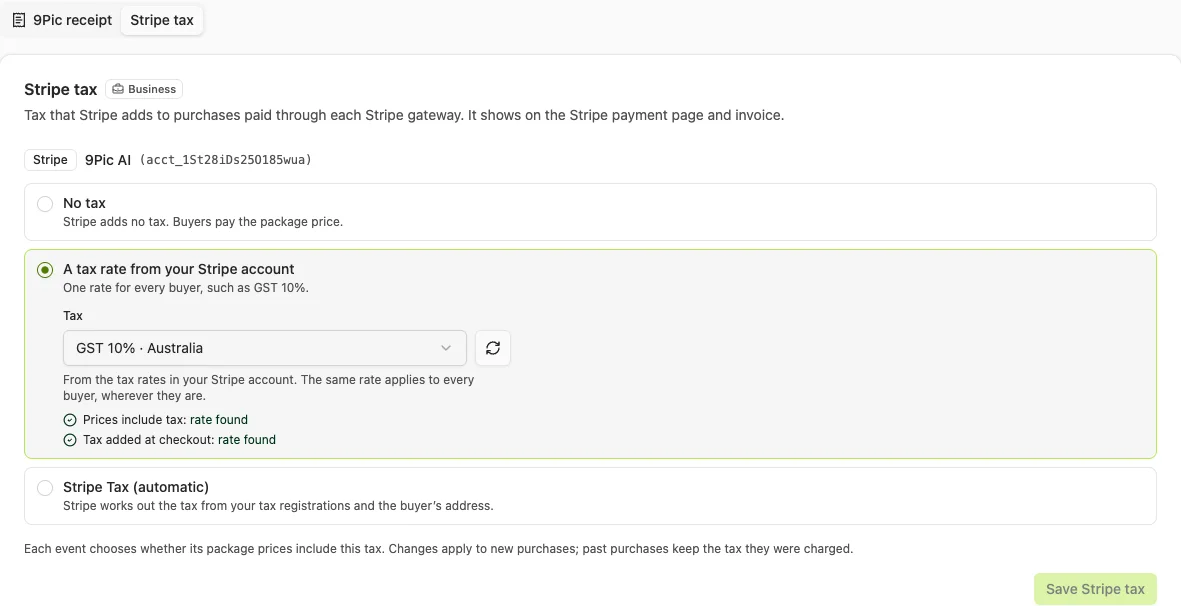
Choose a Tax, for example GST 10% · Australia (the name, rate and place come from the rate in Stripe). The same rate applies to every buyer, wherever they are. Create the rate in Stripe first (see Create a Manual Tax Rate in Stripe).
Stripe Tax (automatic)
Stripe works out the tax from your tax registrations in Stripe, the buyer’s address and your preset product tax code. Stripe asks buyers for their address. If you have no Stripe tax registration where the buyer is, Stripe charges no tax. Stripe Tax is priced separately by Stripe; see Stripe Tax pricing.
Stripe gateway tax for one Stripe gateway, with GST 10% chosen and both kinds of rate found.
A Stripe tax rate is either inclusive or exclusive, and Stripe doesn’t let you change that later. So 9Pic treats rates with the same name, percentage and place as one tax and uses the right kind for each event:
Under the Tax list, the gateway’s block shows whether your Stripe account has a rate for Prices include tax and for Tax added at checkout.
For events that add tax at checkout, create an exclusive rate with the same name, percentage and place as your inclusive one (or the other way round).
Save Stripe gateway tax is refused while an event using the gateway needs a kind of rate the account doesn’t have. The error names those events and links to them; create the missing rate in Stripe, or change that event’s Package prices first.
Then, on each event, open Checkout → Configuration → Payments. The Stripe purchases row shows the tax the gateway charges and asks for Package prices:
Package prices
What the buyer pays for an AUD 30.00 package with 10% GST
Prices include tax (default)
AUD 30.00: AUD 27.27 plus AUD 2.73 GST
Tax added at checkout
AUD 33.00: AUD 30.00 plus AUD 3.00 GST
The row shows the same worked example for your own price. If the account has no rate of the kind you chose, the row says so and links to the tax rates in Stripe. Create the rate there, then select Save changes again: 9Pic re-reads your Stripe account when you save.Requirements and rules:
Stripe gateway tax needs Sales tax settings on your plan (Business). Without them the section shows the plan lock, but a gateway that still has a saved tax keeps Turn off Stripe gateway tax, so turning it off is always allowed.
Saving checks your Stripe account: a tax must still be active there, and Stripe Tax (automatic) must be set up (an active head office address and a preset product tax code in Stripe Tax settings).
An event with several Stripe gateways uses each gateway’s own tax, with the event’s one Package prices choice.
9Pic’s own receipt tax (Receipts and tax) isn’t offered while Stripe is on the event, so a purchase never carries both 9Pic tax and Stripe tax.
Choices are frozen per purchase: changing the gateway’s tax or the event’s choice never alters existing purchases.
If you replace the gateway’s Stripe key with one for a different Stripe account, choose the tax again: rates belong to one Stripe account, so the old choice stops applying.
How the settings map to the manual setup below
Manual Stripe setup in this guide
Still needed with 9Pic Checkout?
Business details, branding and invoice tax ID
Yes. Stripe-issued invoices use them. Without a public business name and address in Stripe, the invoice shows your Stripe account ID instead of your business name.
Create a tax rate
Only for A tax rate from your Stripe account. 9Pic lists your active rates; you choose the tax once on the Stripe gateway instead of applying it per invoice. Create both an inclusive and an exclusive rate if your events price both ways.
Default item prices → Exclude tax
Not for 9Pic purchases with Stripe tax: 9Pic asks Stripe to show prices before tax on those invoices. It still affects invoices you create in Stripe.
Create a test invoice in Stripe
Optional practice only. Test the real flow with a test purchase on an event using your own Stripe test key.
With the gateway’s tax set to GST 10%, the event on Prices include tax and Include Stripe invoice on, a package priced at AUD 30.00 is charged AUD 30.00 and the invoice shows AUD 27.27 + AUD 2.73 GST. The event’s Stripe purchases row shows the same example for your first published package.
Before You Start
Have your business name, address, tax registration number, selling currency, and applicable tax treatment ready. Confirm with your accountant which sales are taxable, which rate applies, and what your country’s invoices must contain. A tax registration number displayed on an invoice does not itself calculate tax.Start in a Stripe sandbox or test mode, in the same account you connected using Stripe Key Setup. Use fictitious participant details for practice. The screenshots show example settings with account information excluded.
Choose for your business
Australian example
What to change elsewhere
Invoice currency
AUD — Australian dollar
Your selling currency, such as USD, EUR, GBP, or INR
Tax name
GST
The appropriate name, such as VAT or Sales tax
Tax region
Australia, all territory
The jurisdiction that applies to the sale
Tax rate
10%
The rate confirmed for your product and customer
Tax registration
Your business’s registration details
Your own valid registration type and number
Pricing
Tax included in the advertised total
Included in the price or added on top, as appropriate
AUD and USD are different currencies. A dollar symbol alone is ambiguous. Check the three-letter currency code. Changing a currency does not change tax obligations, choose a tax rate, or convert a price automatically.
Add Your Business Details
1
Open Stripe invoice settings
In Stripe, open Settings → Billing → Invoices → General. You can also open Invoice settings. Check the account and test/live mode before editing.
2
Review the seller details and branding
Follow Business settings beside Business information to review the public business name, address, and contact details shown to participants. Use Branding settings for your logo and colours. Save changes on each settings page.
3
Add your business tax registration
Return to invoice settings and find Invoice tax information. Choose the correct ID type, enter your own Tax ID, and save it. Select the appropriate default tax ID for invoices. Stripe may place these controls in a Tax tab in some accounts.Check the invoice PDF afterwards to confirm the seller’s tax ID appears. The participant’s tax ID, when needed, is separate from your business’s tax ID.
Add your own business tax registration in Invoice tax information. The example fields are intentionally blank.
Choose Inclusive or Exclusive Tax
Choose this before entering the item price:
Pricing choice
Example at 10%
Participant pays
Yes (inclusive)
AUD 30.00 already includes AUD 2.73 tax
AUD 30.00
No (exclusive)
AUD 30.00 before tax, plus AUD 3.00 tax
AUD 33.00
For the inclusive example, the amount before tax is 30 ÷ 1.10 = 27.27, rounded to cents. The included tax is 30 − 27.27 = 2.73. It is not 10% of the gross amount. Other currencies can use different rounding precision.
Create a Manual Tax Rate in Stripe
1
Open Tax rates
Open Product catalogue → Tax rates, then select Create tax rate or Add a test tax rate. The Tax rates page opens test mode for practice.
2
Enter the rate for your country
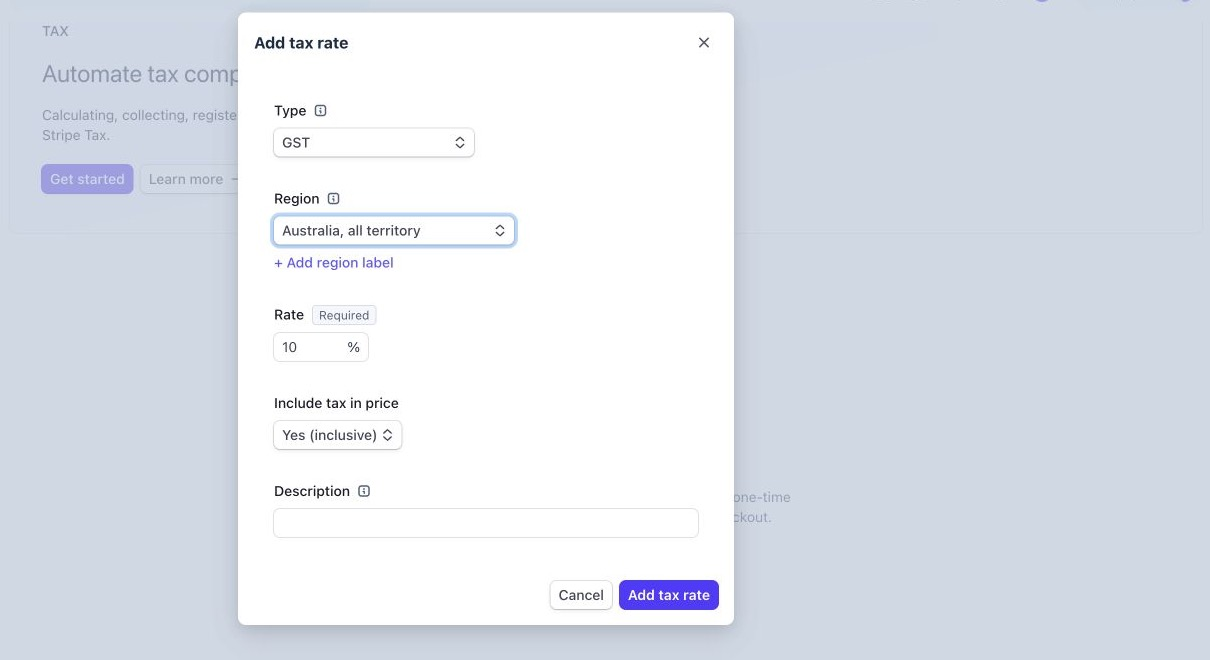
Set Type, Region, and Rate. For this example, choose GST, expand Australia, choose Australia, all territory, and enter 10 in the rate field. Do not copy this rate for another country or a sale with different tax treatment.
3
Include tax in the price
Choose Yes (inclusive) under Include tax in price to keep the participant’s total at AUD 30.00. For a price before tax, choose No (exclusive) instead.
4
Save the rate
Review the settings, then select Add tax rate. Saving creates a reusable rate; you must still apply it to the invoice. If the percentage or country changes later, create a replacement rate rather than expecting the existing rate to change.
Example only: 10% Australian GST included in the item price. Replace the country and rate for your own sales.
Show Prices Before Tax on the PDF
1
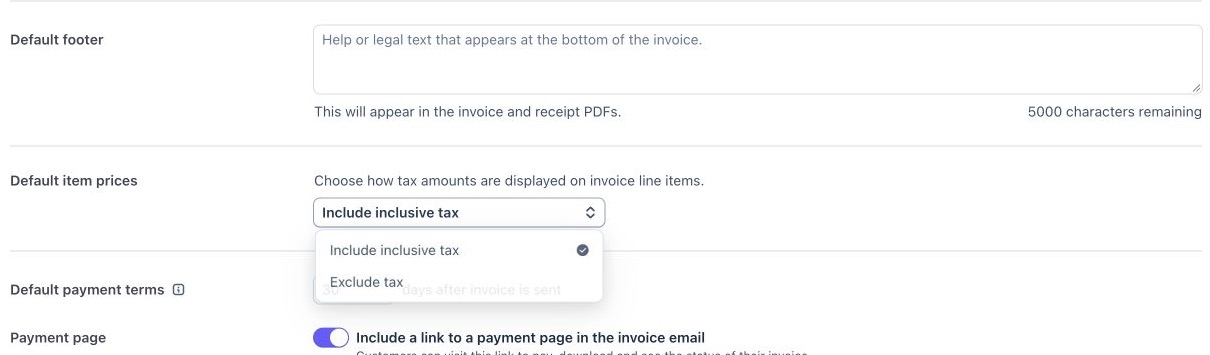
Open Default item prices
Return to Settings → Billing → Invoices → General and find Default item prices.
2
Choose Exclude tax and save
Select Exclude tax if you want the PDF’s item price to show the amount before tax, then save. Keep the tax rate itself inclusive for a tax-inclusive selling price.
Default item prices controls PDF presentation. Choose Exclude tax to display item prices before included tax.
This changes how an existing tax calculation is displayed; it does not apply a tax rate. Stripe’s hosted invoice page and invoice emails continue to show tax-inclusive item prices. Customer-specific display settings can override the account default. See Stripe’s net-price display guidance.
Test an Invoice Directly in Stripe
1
Create a test invoice and choose a customer
In Stripe test mode, open Billing → Invoices and select Create test invoice. Use a fictitious customer with the billing country and address needed for your test.
2
Choose the currency before adding items
Check the invoice’s currency in the Items options. Choose AUD for this example, or your actual selling currency. Add a one-time item with a clear description, such as Participant video clip, quantity 1, and price 30.00.
3
Apply the saved tax rate
Open Item options beneath the item and apply your saved GST 10% inclusive rate. Use manual rates for this example; leave Collect tax automatically off. Creating a rate, selecting AUD, or adding a tax ID does not apply the rate for you.
4
Check the PDF and total
Select Review invoice and inspect the preview before sending or charging. Check the PDF presentation and confirm the seller details, currency, item description, amount before tax, tax name and amount, and final total. For this single-item example, with PDF item prices excluding tax, expect:
Invoice detail
Amount
Participant video clip, excluding GST
AUD 27.27
GST at 10%
AUD 2.73
Total including GST
AUD 30.00
With Include inclusive tax selected instead, the item price remains AUD 30.00 and GST is identified as included. Check your country’s required invoice wording and fields before using the layout for real participants.
A manual invoice can request payment. If a participant already paid through 9Pic, do not send a second payment request or charge them again, and do not use a second invoice as a shortcut to change a completed purchase. With Include Stripe invoice on, Stripe already issues the invoice for each Stripe purchase.
Before Going Live
Test mode and live mode have separate tax-rate records. Recreate the approved setup in the correct live account and review its business details and display settings. Check an invoice from the actual participant purchase flow, not only a manually created Stripe invoice, before launch: make a test purchase on an event that uses your own Stripe test key with Include Stripe invoice and your Stripe gateway tax choice saved.
Check
Expected result
Seller
Correct business name, contact details, and applicable tax registration
Currency
The intended three-letter code, matching the purchase
Tax
Correct jurisdiction, treatment, rate, and separate amount where required
Total
Matches the amount charged; no extra payment request
Participant document
The invoice has the required information, and the invoice page from Download invoice shows Invoice paid
Delivery
The participant can obtain the invoice (or the 9Pic receipt, with Include Stripe invoice off) through the intended purchase flow
Common Questions
Can I use Stripe Tax instead of manual rates?
Yes. In Payment Configuration → Tax Configuration → Stripe gateway tax, choose Stripe Tax (automatic) for the Stripe gateway, then choose Package prices on each event. Set up Stripe Tax in your Stripe account first (head office address, a preset product tax code and your tax registrations). Turning Stripe Tax on only for invoices you create in the Stripe Dashboard does not enable it for 9Pic purchases. See Stripe’s tax documentation.
Will an invoice footer saying GST included be enough?
Why is no GST shown on a participant's invoice?
Check the Stripe gateway’s choice in Payment Configuration → Tax Configuration → Stripe gateway tax: with No tax, Stripe adds no tax. With Stripe Tax (automatic), Stripe charges no tax where you have no tax registration. Purchases keep the settings in force when they were paid, so a purchase made before you changed the setting won’t show the new tax.
A participant can't see Download invoice. What should I check?
Confirm Include Stripe invoice was on when they paid and that they paid through Stripe. If the purchase says the invoice is being prepared, ask them to select Check again a little later. If Payment Configuration shows Invoices blocked, add the missing permission to your Stripe key; see Stripe Key Setup.
Related Guides
Stripe Key Setup
Connect the correct Stripe account with the required permissions.
{"docsConfig":{"theme":"mint","$schema":"https://mintlify.com/docs.json","name":"9Pic AI Documentation","colors":{"primary":"#155DFC","light":"#3080FF","dark":"#0B4AD2"},"logo":{"light":"https://mintcdn.com/9picai/S5EcjfSqjwpORHEo/logo/light.png?fit=max\u0026auto=format\u0026n=S5EcjfSqjwpORHEo\u0026q=85\u0026s=a14647e1552cad86363bd3dfe32ec208","dark":"https://mintcdn.com/9picai/S5EcjfSqjwpORHEo/logo/dark.png?fit=max\u0026auto=format\u0026n=S5EcjfSqjwpORHEo\u0026q=85\u0026s=025984d2e88c0cccd1a0567ad7488357"},"favicon":"https://mintcdn.com/9picai/S5EcjfSqjwpORHEo/favicon.svg?fit=max\u0026auto=format\u0026n=S5EcjfSqjwpORHEo\u0026q=85\u0026s=65125317ce120b5f2cb637eaa6cde837","navbar":{"links":[{"href":"mailto:support@9pic.ai","label":"Support"}]},"footer":{"socials":{"x":"https://x.com/9picai","linkedin":"https://linkedin.com/company/9pic-ai"}},"integrations":{"clarity":{"projectId":"vahau6obj9"}},"contextual":{"options":["copy","view","chatgpt","claude"],"display":"header"},"styling":{"latex":false},"navigation":{"global":{},"pages":[]}},"deployment":{"deploymentMetadataValue":{"subdomain":"9picai","hasAudioNarration":false,"actualSubdomain":"9picai","customDomains":["docs.9pic.ai"],"gitSource":{"type":"github","owner":"theargofactory","repo":"bhaago_india","deployBranch":"master","contentDirectory":"9pic-docs","isPrivate":true,"mountPath":"","label":""},"entitlements":{},"buildId":"6afd4d39edadaaf94a621dad","clientVersion":"0.0.4177","searchFilterCounts":[{"language":"default","tag":"API Reference","count":37},{"language":"default","tag":"Products","count":37},{"language":"default","tag":"Account \u0026 Billing","count":31},{"language":"default","tag":"Get Started","count":23},{"language":"default","tag":"Troubleshooting","count":14},{"language":"default","tag":"Events","count":12},{"language":"default","tag":"AI \u0026 Automation","count":11},{"language":"default","tag":"Events \u0026 Photos","count":11},{"language":"default","tag":"Plans","count":8},{"language":"default","tag":"AI Assistants","count":8}]},"assistantConfig":{"enableAskAiButton":false,"enableStarterQuestions":false,"enableAskAiSearchBar":true},"basePath":"","hasChatPermissions":false,"hasWebMcpPermissions":false,"toggles":[{"name":"kill-isr","enabled":true,"variant":{"name":"disabled","enabled":false,"feature_enabled":true},"impressionData":false},{"name":"custom-rbac-roles","enabled":true,"variant":{"name":"disabled","enabled":false,"feature_enabled":true},"impressionData":false},{"name":"agent-mintlify-slack","enabled":true,"variant":{"name":"disabled","enabled":false,"feature_enabled":true},"impressionData":false},{"name":"agent-integrations-settings","enabled":true,"variant":{"name":"disabled","enabled":false,"feature_enabled":true},"impressionData":false},{"name":"rbac-expansion","enabled":true,"variant":{"name":"disabled","enabled":false,"feature_enabled":true},"impressionData":false},{"name":"automations-pr-grouping","enabled":true,"variant":{"name":"disabled","enabled":false,"feature_enabled":true},"impressionData":false},{"name":"custom-prefix","enabled":true,"variant":{"name":"disabled","enabled":false,"feature_enabled":true},"impressionData":false},{"name":"analytics-v7","enabled":true,"variant":{"name":"disabled","enabled":false,"feature_enabled":true},"impressionData":false},{"name":"user-flows-analytics","enabled":true,"variant":{"name":"disabled","enabled":false,"feature_enabled":true},"impressionData":false},{"name":"no-publish-flow","enabled":true,"variant":{"name":"disabled","enabled":false,"feature_enabled":true},"impressionData":false},{"name":"workos-onboarding","enabled":true,"variant":{"name":"disabled","enabled":false,"feature_enabled":true},"impressionData":false},{"name":"snapshot-serving-live","enabled":true,"variant":{"name":"disabled","enabled":false,"feature_enabled":true},"impressionData":false},{"name":"stripTemperatureMiddleware","enabled":true,"variant":{"name":"disabled","enabled":false,"feature_enabled":true},"impressionData":false},{"name":"support-platform-pylon-zendesk","enabled":true,"variant":{"name":"disabled","enabled":false,"feature_enabled":true},"impressionData":false},{"name":"snapshot-serving","enabled":true,"variant":{"name":"disabled","enabled":false,"feature_enabled":true},"impressionData":false},{"name":"instant-rollback","enabled":true,"variant":{"name":"disabled","enabled":false,"feature_enabled":true},"impressionData":false},{"name":"granular-notifications-server","enabled":true,"variant":{"name":"disabled","enabled":false,"feature_enabled":true},"impressionData":false},{"name":"granular-notifications","enabled":true,"variant":{"name":"disabled","enabled":false,"feature_enabled":true},"impressionData":false},{"name":"automations-fable","enabled":true,"variant":{"name":"disabled","enabled":false,"feature_enabled":true},"impressionData":false},{"name":"fixed-ai-action-pricing","enabled":true,"variant":{"name":"disabled","enabled":false,"feature_enabled":true},"impressionData":false},{"name":"automation-resolve-merge-conflict","enabled":true,"variant":{"name":"disabled","enabled":false,"feature_enabled":true},"impressionData":false},{"name":"scoped-publishing","enabled":true,"variant":{"name":"disabled","enabled":false,"feature_enabled":true},"impressionData":false},{"name":"mintql","enabled":true,"variant":{"name":"disabled","enabled":false,"feature_enabled":true},"impressionData":false},{"name":"page-level-analytics","enabled":true,"variant":{"name":"disabled","enabled":false,"feature_enabled":true},"impressionData":false},{"name":"editor-version-history-v2","enabled":true,"variant":{"name":"disabled","enabled":false,"feature_enabled":true},"impressionData":false},{"name":"billing-page-v2","enabled":true,"variant":{"name":"disabled","enabled":false,"feature_enabled":true},"impressionData":false},{"name":"full-page-search","enabled":true,"variant":{"name":"disabled","enabled":false,"feature_enabled":true},"impressionData":false},{"name":"workspace-projects","enabled":true,"variant":{"name":"disabled","enabled":false,"feature_enabled":true},"impressionData":false},{"name":"assistant-v5","enabled":true,"variant":{"name":"disabled","enabled":false,"feature_enabled":true},"impressionData":false},{"name":"fork-pr-previews","enabled":true,"variant":{"name":"disabled","enabled":false,"feature_enabled":true},"impressionData":false},{"name":"revalidation-jwt","enabled":true,"variant":{"name":"disabled","enabled":false,"feature_enabled":true},"impressionData":false},{"name":"workos-sso-scim","enabled":true,"variant":{"name":"disabled","enabled":false,"feature_enabled":true},"impressionData":false},{"name":"hobby-abuse-scan","enabled":true,"variant":{"name":"disabled","enabled":false,"feature_enabled":true},"impressionData":false},{"name":"dashboard-inbox","enabled":true,"variant":{"name":"disabled","enabled":false,"feature_enabled":true},"impressionData":false},{"name":"workos-signup","enabled":true,"variant":{"name":"disabled","enabled":false,"feature_enabled":true},"impressionData":false},{"name":"turbopuffer-dual-write","enabled":true,"variant":{"name":"disabled","enabled":false,"feature_enabled":true},"impressionData":false},{"name":"workos-enabled","enabled":true,"variant":{"name":"disabled","enabled":false,"feature_enabled":true},"impressionData":false},{"name":"approve-review-flow","enabled":true,"variant":{"name":"disabled","enabled":false,"feature_enabled":true},"impressionData":false},{"name":"editor-metadata","enabled":true,"variant":{"name":"disabled","enabled":false,"feature_enabled":true},"impressionData":false},{"name":"sso-setup-deadline-banner","enabled":true,"variant":{"name":"disabled","enabled":false,"feature_enabled":true},"impressionData":false},{"name":"turbopuffer-serve","enabled":true,"variant":{"name":"disabled","enabled":false,"feature_enabled":true},"impressionData":false},{"name":"live-agents","enabled":true,"variant":{"name":"disabled","enabled":false,"feature_enabled":true},"impressionData":false},{"name":"starter-pricing","enabled":true,"variant":{"name":"control","enabled":true,"payload":{"type":"string","value":"control"},"feature_enabled":true},"impressionData":false},{"name":"llms-txt-v2","enabled":true,"variant":{"name":"disabled","enabled":false,"feature_enabled":true},"impressionData":false},{"name":"wildcard-email-auth","enabled":true,"variant":{"name":"disabled","enabled":false,"feature_enabled":true},"impressionData":false}],"googleFontsInlined":false},"customCss":[],"page":{"pagePath":"account/payment-gateways/stripe-invoices","slug":"/account/payment-gateways/stripe-invoices","pageMetadata":{"title":"Stripe Invoice Setup","description":"Turn on Stripe-issued invoices and Stripe tax for 9Pic Checkout, and prepare your Stripe invoice details, with a worked inclusive-tax example.","icon":"file-invoice-dollar","href":"/account/payment-gateways/stripe-invoices"},"description":{"compiledSource":"\"use strict\";\nconst {jsx: _jsx} = arguments[0];\nconst {useMDXComponents: _provideComponents} = arguments[0];\nfunction _createMdxContent(props) {\n const _components = {\n p: \"p\",\n ..._provideComponents(),\n ...props.components\n };\n return _jsx(_components.p, {\n children: \"Turn on Stripe-issued invoices and Stripe tax for 9Pic Checkout, and prepare your Stripe invoice details, with a worked inclusive-tax example.\"\n });\n}\nfunction MDXContent(props = {}) {\n const {wrapper: MDXLayout} = {\n ..._provideComponents(),\n ...props.components\n };\n return MDXLayout ? _jsx(MDXLayout, {\n ...props,\n children: _jsx(_createMdxContent, {\n ...props\n })\n }) : _createMdxContent(props);\n}\nreturn {\n default: MDXContent\n};\n","frontmatter":{},"scope":{}},"pageType":"default","mdx":{"mdxSource":{"compiledSource":"\"use strict\";const{Fragment:_Fragment,jsx:_jsx,jsxs:_jsxs}=arguments[0];const{useMDXComponents:_provideComponents}=arguments[0];function _createMdxContent(props){const _components={a:`a`,li:`li`,p:`p`,strong:`strong`,tbody:`tbody`,td:`td`,th:`th`,thead:`thead`,tr:`tr`,ul:`ul`,..._provideComponents(),...props.components},{Accordion,AccordionGroup,Card,CardGroup,Frame,Heading,Note,OptimizedImage,Step,Steps,Table,Warning}=_components;if(!Accordion)_missingMdxReference(`Accordion`,true);if(!AccordionGroup)_missingMdxReference(`AccordionGroup`,true);if(!Card)_missingMdxReference(`Card`,true);if(!CardGroup)_missingMdxReference(`CardGroup`,true);if(!Frame)_missingMdxReference(`Frame`,true);if(!Heading)_missingMdxReference(`Heading`,true);if(!Note)_missingMdxReference(`Note`,true);if(!OptimizedImage)_missingMdxReference(`OptimizedImage`,true);if(!Step)_missingMdxReference(`Step`,true);if(!Steps)_missingMdxReference(`Steps`,true);if(!Table)_missingMdxReference(`Table`,true);if(!Warning)_missingMdxReference(`Warning`,true);return _jsxs(_Fragment,{children:[_jsx(Heading,{level:`2`,id:`overview`,children:`Overview`}),`\n`,_jsxs(_components.p,{children:[`When an event takes payment through your own Stripe account, 9Pic Checkout can ask Stripe to issue the participant’s invoice and to add tax. You choose the tax once for each Stripe gateway in `,_jsx(_components.strong,{children:`Payment Configuration`}),`, and each event says whether its package prices include that tax and whether Stripe issues invoices. This guide explains those settings and how to prepare your Stripe account so the invoice shows the right business details and tax.`]}),`\n`,_jsxs(_components.p,{children:[`The worked example uses `,_jsx(_components.strong,{children:`Australian dollars (AUD)`}),` and `,_jsx(_components.strong,{children:`10% GST included in the price`}),`. For another country, use your own currency, tax name, region, and applicable rate.`]}),`\n`,_jsx(Heading,{level:`2`,id:`using-this-with-9pic-checkout`,children:`Using this with 9Pic Checkout`}),`\n`,_jsxs(Table,{children:[_jsx(_components.thead,{children:_jsxs(_components.tr,{children:[_jsx(_components.th,{children:`Setting`}),_jsx(_components.th,{children:`Where`}),_jsx(_components.th,{children:`What it does`})]})}),_jsxs(_components.tbody,{children:[_jsxs(_components.tr,{children:[_jsx(_components.td,{children:_jsx(_components.strong,{children:`Stripe gateway tax`})}),_jsxs(_components.td,{children:[_jsx(_components.strong,{children:`Payment Configuration → Tax Configuration → Stripe gateway tax`}),`, once per Stripe gateway`]}),_jsxs(_components.td,{children:[_jsx(_components.strong,{children:`No tax`}),`, `,_jsx(_components.strong,{children:`A tax rate from your Stripe account`}),` or `,_jsx(_components.strong,{children:`Stripe Tax (automatic)`}),`: the tax Stripe adds to purchases paid through that gateway, on every event that uses it.`]})]}),_jsxs(_components.tr,{children:[_jsx(_components.td,{children:_jsx(_components.strong,{children:`Include Stripe invoice`})}),_jsxs(_components.td,{children:[`Event `,_jsx(_components.strong,{children:`Checkout → Configuration → Payments → Stripe purchases`})]}),_jsxs(_components.td,{children:[`Stripe creates a paid invoice after each successful Stripe payment. Participants see `,_jsx(_components.strong,{children:`Download invoice`}),` on their purchase. Off by default.`]})]}),_jsxs(_components.tr,{children:[_jsx(_components.td,{children:_jsx(_components.strong,{children:`Package prices`})}),_jsxs(_components.td,{children:[`Event `,_jsx(_components.strong,{children:`Checkout → Configuration → Payments → Stripe purchases`})]}),_jsxs(_components.td,{children:[_jsx(_components.strong,{children:`Prices include tax`}),` or `,_jsx(_components.strong,{children:`Tax added at checkout`}),`, for this event. Shown when the gateway adds tax.`]})]})]})]}),`\n`,_jsxs(_components.p,{children:[`The two event settings save with `,_jsx(_components.strong,{children:`Save changes`}),` at the bottom of the Configuration tab. `,_jsx(_components.strong,{children:`Stripe gateway tax`}),` saves with `,_jsx(_components.strong,{children:`Save Stripe gateway tax`}),` in the `,_jsx(_components.strong,{children:`Stripe gateway tax`}),` section. See `,_jsx(_components.a,{href:`/products/checkout/configuration#stripe-invoices-and-stripe-tax`,children:`Checkout Configuration`}),` for every on-screen option.`]}),`\n`,_jsx(Heading,{level:`3`,id:`include-stripe-invoice`,children:`Include Stripe invoice`}),`\n`,_jsx(_components.p,{children:`When it’s on, Stripe’s payment page asks the participant for a billing address and lets them add a tax ID, and Stripe issues a paid invoice once the payment succeeds. 9Pic never creates a second invoice and never charges the participant again.`}),`\n`,_jsx(Frame,{caption:`Include Stripe invoice and Package prices sit in the Stripe purchases row of the event's Payments section and save with Save changes.`,children:_jsx(OptimizedImage,{src:`https://assets.9pic.ai/docs/dashboard-guide/payment-config/stripe-purchases.webp?v=20261105b`,alt:`Checkout Configuration Payments section with the Stripe purchases row: Include Stripe invoice switched on with the Stripe invoice pricing link, and Tax showing GST 10% Australia with Package prices set to Prices include tax and the example A$30.00 = A$27.27 plus A$2.73 GST`})}),`\n`,_jsxs(_components.ul,{children:[`\n`,_jsxs(_components.li,{children:[`The invoice can take a short time to appear. Until then the purchase says `,_jsx(_components.strong,{children:`Your invoice is being prepared. Check again in a minute.`}),` with a `,_jsx(_components.strong,{children:`Check again`}),` button. A missing invoice never blocks photo or clip downloads.`]}),`\n`,_jsxs(_components.li,{children:[`When it’s off, and for older Stripe purchases made without a Stripe invoice, participants get the standard 9Pic `,_jsx(_components.strong,{children:`Receipt`}),`. 9Pic no longer creates separate invoices on request for Stripe purchases. Invoices issued earlier stay downloadable.`]}),`\n`,_jsx(_components.li,{children:`On an event with several ways to pay, it applies only to purchases paid through Stripe. Buyers who pay another way get the standard 9Pic receipt, without tax.`}),`\n`,_jsxs(_components.li,{children:[`If you remove Stripe from the event, the setting is kept but shows `,_jsx(_components.strong,{children:`Inactive`}),`, and it works again when you add a Stripe gateway back.`]}),`\n`,_jsx(_components.li,{children:`Settings are frozen when the participant opens the payment page, so turning it on or off never changes a purchase that already exists.`}),`\n`,_jsxs(_components.li,{children:[_jsx(_components.strong,{children:`Download invoice`}),` opens Stripe’s invoice page, which shows `,_jsx(_components.strong,{children:`Invoice paid`}),` with the amount, payment date and card, and offers `,_jsx(_components.strong,{children:`Download invoice`}),` and `,_jsx(_components.strong,{children:`Download receipt`}),`. Stripe’s invoice PDF keeps the “Amount due” layout even after payment, so participants who need proof of payment should use the receipt from that page.`]}),`\n`]}),`\n`,_jsx(Frame,{caption:`With Include Stripe invoice on, the participant's purchase shows Download invoice.`,children:_jsx(OptimizedImage,{src:`https://assets.9pic.ai/docs/dashboard-guide/payment-config/participant-download-invoice.webp?v=20261105`,alt:`Participant purchase page with Download Originals and a Payment and Invoice card showing A$30.00 Completed and a Download invoice button`})}),`\n`,_jsx(Frame,{caption:`With Include Stripe invoice off, the 9Pic receipt shows the amount before tax and Stripe's GST.`,children:_jsx(OptimizedImage,{src:`https://assets.9pic.ai/docs/dashboard-guide/payment-config/participant-receipt-stripe-tax.webp?v=20261105`,alt:`9Pic payment receipt for a video clip showing Paid, Before tax A$10.00, GST 10% A$1.00 and a total of A$11.00`})}),`\n`,_jsx(Warning,{children:_jsxs(_components.p,{children:[_jsx(_components.strong,{children:`Stripe charges for each invoice it creates`}),`, even if the participant never downloads it. At the time of writing, Stripe lists 0.4% of the transaction total, up to USD 2 (or the local currency equivalent) per invoice, priced separately from Stripe Invoicing. Check `,_jsx(_components.a,{href:`https://support.stripe.com/questions/pricing-for-post-payment-invoices-for-one-time-purchases-via-checkout-and-payment-links`,children:`Stripe’s current pricing for post-payment invoices`}),` before turning it on.`]})}),`\n`,_jsx(Note,{children:_jsxs(_components.p,{children:[_jsx(_components.strong,{children:`Testing:`}),` 9Pic’s own test payment account (used on Trial) never issues invoices or adds Stripe tax. If you assign a Stripe gateway with `,_jsx(_components.strong,{children:`your own Stripe test key`}),`, Stripe issues test invoices, so you can check the whole flow before going live.`]})}),`\n`,_jsx(Heading,{level:`3`,id:`stripe-tax`,children:`Stripe tax`}),`\n`,_jsxs(_components.p,{children:[`Set it in `,_jsx(_components.strong,{children:`Payment Configuration → Tax Configuration → Stripe gateway tax`}),`. It has one block per Stripe gateway of your own (9Pic’s own test account never adds tax, so it isn’t listed). If you have no Stripe gateway yet, the section asks you to add one in `,_jsx(_components.strong,{children:`Gateway Configurations`}),` first.`]}),`\n`,_jsxs(Table,{children:[_jsx(_components.thead,{children:_jsxs(_components.tr,{children:[_jsx(_components.th,{children:`Choice`}),_jsx(_components.th,{children:`What Stripe does`})]})}),_jsxs(_components.tbody,{children:[_jsxs(_components.tr,{children:[_jsx(_components.td,{children:_jsx(_components.strong,{children:`No tax`})}),_jsx(_components.td,{children:`Stripe adds no tax. Buyers pay the package price.`})]}),_jsxs(_components.tr,{children:[_jsx(_components.td,{children:_jsx(_components.strong,{children:`A tax rate from your Stripe account`})}),_jsxs(_components.td,{children:[`Choose a `,_jsx(_components.strong,{children:`Tax`}),`, for example `,_jsx(_components.strong,{children:`GST 10% · Australia`}),` (the name, rate and place come from the rate in Stripe). The same rate applies to every buyer, wherever they are. Create the rate in Stripe first (see `,_jsx(_components.a,{href:`#create-a-manual-tax-rate-in-stripe`,children:`Create a Manual Tax Rate in Stripe`}),`).`]})]}),_jsxs(_components.tr,{children:[_jsx(_components.td,{children:_jsx(_components.strong,{children:`Stripe Tax (automatic)`})}),_jsxs(_components.td,{children:[`Stripe works out the tax from your tax registrations in Stripe, the buyer’s address and your preset product tax code. Stripe asks buyers for their address. If you have no Stripe tax registration where the buyer is, Stripe charges no tax. Stripe Tax is priced separately by Stripe; see `,_jsx(_components.a,{href:`https://stripe.com/tax/pricing`,children:`Stripe Tax pricing`}),`.`]})]})]})]}),`\n`,_jsx(Frame,{caption:`Stripe gateway tax for one Stripe gateway, with GST 10% chosen and both kinds of rate found.`,children:_jsx(OptimizedImage,{src:`https://assets.9pic.ai/docs/dashboard-guide/payment-config/stripe-tax-tab.webp?v=20261105c`,alt:`Tax Configuration with the 9Pic receipt and Stripe tax tabs, Stripe tax open for a Stripe gateway with A tax rate from your Stripe account chosen, Tax GST 10% Australia, rates found for Prices include tax and Tax added at checkout`})}),`\n`,_jsx(_components.p,{children:`A Stripe tax rate is either inclusive or exclusive, and Stripe doesn’t let you change that later. So 9Pic treats rates with the same name, percentage and place as one tax and uses the right kind for each event:`}),`\n`,_jsxs(_components.ul,{children:[`\n`,_jsxs(_components.li,{children:[`Under the `,_jsx(_components.strong,{children:`Tax`}),` list, the gateway’s block shows whether your Stripe account has a rate for `,_jsx(_components.strong,{children:`Prices include tax`}),` and for `,_jsx(_components.strong,{children:`Tax added at checkout`}),`.`]}),`\n`,_jsx(_components.li,{children:`For events that add tax at checkout, create an exclusive rate with the same name, percentage and place as your inclusive one (or the other way round).`}),`\n`,_jsxs(_components.li,{children:[_jsx(_components.strong,{children:`Save Stripe gateway tax`}),` is refused while an event using the gateway needs a kind of rate the account doesn’t have. The error names those events and links to them; create the missing rate in Stripe, or change that event’s `,_jsx(_components.strong,{children:`Package prices`}),` first.`]}),`\n`]}),`\n`,_jsxs(_components.p,{children:[`Then, on each event, open `,_jsx(_components.strong,{children:`Checkout → Configuration → Payments`}),`. The `,_jsx(_components.strong,{children:`Stripe purchases`}),` row shows the tax the gateway charges and asks for `,_jsx(_components.strong,{children:`Package prices`}),`:`]}),`\n`,_jsxs(Table,{children:[_jsx(_components.thead,{children:_jsxs(_components.tr,{children:[_jsx(_components.th,{children:`Package prices`}),_jsx(_components.th,{children:`What the buyer pays for an AUD 30.00 package with 10% GST`})]})}),_jsxs(_components.tbody,{children:[_jsxs(_components.tr,{children:[_jsxs(_components.td,{children:[_jsx(_components.strong,{children:`Prices include tax`}),` (default)`]}),_jsx(_components.td,{children:`AUD 30.00: AUD 27.27 plus AUD 2.73 GST`})]}),_jsxs(_components.tr,{children:[_jsx(_components.td,{children:_jsx(_components.strong,{children:`Tax added at checkout`})}),_jsx(_components.td,{children:`AUD 33.00: AUD 30.00 plus AUD 3.00 GST`})]})]})]}),`\n`,_jsxs(_components.p,{children:[`The row shows the same worked example for your own price. If the account has no rate of the kind you chose, the row says so and links to the tax rates in Stripe. Create the rate there, then select `,_jsx(_components.strong,{children:`Save changes`}),` again: 9Pic re-reads your Stripe account when you save.`]}),`\n`,_jsx(_components.p,{children:`Requirements and rules:`}),`\n`,_jsxs(_components.ul,{children:[`\n`,_jsxs(_components.li,{children:[_jsx(_components.strong,{children:`Stripe gateway tax`}),` needs `,_jsx(_components.strong,{children:`Sales tax settings`}),` on your plan (Business). Without them the section shows the plan lock, but a gateway that still has a saved tax keeps `,_jsx(_components.strong,{children:`Turn off Stripe gateway tax`}),`, so turning it off is always allowed.`]}),`\n`,_jsxs(_components.li,{children:[`Saving checks your Stripe account: a tax must still be active there, and `,_jsx(_components.strong,{children:`Stripe Tax (automatic)`}),` must be set up (an active head office address and a preset product tax code in Stripe Tax settings).`]}),`\n`,_jsxs(_components.li,{children:[`An event with several Stripe gateways uses each gateway’s own tax, with the event’s one `,_jsx(_components.strong,{children:`Package prices`}),` choice.`]}),`\n`,_jsxs(_components.li,{children:[`9Pic’s own receipt tax (`,_jsx(_components.strong,{children:`Receipts and tax`}),`) isn’t offered while Stripe is on the event, so a purchase never carries both 9Pic tax and Stripe tax.`]}),`\n`,_jsx(_components.li,{children:`Choices are frozen per purchase: changing the gateway’s tax or the event’s choice never alters existing purchases.`}),`\n`,_jsx(_components.li,{children:`If you replace the gateway’s Stripe key with one for a different Stripe account, choose the tax again: rates belong to one Stripe account, so the old choice stops applying.`}),`\n`]}),`\n`,_jsx(Heading,{level:`3`,id:`how-the-settings-map-to-the-manual-setup-below`,children:`How the settings map to the manual setup below`}),`\n`,_jsxs(Table,{children:[_jsx(_components.thead,{children:_jsxs(_components.tr,{children:[_jsx(_components.th,{children:`Manual Stripe setup in this guide`}),_jsx(_components.th,{children:`Still needed with 9Pic Checkout?`})]})}),_jsxs(_components.tbody,{children:[_jsxs(_components.tr,{children:[_jsx(_components.td,{children:`Business details, branding and invoice tax ID`}),_jsx(_components.td,{children:`Yes. Stripe-issued invoices use them. Without a public business name and address in Stripe, the invoice shows your Stripe account ID instead of your business name.`})]}),_jsxs(_components.tr,{children:[_jsx(_components.td,{children:`Create a tax rate`}),_jsxs(_components.td,{children:[`Only for `,_jsx(_components.strong,{children:`A tax rate from your Stripe account`}),`. 9Pic lists your active rates; you choose the tax once on the Stripe gateway instead of applying it per invoice. Create both an inclusive and an exclusive rate if your events price both ways.`]})]}),_jsxs(_components.tr,{children:[_jsxs(_components.td,{children:[`Default item prices → `,_jsx(_components.strong,{children:`Exclude tax`})]}),_jsx(_components.td,{children:`Not for 9Pic purchases with Stripe tax: 9Pic asks Stripe to show prices before tax on those invoices. It still affects invoices you create in Stripe.`})]}),_jsxs(_components.tr,{children:[_jsx(_components.td,{children:`Create a test invoice in Stripe`}),_jsx(_components.td,{children:`Optional practice only. Test the real flow with a test purchase on an event using your own Stripe test key.`})]})]})]}),`\n`,_jsxs(_components.p,{children:[`With the gateway’s tax set to `,_jsx(_components.strong,{children:`GST 10%`}),`, the event on `,_jsx(_components.strong,{children:`Prices include tax`}),` and `,_jsx(_components.strong,{children:`Include Stripe invoice`}),` on, a package priced at `,_jsx(_components.strong,{children:`AUD 30.00`}),` is charged AUD 30.00 and the invoice shows `,_jsx(_components.strong,{children:`AUD 27.27 + AUD 2.73 GST`}),`. The event’s `,_jsx(_components.strong,{children:`Stripe purchases`}),` row shows the same example for your first published package.`]}),`\n`,_jsx(Heading,{level:`2`,id:`before-you-start`,children:`Before You Start`}),`\n`,_jsx(_components.p,{children:`Have your business name, address, tax registration number, selling currency, and applicable tax treatment ready. Confirm with your accountant which sales are taxable, which rate applies, and what your country’s invoices must contain. A tax registration number displayed on an invoice does not itself calculate tax.`}),`\n`,_jsxs(_components.p,{children:[`Start in a `,_jsx(_components.strong,{children:`Stripe sandbox or test mode`}),`, in the same account you connected using `,_jsx(_components.a,{href:`/account/payment-gateways/stripe-restricted-key`,children:`Stripe Key Setup`}),`. Use fictitious participant details for practice. The screenshots show example settings with account information excluded.`]}),`\n`,_jsxs(Table,{children:[_jsx(_components.thead,{children:_jsxs(_components.tr,{children:[_jsx(_components.th,{children:`Choose for your business`}),_jsx(_components.th,{children:`Australian example`}),_jsx(_components.th,{children:`What to change elsewhere`})]})}),_jsxs(_components.tbody,{children:[_jsxs(_components.tr,{children:[_jsx(_components.td,{children:`Invoice currency`}),_jsxs(_components.td,{children:[_jsx(_components.strong,{children:`AUD`}),` — Australian dollar`]}),_jsx(_components.td,{children:`Your selling currency, such as USD, EUR, GBP, or INR`})]}),_jsxs(_components.tr,{children:[_jsx(_components.td,{children:`Tax name`}),_jsx(_components.td,{children:_jsx(_components.strong,{children:`GST`})}),_jsx(_components.td,{children:`The appropriate name, such as VAT or Sales tax`})]}),_jsxs(_components.tr,{children:[_jsx(_components.td,{children:`Tax region`}),_jsx(_components.td,{children:_jsx(_components.strong,{children:`Australia, all territory`})}),_jsx(_components.td,{children:`The jurisdiction that applies to the sale`})]}),_jsxs(_components.tr,{children:[_jsx(_components.td,{children:`Tax rate`}),_jsx(_components.td,{\"data-numeric\":`true`,children:_jsx(_components.strong,{children:`10%`})}),_jsx(_components.td,{children:`The rate confirmed for your product and customer`})]}),_jsxs(_components.tr,{children:[_jsx(_components.td,{children:`Tax registration`}),_jsx(_components.td,{children:`Your business’s registration details`}),_jsx(_components.td,{children:`Your own valid registration type and number`})]}),_jsxs(_components.tr,{children:[_jsx(_components.td,{children:`Pricing`}),_jsx(_components.td,{children:`Tax included in the advertised total`}),_jsx(_components.td,{children:`Included in the price or added on top, as appropriate`})]})]})]}),`\n`,_jsx(Note,{children:_jsxs(_components.p,{children:[_jsx(_components.strong,{children:`AUD and USD are different currencies.`}),` A dollar symbol alone is ambiguous. Check the three-letter currency code. Changing a currency does not change tax obligations, choose a tax rate, or convert a price automatically.`]})}),`\n`,_jsx(Heading,{level:`2`,id:`add-your-business-details`,children:`Add Your Business Details`}),`\n`,_jsxs(Steps,{children:[_jsx(Step,{title:`Open Stripe invoice settings`,children:_jsxs(_components.p,{children:[`In Stripe, open `,_jsx(_components.strong,{children:`Settings → Billing → Invoices → General`}),`. You can also open `,_jsx(_components.a,{href:`https://dashboard.stripe.com/settings/billing/invoice`,children:`Invoice settings`}),`. Check the account and test/live mode before editing.`]})}),_jsx(Step,{title:`Review the seller details and branding`,children:_jsxs(_components.p,{children:[`Follow `,_jsx(_components.strong,{children:`Business settings`}),` beside `,_jsx(_components.strong,{children:`Business information`}),` to review the public business name, address, and contact details shown to participants. Use `,_jsx(_components.strong,{children:`Branding settings`}),` for your logo and colours. Save changes on each settings page.`]})}),_jsxs(Step,{title:`Add your business tax registration`,children:[_jsxs(_components.p,{children:[`Return to invoice settings and find `,_jsx(_components.strong,{children:`Invoice tax information`}),`. Choose the correct `,_jsx(_components.strong,{children:`ID type`}),`, enter your own `,_jsx(_components.strong,{children:`Tax ID`}),`, and save it. Select the appropriate default tax ID for invoices. Stripe may place these controls in a `,_jsx(_components.strong,{children:`Tax`}),` tab in some accounts.`]}),_jsx(_components.p,{children:`Check the invoice PDF afterwards to confirm the seller’s tax ID appears. The participant’s tax ID, when needed, is separate from your business’s tax ID.`})]})]}),`\n`,_jsx(Frame,{caption:`Add your own business tax registration in Invoice tax information. The example fields are intentionally blank.`,children:_jsx(OptimizedImage,{src:`https://assets.9pic.ai/docs/dashboard-guide/payment-config/stripe-invoice-tax-id.webp?v=20261105`,alt:`Stripe Invoice tax information section with an ID type selector and an empty Tax ID field`})}),`\n`,_jsx(Heading,{level:`2`,id:`choose-inclusive-or-exclusive-tax`,children:`Choose Inclusive or Exclusive Tax`}),`\n`,_jsx(_components.p,{children:`Choose this before entering the item price:`}),`\n`,_jsxs(Table,{children:[_jsx(_components.thead,{children:_jsxs(_components.tr,{children:[_jsx(_components.th,{children:`Pricing choice`}),_jsx(_components.th,{children:`Example at 10%`}),_jsx(_components.th,{children:`Participant pays`})]})}),_jsxs(_components.tbody,{children:[_jsxs(_components.tr,{children:[_jsx(_components.td,{children:_jsx(_components.strong,{children:`Yes (inclusive)`})}),_jsx(_components.td,{children:`AUD 30.00 already includes AUD 2.73 tax`}),_jsx(_components.td,{children:_jsx(_components.strong,{children:`AUD 30.00`})})]}),_jsxs(_components.tr,{children:[_jsx(_components.td,{children:_jsx(_components.strong,{children:`No (exclusive)`})}),_jsx(_components.td,{children:`AUD 30.00 before tax, plus AUD 3.00 tax`}),_jsx(_components.td,{children:_jsx(_components.strong,{children:`AUD 33.00`})})]})]})]}),`\n`,_jsxs(_components.p,{children:[`For the inclusive example, the amount before tax is `,_jsx(_components.strong,{children:`30 ÷ 1.10 = 27.27`}),`, rounded to cents. The included tax is `,_jsx(_components.strong,{children:`30 − 27.27 = 2.73`}),`. It is not 10% of the gross amount. Other currencies can use different rounding precision.`]}),`\n`,_jsx(Heading,{level:`2`,id:`create-a-manual-tax-rate-in-stripe`,children:`Create a Manual Tax Rate in Stripe`}),`\n`,_jsxs(Steps,{children:[_jsx(Step,{title:`Open Tax rates`,children:_jsxs(_components.p,{children:[`Open `,_jsx(_components.strong,{children:`Product catalogue → Tax rates`}),`, then select `,_jsx(_components.strong,{children:`Create tax rate`}),` or `,_jsx(_components.strong,{children:`Add a test tax rate`}),`. The `,_jsx(_components.a,{href:`https://dashboard.stripe.com/test/tax-rates`,children:`Tax rates page`}),` opens test mode for practice.`]})}),_jsx(Step,{title:`Enter the rate for your country`,children:_jsxs(_components.p,{children:[`Set `,_jsx(_components.strong,{children:`Type`}),`, `,_jsx(_components.strong,{children:`Region`}),`, and `,_jsx(_components.strong,{children:`Rate`}),`. For this example, choose `,_jsx(_components.strong,{children:`GST`}),`, expand `,_jsx(_components.strong,{children:`Australia`}),`, choose `,_jsx(_components.strong,{children:`Australia, all territory`}),`, and enter `,_jsx(_components.strong,{children:`10`}),` in the rate field. Do not copy this rate for another country or a sale with different tax treatment.`]})}),_jsx(Step,{title:`Include tax in the price`,children:_jsxs(_components.p,{children:[`Choose `,_jsx(_components.strong,{children:`Yes (inclusive)`}),` under `,_jsx(_components.strong,{children:`Include tax in price`}),` to keep the participant’s total at AUD 30.00. For a price before tax, choose `,_jsx(_components.strong,{children:`No (exclusive)`}),` instead.`]})}),_jsx(Step,{title:`Save the rate`,children:_jsxs(_components.p,{children:[`Review the settings, then select `,_jsx(_components.strong,{children:`Add tax rate`}),`. Saving creates a reusable rate; you must still apply it to the invoice. If the percentage or country changes later, create a replacement rate rather than expecting the existing rate to change.`]})})]}),`\n`,_jsx(Frame,{caption:`Example only: 10% Australian GST included in the item price. Replace the country and rate for your own sales.`,children:_jsx(OptimizedImage,{src:`https://assets.9pic.ai/docs/dashboard-guide/payment-config/stripe-inclusive-gst.webp`,alt:`Stripe Add tax rate form with GST, Australia all territory, rate 10%, and Yes inclusive selected`})}),`\n`,_jsx(Heading,{level:`2`,id:`show-prices-before-tax-on-the-pdf`,children:`Show Prices Before Tax on the PDF`}),`\n`,_jsxs(Steps,{children:[_jsx(Step,{title:`Open Default item prices`,children:_jsxs(_components.p,{children:[`Return to `,_jsx(_components.strong,{children:`Settings → Billing → Invoices → General`}),` and find `,_jsx(_components.strong,{children:`Default item prices`}),`.`]})}),_jsx(Step,{title:`Choose Exclude tax and save`,children:_jsxs(_components.p,{children:[`Select `,_jsx(_components.strong,{children:`Exclude tax`}),` if you want the PDF’s item price to show the amount before tax, then save. Keep the tax rate itself `,_jsx(_components.strong,{children:`inclusive`}),` for a tax-inclusive selling price.`]})})]}),`\n`,_jsx(Frame,{caption:`Default item prices controls PDF presentation. Choose Exclude tax to display item prices before included tax.`,children:_jsx(OptimizedImage,{src:`https://assets.9pic.ai/docs/dashboard-guide/payment-config/stripe-invoice-price-display.webp`,alt:`Stripe invoice settings showing the Default item prices choices Include inclusive tax and Exclude tax`})}),`\n`,_jsxs(_components.p,{children:[`This changes how an existing tax calculation is displayed; it does `,_jsx(_components.strong,{children:`not`}),` apply a tax rate. Stripe’s hosted invoice page and invoice emails continue to show tax-inclusive item prices. Customer-specific display settings can override the account default. See `,_jsx(_components.a,{href:`https://docs.stripe.com/invoicing/taxes#net-prices-and-taxes`,children:`Stripe’s net-price display guidance`}),`.`]}),`\n`,_jsx(Heading,{level:`2`,id:`test-an-invoice-directly-in-stripe`,children:`Test an Invoice Directly in Stripe`}),`\n`,_jsxs(Steps,{children:[_jsx(Step,{title:`Create a test invoice and choose a customer`,children:_jsxs(_components.p,{children:[`In Stripe test mode, open `,_jsx(_components.strong,{children:`Billing → Invoices`}),` and select `,_jsx(_components.strong,{children:`Create test invoice`}),`. Use a fictitious customer with the billing country and address needed for your test.`]})}),_jsx(Step,{title:`Choose the currency before adding items`,children:_jsxs(_components.p,{children:[`Check the invoice’s currency in the `,_jsx(_components.strong,{children:`Items`}),` options. Choose `,_jsx(_components.strong,{children:`AUD`}),` for this example, or your actual selling currency. Add a one-time item with a clear description, such as `,_jsx(_components.strong,{children:`Participant video clip`}),`, quantity `,_jsx(_components.strong,{children:`1`}),`, and price `,_jsx(_components.strong,{children:`30.00`}),`.`]})}),_jsx(Step,{title:`Apply the saved tax rate`,children:_jsxs(_components.p,{children:[`Open `,_jsx(_components.strong,{children:`Item options`}),` beneath the item and apply your saved `,_jsx(_components.strong,{children:`GST 10% inclusive`}),` rate. Use manual rates for this example; leave `,_jsx(_components.strong,{children:`Collect tax automatically`}),` off. Creating a rate, selecting AUD, or adding a tax ID does not apply the rate for you.`]})}),_jsxs(Step,{title:`Check the PDF and total`,children:[_jsxs(_components.p,{children:[`Select `,_jsx(_components.strong,{children:`Review invoice`}),` and inspect the preview before sending or charging. Check the PDF presentation and confirm the seller details, currency, item description, amount before tax, tax name and amount, and final total. For this single-item example, with PDF item prices excluding tax, expect:`]}),_jsxs(Table,{children:[_jsx(_components.thead,{children:_jsxs(_components.tr,{children:[_jsx(_components.th,{children:`Invoice detail`}),_jsx(_components.th,{style:{textAlign:`right`},children:`Amount`})]})}),_jsxs(_components.tbody,{children:[_jsxs(_components.tr,{children:[_jsx(_components.td,{children:`Participant video clip, excluding GST`}),_jsx(_components.td,{style:{textAlign:`right`},children:`AUD 27.27`})]}),_jsxs(_components.tr,{children:[_jsx(_components.td,{children:`GST at 10%`}),_jsx(_components.td,{style:{textAlign:`right`},children:`AUD 2.73`})]}),_jsxs(_components.tr,{children:[_jsx(_components.td,{children:_jsx(_components.strong,{children:`Total including GST`})}),_jsx(_components.td,{style:{textAlign:`right`},children:_jsx(_components.strong,{children:`AUD 30.00`})})]})]})]}),_jsxs(_components.p,{children:[`With `,_jsx(_components.strong,{children:`Include inclusive tax`}),` selected instead, the item price remains AUD 30.00 and GST is identified as included. Check your country’s required invoice wording and fields before using the layout for real participants.`]})]})]}),`\n`,_jsx(Warning,{children:_jsxs(_components.p,{children:[`A manual invoice can request payment. If a participant already paid through 9Pic, do not send a second payment request or charge them again, and do not use a second invoice as a shortcut to change a completed purchase. With `,_jsx(_components.strong,{children:`Include Stripe invoice`}),` on, Stripe already issues the invoice for each Stripe purchase.`]})}),`\n`,_jsx(Heading,{level:`2`,id:`before-going-live`,children:`Before Going Live`}),`\n`,_jsxs(_components.p,{children:[`Test mode and live mode have separate tax-rate records. Recreate the approved setup in the correct live account and review its business details and display settings. Check an invoice from the `,_jsx(_components.strong,{children:`actual participant purchase flow`}),`, not only a manually created Stripe invoice, before launch: make a test purchase on an event that uses your own Stripe test key with `,_jsx(_components.strong,{children:`Include Stripe invoice`}),` and your `,_jsx(_components.strong,{children:`Stripe gateway tax`}),` choice saved.`]}),`\n`,_jsxs(Table,{children:[_jsx(_components.thead,{children:_jsxs(_components.tr,{children:[_jsx(_components.th,{children:`Check`}),_jsx(_components.th,{children:`Expected result`})]})}),_jsxs(_components.tbody,{children:[_jsxs(_components.tr,{children:[_jsx(_components.td,{children:`Seller`}),_jsx(_components.td,{children:`Correct business name, contact details, and applicable tax registration`})]}),_jsxs(_components.tr,{children:[_jsx(_components.td,{children:`Currency`}),_jsx(_components.td,{children:`The intended three-letter code, matching the purchase`})]}),_jsxs(_components.tr,{children:[_jsx(_components.td,{children:`Tax`}),_jsx(_components.td,{children:`Correct jurisdiction, treatment, rate, and separate amount where required`})]}),_jsxs(_components.tr,{children:[_jsx(_components.td,{children:`Total`}),_jsx(_components.td,{children:`Matches the amount charged; no extra payment request`})]}),_jsxs(_components.tr,{children:[_jsx(_components.td,{children:`Participant document`}),_jsxs(_components.td,{children:[`The invoice has the required information, and the invoice page from `,_jsx(_components.strong,{children:`Download invoice`}),` shows `,_jsx(_components.strong,{children:`Invoice paid`})]})]}),_jsxs(_components.tr,{children:[_jsx(_components.td,{children:`Delivery`}),_jsxs(_components.td,{children:[`The participant can obtain the invoice (or the 9Pic receipt, with `,_jsx(_components.strong,{children:`Include Stripe invoice`}),` off) through the intended purchase flow`]})]})]})]}),`\n`,_jsx(Heading,{level:`2`,id:`common-questions`,children:`Common Questions`}),`\n`,_jsxs(AccordionGroup,{children:[_jsx(Accordion,{title:`Can I use Stripe Tax instead of manual rates?`,id:`can-i-use-stripe-tax-instead-of-manual-rates`,children:_jsxs(_components.p,{children:[`Yes. In `,_jsx(_components.strong,{children:`Payment Configuration → Tax Configuration → Stripe gateway tax`}),`, choose `,_jsx(_components.strong,{children:`Stripe Tax (automatic)`}),` for the Stripe gateway, then choose `,_jsx(_components.strong,{children:`Package prices`}),` on each event. Set up Stripe Tax in your Stripe account first (head office address, a preset product tax code and your tax registrations). Turning Stripe Tax on only for invoices you create in the Stripe Dashboard does not enable it for 9Pic purchases. See `,_jsx(_components.a,{href:`https://docs.stripe.com/tax`,children:`Stripe’s tax documentation`}),`.`]})}),_jsx(Accordion,{title:`Will an invoice footer saying GST included be enough?`,id:`will-an-invoice-footer-saying-gst-included-be-enough`,children:_jsx(_components.p,{children:`A footer is text. It does not calculate tax, create a tax breakdown, or establish that the invoice meets local requirements. Apply the correct tax treatment and check the resulting document.`})}),_jsx(Accordion,{title:`Why is no GST shown on a participant's invoice?`,id:`why-is-no-gst-shown-on-a-participants-invoice`,children:_jsxs(_components.p,{children:[`Check the Stripe gateway’s choice in `,_jsx(_components.strong,{children:`Payment Configuration → Tax Configuration → Stripe gateway tax`}),`: with `,_jsx(_components.strong,{children:`No tax`}),`, Stripe adds no tax. With `,_jsx(_components.strong,{children:`Stripe Tax (automatic)`}),`, Stripe charges no tax where you have no tax registration. Purchases keep the settings in force when they were paid, so a purchase made before you changed the setting won’t show the new tax.`]})}),_jsx(Accordion,{title:`A participant can't see Download invoice. What should I check?`,id:`a-participant-cant-see-download-invoice-what-should-i-check`,children:_jsxs(_components.p,{children:[`Confirm `,_jsx(_components.strong,{children:`Include Stripe invoice`}),` was on when they paid and that they paid through Stripe. If the purchase says the invoice is being prepared, ask them to select `,_jsx(_components.strong,{children:`Check again`}),` a little later. If `,_jsx(_components.strong,{children:`Payment Configuration`}),` shows `,_jsx(_components.strong,{children:`Invoices blocked`}),`, add the missing permission to your Stripe key; see `,_jsx(_components.a,{href:`/account/payment-gateways/stripe-restricted-key`,children:`Stripe Key Setup`}),`.`]})})]}),`\n`,_jsx(Heading,{level:`2`,id:`related-guides`,children:`Related Guides`}),`\n`,_jsxs(CardGroup,{cols:2,children:[_jsx(Card,{title:`Stripe Key Setup`,icon:`key`,href:`/account/payment-gateways/stripe-restricted-key`,children:_jsx(_components.p,{children:`Connect the correct Stripe account with the required permissions.`})}),_jsx(Card,{title:`Payment Configuration`,icon:`credit-card`,href:`/account/payment-gateways`,children:_jsx(_components.p,{children:`Review your organisation’s payment configuration.`})})]}),`\n`,_jsxs(_components.p,{children:[`Stripe references: `,_jsx(_components.a,{href:`https://docs.stripe.com/invoicing/customize`,children:`Customise invoices`}),`, `,_jsx(_components.a,{href:`https://docs.stripe.com/tax/invoicing/tax-ids`,children:`business tax IDs`}),`, `,_jsx(_components.a,{href:`https://docs.stripe.com/tax/tax-rates`,children:`manual tax rates`}),`, `,_jsx(_components.a,{href:`https://docs.stripe.com/invoicing/taxes/tax-rates`,children:`apply rates to invoices`}),`, and `,_jsx(_components.a,{href:`https://docs.stripe.com/invoicing/dashboard`,children:`create an invoice`}),`. Stripe labels can vary by account and region.`]})]})}function MDXContent(props={}){const{wrapper:MDXLayout}={..._provideComponents(),...props.components};return MDXLayout?_jsx(MDXLayout,{...props,children:_jsx(_createMdxContent,{...props})}):_createMdxContent(props)}return{default:MDXContent};function _missingMdxReference(id,component){throw new Error(`Expected `+(component?`component`:`object`)+\" `\"+id+\"` to be defined: you likely forgot to import, pass, or provide it.\")}","frontmatter":{},"scope":{"config":{},"pageMetadata":{"title":"Stripe Invoice Setup","description":"Turn on Stripe-issued invoices and Stripe tax for 9Pic Checkout, and prepare your Stripe invoice details, with a worked inclusive-tax example.","icon":"file-invoice-dollar","href":"/account/payment-gateways/stripe-invoices"}}},"mdxSourceWithNoJs":null},"mdxExtracts":{"tableOfContents":[{"title":"Overview","slug":"overview","depth":2,"children":[]},{"title":"Using this with 9Pic Checkout","slug":"using-this-with-9pic-checkout","depth":2,"children":[{"title":"Include Stripe invoice","slug":"include-stripe-invoice","depth":3,"children":[]},{"title":"Stripe tax","slug":"stripe-tax","depth":3,"children":[]},{"title":"How the settings map to the manual setup below","slug":"how-the-settings-map-to-the-manual-setup-below","depth":3,"children":[]}]},{"title":"Before You Start","slug":"before-you-start","depth":2,"children":[]},{"title":"Add Your Business Details","slug":"add-your-business-details","depth":2,"children":[]},{"title":"Choose Inclusive or Exclusive Tax","slug":"choose-inclusive-or-exclusive-tax","depth":2,"children":[]},{"title":"Create a Manual Tax Rate in Stripe","slug":"create-a-manual-tax-rate-in-stripe","depth":2,"children":[]},{"title":"Show Prices Before Tax on the PDF","slug":"show-prices-before-tax-on-the-pdf","depth":2,"children":[]},{"title":"Test an Invoice Directly in Stripe","slug":"test-an-invoice-directly-in-stripe","depth":2,"children":[]},{"title":"Before Going Live","slug":"before-going-live","depth":2,"children":[]},{"title":"Common Questions","slug":"common-questions","depth":2,"children":[]},{"title":"Related Guides","slug":"related-guides","depth":2,"children":[]}],"codeExamples":{}},"jsLinks":[],"subdomain":"9picai","siteName":"9Pic AI Documentation","title":"Stripe Invoice Setup - 9Pic AI Documentation","navMaps":{"firstHrefInVersion":{},"firstHrefInLanguage":{}},"lastModified":"2026-11-17T19:15:49.302Z","originalFileLocation":"account/payment-gateways/stripe-invoices.mdx"},"headHtml":"\u003cscript data-mint-head>(function(){var d=document.documentElement,p=null;if(!p){try{p=localStorage.getItem(\"isDarkMode\")}catch(e){}if(p==='true')p='dark';else if(p==='false')p='light';if(p!=='light'\u0026\u0026p!=='dark'\u0026\u0026p!=='system')p=\"system\"}var r=p==='system'?(matchMedia(\"(prefers-color-scheme: dark)\").matches?'dark':'light'):p;d.classList.remove(r==='dark'?'light':'dark');d.classList.add(r);d.setAttribute(\"data-theme-preference\",p)})();\u003c/script>\u003cmeta data-mint-head name=\"description\" content=\"Turn on Stripe-issued invoices and Stripe tax for 9Pic Checkout, and prepare your Stripe invoice details, with a worked inclusive-tax example.\">\u003cmeta data-mint-head name=\"application-name\" content=\"9Pic AI Documentation\">\u003cmeta data-mint-head name=\"generator\" content=\"Mintlify\">\u003clink data-mint-head rel=\"icon\" type=\"image/png\" sizes=\"192x192\" href=\"/mintlify-assets/_mintlify/favicons/9picai/9qO0Knt0dMOPX3DE/_generated/favicon/android-chrome-192x192.png\" media=\"(prefers-color-scheme: light)\">\u003clink data-mint-head rel=\"apple-touch-icon\" type=\"image/png\" sizes=\"180x180\" href=\"/mintlify-assets/_mintlify/favicons/9picai/9qO0Knt0dMOPX3DE/_generated/favicon/apple-touch-icon.png\">\u003clink data-mint-head rel=\"icon\" type=\"image/png\" sizes=\"16x16\" href=\"/mintlify-assets/_mintlify/favicons/9picai/9qO0Knt0dMOPX3DE/_generated/favicon/favicon-16x16.png\" media=\"(prefers-color-scheme: light)\">\u003clink data-mint-head rel=\"icon\" type=\"image/png\" sizes=\"32x32\" href=\"/mintlify-assets/_mintlify/favicons/9picai/9qO0Knt0dMOPX3DE/_generated/favicon/favicon-32x32.png\" media=\"(prefers-color-scheme: light)\">\u003clink data-mint-head rel=\"shortcut icon\" type=\"image/x-icon\" href=\"/mintlify-assets/_mintlify/favicons/9picai/9qO0Knt0dMOPX3DE/_generated/favicon/favicon.ico\" media=\"(prefers-color-scheme: light)\">\u003clink data-mint-head rel=\"icon\" type=\"image/png\" sizes=\"192x192\" href=\"/mintlify-assets/_mintlify/favicons/9picai/9qO0Knt0dMOPX3DE/_generated/favicon-dark/android-chrome-192x192.png\" media=\"(prefers-color-scheme: dark)\">\u003clink data-mint-head rel=\"icon\" type=\"image/png\" sizes=\"16x16\" href=\"/mintlify-assets/_mintlify/favicons/9picai/9qO0Knt0dMOPX3DE/_generated/favicon-dark/favicon-16x16.png\" media=\"(prefers-color-scheme: dark)\">\u003clink data-mint-head rel=\"icon\" type=\"image/png\" sizes=\"32x32\" href=\"/mintlify-assets/_mintlify/favicons/9picai/9qO0Knt0dMOPX3DE/_generated/favicon-dark/favicon-32x32.png\" media=\"(prefers-color-scheme: dark)\">\u003clink data-mint-head rel=\"shortcut icon\" type=\"image/x-icon\" href=\"/mintlify-assets/_mintlify/favicons/9picai/9qO0Knt0dMOPX3DE/_generated/favicon-dark/favicon.ico\" media=\"(prefers-color-scheme: dark)\">\u003cmeta data-mint-head property=\"og:title\" content=\"Stripe Invoice Setup - 9Pic AI Documentation\">\u003cmeta data-mint-head property=\"og:description\" content=\"Turn on Stripe-issued invoices and Stripe tax for 9Pic Checkout, and prepare your Stripe invoice details, with a worked inclusive-tax example.\">\u003cmeta data-mint-head property=\"og:site_name\" content=\"9Pic AI Documentation\">\u003cmeta data-mint-head property=\"og:url\" content=\"https://docs.9pic.ai/account/payment-gateways/stripe-invoices\">\u003cmeta data-mint-head property=\"og:type\" content=\"website\">\u003cmeta data-mint-head property=\"og:image\" content=\"https://9picai.mintlify.site/_mintlify/api/og/v2?division=Payment+Gateways\u0026amp;title=Stripe+Invoice+Setup\u0026amp;description=Turn+on+Stripe-issued+invoices+and+Stripe+tax+for+9Pic+Checkout%2C+and+prepare+your+Stripe+invoice+details%2C+with+a+worked+inclusive-tax+example.\u0026amp;theme=b5a7382b9996fec4070d7961\u0026amp;signature=0cac60a504395b83b2b3841e5bbdf1931601a326900cc10523e22ab986dcfc60\">\u003cmeta data-mint-head property=\"og:image:width\" content=\"1200\">\u003cmeta data-mint-head property=\"og:image:height\" content=\"630\">\u003cmeta data-mint-head name=\"twitter:card\" content=\"summary_large_image\">\u003cmeta data-mint-head name=\"twitter:title\" content=\"Stripe Invoice Setup - 9Pic AI Documentation\">\u003cmeta data-mint-head name=\"twitter:description\" content=\"Turn on Stripe-issued invoices and Stripe tax for 9Pic Checkout, and prepare your Stripe invoice details, with a worked inclusive-tax example.\">\u003cmeta data-mint-head name=\"twitter:image\" content=\"https://9picai.mintlify.site/_mintlify/api/og/v2?division=Payment+Gateways\u0026amp;title=Stripe+Invoice+Setup\u0026amp;description=Turn+on+Stripe-issued+invoices+and+Stripe+tax+for+9Pic+Checkout%2C+and+prepare+your+Stripe+invoice+details%2C+with+a+worked+inclusive-tax+example.\u0026amp;theme=b5a7382b9996fec4070d7961\u0026amp;signature=0cac60a504395b83b2b3841e5bbdf1931601a326900cc10523e22ab986dcfc60\">\u003cmeta data-mint-head name=\"twitter:image:width\" content=\"1200\">\u003cmeta data-mint-head name=\"twitter:image:height\" content=\"630\">\u003cmeta data-mint-head name=\"msapplication-config\" content=\"/mintlify-assets/_mintlify/favicons/9picai/9qO0Knt0dMOPX3DE/_generated/favicon/browserconfig.xml\">\u003cmeta data-mint-head name=\"apple-mobile-web-app-title\" content=\"9Pic AI Documentation\">\u003cmeta data-mint-head name=\"msapplication-TileColor\" content=\"#155DFC\">\u003clink data-mint-head rel=\"canonical\" href=\"https://docs.9pic.ai/account/payment-gateways/stripe-invoices\">\u003clink data-mint-head rel=\"alternate\" type=\"application/xml\" href=\"/sitemap.xml\">\u003clink data-mint-head rel=\"alternate\" type=\"text/markdown\" href=\"/account/payment-gateways/stripe-invoices.md\">\u003cscript data-mint-head type=\"application/ld+json\">{\"@context\":\"https://schema.org\",\"@graph\":[{\"@type\":\"Organization\",\"@id\":\"https://docs.9pic.ai/#organization\",\"name\":\"9Pic AI Documentation\",\"url\":\"https://docs.9pic.ai\",\"logo\":{\"@type\":\"ImageObject\",\"url\":\"https://mintcdn.com/9picai/S5EcjfSqjwpORHEo/logo/light.png?fit=max\u0026auto=format\u0026n=S5EcjfSqjwpORHEo\u0026q=85\u0026s=a14647e1552cad86363bd3dfe32ec208\"}},{\"@type\":\"WebSite\",\"@id\":\"https://docs.9pic.ai#website\",\"name\":\"9Pic AI Documentation\",\"url\":\"https://docs.9pic.ai\",\"publisher\":{\"@id\":\"https://docs.9pic.ai/#organization\"}},{\"@type\":\"WebPage\",\"@id\":\"https://docs.9pic.ai/account/payment-gateways/stripe-invoices#webpage\",\"url\":\"https://docs.9pic.ai/account/payment-gateways/stripe-invoices\",\"name\":\"Stripe Invoice Setup\",\"description\":\"Turn on Stripe-issued invoices and Stripe tax for 9Pic Checkout, and prepare your Stripe invoice details, with a worked inclusive-tax example.\",\"dateModified\":\"2026-11-17T19:15:49.302Z\",\"isPartOf\":{\"@id\":\"https://docs.9pic.ai#website\"},\"breadcrumb\":{\"@id\":\"https://docs.9pic.ai/account/payment-gateways/stripe-invoices#breadcrumb\"}},{\"@type\":\"BreadcrumbList\",\"@id\":\"https://docs.9pic.ai/account/payment-gateways/stripe-invoices#breadcrumb\",\"itemListElement\":[{\"@type\":\"ListItem\",\"position\":1,\"name\":\"Payment Gateways\",\"item\":\"https://docs.9pic.ai/account/payment-gateways\"},{\"@type\":\"ListItem\",\"position\":2,\"name\":\"Stripe Invoice Setup\",\"item\":\"https://docs.9pic.ai/account/payment-gateways/stripe-invoices\"}]},{\"@type\":[\"Article\",\"TechArticle\"],\"@id\":\"https://docs.9pic.ai/account/payment-gateways/stripe-invoices#article\",\"headline\":\"Stripe Invoice Setup\",\"name\":\"Stripe Invoice Setup\",\"description\":\"Turn on Stripe-issued invoices and Stripe tax for 9Pic Checkout, and prepare your Stripe invoice details, with a worked inclusive-tax example.\",\"url\":\"https://docs.9pic.ai/account/payment-gateways/stripe-invoices\",\"mainEntityOfPage\":{\"@id\":\"https://docs.9pic.ai/account/payment-gateways/stripe-invoices#webpage\"},\"dateModified\":\"2026-11-17T19:15:49.302Z\",\"publisher\":{\"@id\":\"https://docs.9pic.ai/#organization\"},\"isPartOf\":{\"@id\":\"https://docs.9pic.ai#website\"}}]}\u003c/script>\u003cscript data-mint-head type=\"application/ld+json\">{\"@context\":\"https://schema.org\",\"@type\":\"WebSite\",\"name\":\"9Pic AI Documentation\",\"publisher\":{\"@type\":\"Organization\",\"name\":\"9Pic AI Documentation\"},\"provider\":{\"@type\":\"Organization\",\"name\":\"Mintlify\",\"url\":\"https://mintlify.com\"}}\u003c/script>","agentPointerHref":"/account/payment-gateways/stripe-invoices.md","siteName":"9Pic AI Documentation","nav":{"global":{},"tabs":[{"tab":"Get Started","pages":[{"title":"Get Started","href":"/get-started"}]},{"tab":"Products","pages":[{"title":"Products","href":"/products/events/list"}]},{"tab":"Account \u0026 Billing","groups":[{"group":"Plans","pages":[{"title":"Compare Plans","icon":"scale-balanced","href":"/account/plans/compare"},{"title":"Trial","icon":"rocket","href":"/account/plans/trial"},{"title":"Pay As You Go","icon":"coins","href":"/account/plans/pay-as-you-go"},{"title":"Pro","icon":"crown","href":"/account/plans/pro"},{"title":"Business","icon":"briefcase","href":"/account/plans/business"},{"title":"Change Your Plan","icon":"arrow-up-right-from-square","href":"/account/plans/upgrade"},{"title":"Renewal","icon":"arrows-rotate","href":"/account/plans/renewal"},{"title":"Fair Usage Policy","icon":"scale-balanced","href":"/account/plans/fair-usage"}]},{"group":"Credits","pages":[{"title":"Credits \u0026 Billing","icon":"coins","href":"/account/credits/overview"},{"title":"Photo Processing Costs","icon":"gauge","href":"/account/credits/costs"},{"title":"Buy More Credits","icon":"cart-shopping","href":"/account/credits/buy"},{"title":"Invoices \u0026 Transactions","icon":"file-invoice","href":"/account/credits/invoices"},{"title":"Avoid Wasting Credits","icon":"triangle-exclamation","href":"/account/credits/avoid-waste"}]},{"group":"Your Site","pages":[{"title":"Settings Overview","icon":"gear","href":"/account/site/index"},{"title":"Run the Setup Wizard","icon":"wand-magic-sparkles","href":"/account/site/setup-wizard"},{"title":"Branding \u0026 Theme","icon":"palette","href":"/account/site/branding"},{"title":"Domain \u0026 Region","icon":"globe","href":"/account/site/domain"},{"title":"Footer \u0026 Social","icon":"share-nodes","href":"/account/site/footer"},{"title":"Contact Us Page","icon":"address-card","href":"/account/site/contact"},{"title":"Advanced Settings","icon":"sliders","href":"/account/site/advanced"}]},{"group":"Team \u0026 Account","pages":[{"title":"Account","icon":"user","href":"/account/profile"},{"title":"Team","icon":"users","href":"/account/team"}]},{"group":"Payment Gateways","pages":[{"title":"Payment Configuration","icon":"wallet","href":"/account/payment-gateways/index"},{"title":"Stripe Key Setup","description":"Create a Stripe restricted key for 9Pic Checkout and add it to Payment Configuration.","icon":"key","href":"/account/payment-gateways/stripe-restricted-key"},{"title":"Stripe Invoice Setup","icon":"file-invoice-dollar","href":"/account/payment-gateways/stripe-invoices"},{"title":"AFS Gateway Setup","description":"Add AFS Gateway credentials to 9Pic Checkout and prepare an event for test or live payments.","icon":"credit-card","href":"/account/payment-gateways/afs-gateway"},{"title":"BENEFIT Setup","icon":"credit-card","href":"/account/payment-gateways/benefit-gateway"},{"title":"PayMongo Setup","icon":"credit-card","href":"/account/payment-gateways/paymongo"},{"title":"Xendit Setup","icon":"credit-card","href":"/account/payment-gateways/xendit"}]},{"group":"Get Help","pages":[{"title":"Contact Support","icon":"life-ring","href":"/account/support"},{"title":"Talk to Us","icon":"comments","href":"/account/talk-to-us"}]}]},{"tab":"Troubleshooting","pages":[{"title":"Troubleshooting","href":"/troubleshooting"}]},{"tab":"AI \u0026 Automation","pages":[{"title":"AI \u0026 Automation","href":"/integrations/ai-assistants"}]},{"tab":"API Reference","pages":[{"title":"API Reference","href":"/api-reference"}]}]},"basePath":"","title":"Stripe Invoice Setup - 9Pic AI Documentation","deploymentId":"dpl_HhUetB7eHHDAmK9T1Teip38TgFx9","buildId":"dpl_HhUetB7eHHDAmK9T1Teip38TgFx9","dynamics":["07c022d89b","a74be98ba7"],"chunks":["Frame-DevImLcx.js","DynamicMarkdown-BGHukeRM.js","zoom-image-lightbox-DQG3o8Eu.js","lightbox-handle-r17bVUz3.js"]}