
Add AFS Gateway credentials to 9Pic Checkout and prepare an event for test or live payments.
9Pic Checkout is a Business plan feature. Only team admins can add or change an AFS Gateway configuration.
Overview
AFS Gateway uses Mastercard Hosted Checkout to collect payments for 9Pic Checkout. Add one AFS configuration for your organisation, then assign it to the event that will sell packages.You need two values from your AFS merchant setup: a Merchant ID and an API password. The Merchant ID identifies the account; the API password is private and should be handled like a password.TODO screenshot (Codex Chrome required): Capture the Add Payment Gateway dialog with AFS Gateway selected, using redacted placeholder credentials.
Before You Start
Requirement
Why it matters
AFS merchant access
You need the Merchant ID and API password issued for the AFS account you will use.
Correct environment
A Merchant ID starting with TEST uses the AFS simulator. AFS provides a separate live Merchant ID for real payments.
A team admin account
Only team admins can open and manage Payment Configuration.
A Business or Enterprise organisation
Payment Configuration and 9Pic Checkout are available on the Business plan, and on Enterprise.
Supported event currency
AFS package prices can use BHD, USD, AED, SAR, or QAR.
Do not share the API password in email, chat, task tickets, screenshots, frontend code, or a public repository. If you think it has been exposed, replace it in AFS and update the configuration in 9Pic.
Get Your AFS Credentials
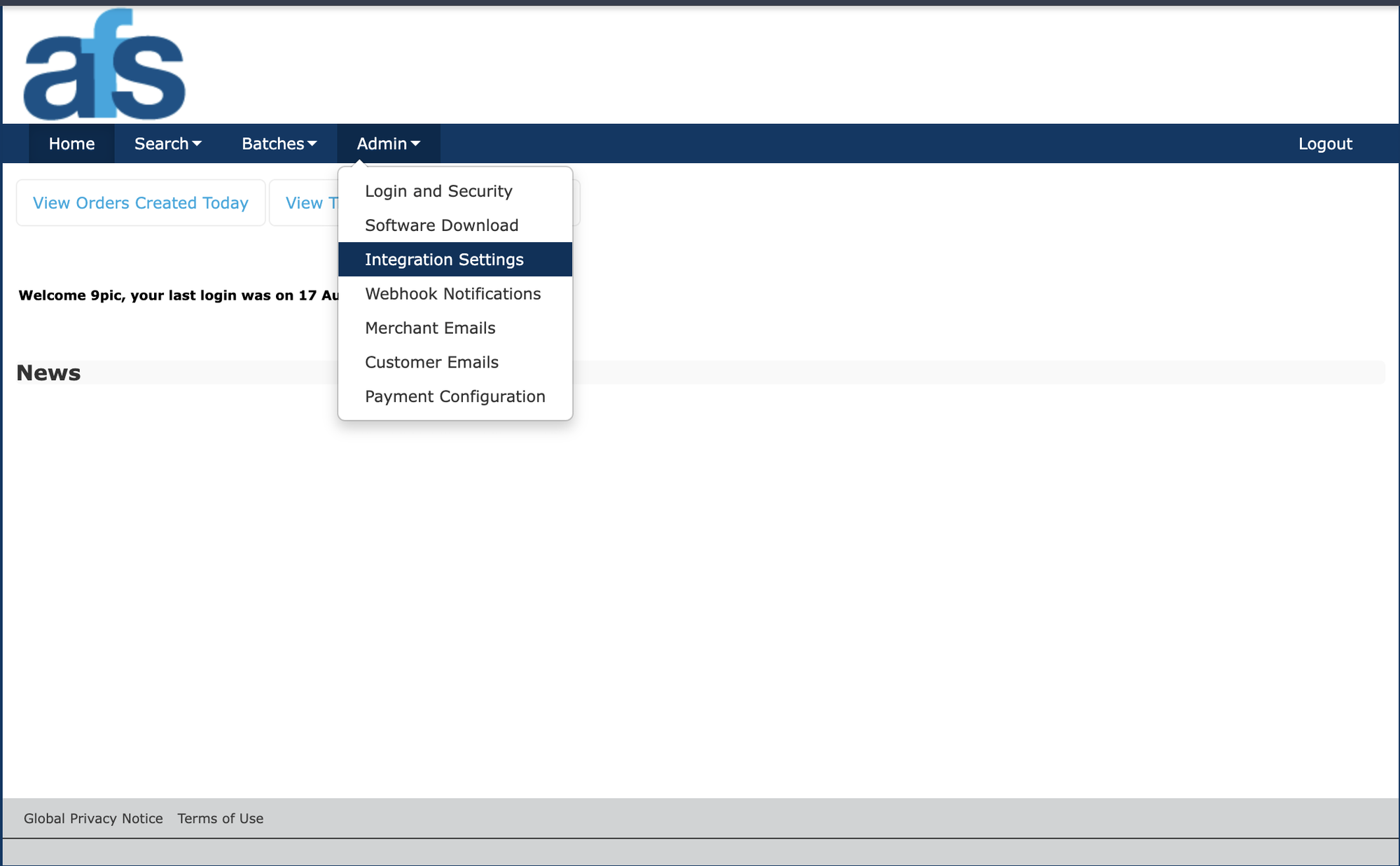
AFS Admin menu with Integration Settings highlighted
1
Open your AFS merchant setup
Sign in to the AFS merchant administration area for the account you plan to use. Open Admin -> Integration Settings and find the Integration Authentication section.
2
Get the API password
Copy Password 1 from the Integration Authentication section. Paste this value into the AFS API Password field in 9Pic. Do not copy it into a buyer-facing website or app.
3
Decide whether you are testing or going live
Use the simulator credentials while testing. A Merchant ID that begins with TEST is recognised as a test configuration. Use the separate live Merchant ID only when the event is ready to accept real payments.
4
Store the API password safely
Keep the password in your organisation’s approved password manager until you add it to 9Pic. AFS credentials should never be added to a buyer-facing website or app.
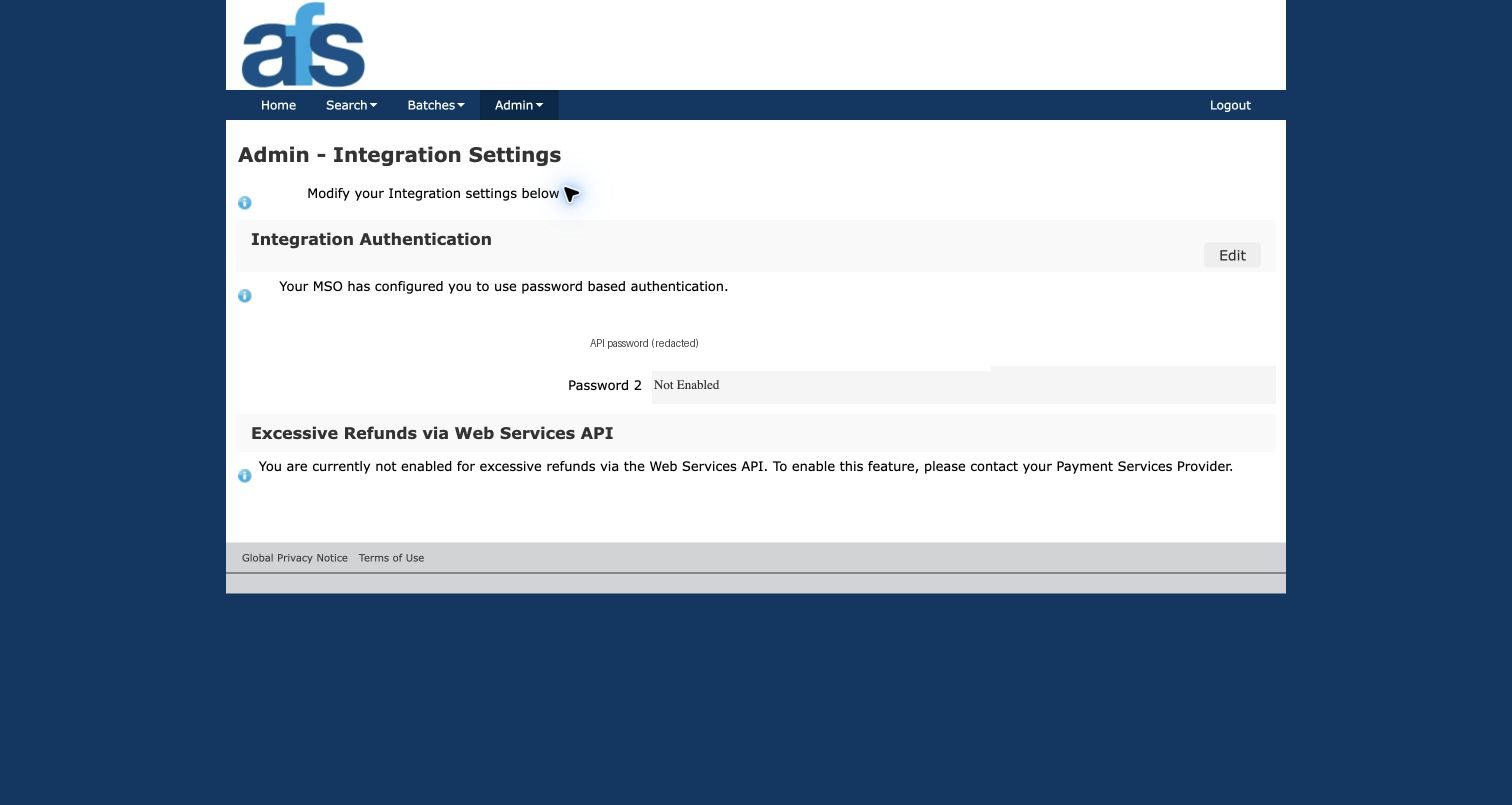
AFS Integration Settings with the API password redacted
Need help locating the credentials in AFS? Use the AFS integration guide or contact the AFS team that provisioned your merchant account.
Add AFS Gateway to 9Pic
1
Open Payment Config
In the dashboard sidebar, select Payment Config.
2
Start a new gateway
In Payment Gateway Configurations, click Add Gateway, then select AFS Gateway.
3
Name the configuration
Enter an optional Label that makes the configuration easy to recognise, such as AFS Test or AFS Live Bahrain.
4
Enter the Merchant ID
Paste the AFS Merchant ID into Merchant ID. This field is required. Use the ID that matches the environment you chose: a TEST ID for simulator checks or your live ID for real payments.
5
Enter the API password
Paste the AFS API password into AFS API Password. This required value is stored as a protected credential for your organisation.
6
Create the gateway
Click Create Gateway. The new AFS Gateway configuration appears in the organisation’s gateway list. 9Pic then checks the Merchant ID and API password with AFS, without creating an order, and shows the result under Secrets, such as Key accepted. See Key Check for what each result means.
Assign AFS to an Event
1
Open the event Checkout configuration
Open the event, then open its Checkout configuration.
2
Assign the AFS configuration
In the Payment gateways card, select Assign (or Edit if a gateway is already assigned), choose the AFS Gateway configuration (or add it under Add another way to pay), and save. To let buyers in Bahrain pay with debit cards too, add BENEFIT to the same event.
3
Set package prices in a supported currency
Create or update Checkout packages in BHD, USD, AED, SAR, or QAR. Other currencies cannot be used with AFS.
4
Publish and test
Publish the packages and run a complete buyer journey using the simulator before you switch the event to a live AFS configuration.
Removing a gateway while Checkout is live pauses Checkout first. Confirm the remaining gateways and package currency before you turn Checkout back on.
Verify the Setup
Check
What to confirm
Correct mode
Test events use a Merchant ID beginning with TEST; public checkout uses the live Merchant ID.
Payment page opens
A buyer can continue from 9Pic to the AFS hosted payment page.
Payment completes
A successful test payment returns to 9Pic and marks the order paid.
Price is correct
The amount shown by AFS matches the package price, including three decimal places for BHD.
Cancellation works
Cancelling returns the buyer to 9Pic without marking the order paid.
Troubleshooting
9Pic says the Merchant ID or API password is missing.
Edit the AFS Gateway configuration and confirm that both required fields have values. The Merchant ID and AFS API Password are separate fields.
My test configuration does not work for a public event.
A Merchant ID beginning with TEST is only for the simulator and cannot be used for public checkout. Add or update the configuration with the live Merchant ID supplied by AFS.
I cannot select my AFS configuration for an event.
Confirm that the configuration was created for the same organisation as the event, then save the selection from the event’s Payment gateways card.
The package currency is unavailable after I assign AFS.
AFS supports BHD, USD, AED, SAR, and QAR in 9Pic Checkout. Select one of those currencies or assign a gateway that supports the currency you need.
Next Steps
Payment Config
Manage the payment gateways saved for your organisation.
Checkout Setup
Assign a gateway, publish packages, and enable Checkout for an event.
{"docsConfig":{"theme":"mint","$schema":"https://mintlify.com/docs.json","name":"9Pic AI Documentation","colors":{"primary":"#155DFC","light":"#3080FF","dark":"#0B4AD2"},"logo":{"light":"https://mintcdn.com/9picai/S5EcjfSqjwpORHEo/logo/light.png?fit=max\u0026auto=format\u0026n=S5EcjfSqjwpORHEo\u0026q=85\u0026s=a14647e1552cad86363bd3dfe32ec208","dark":"https://mintcdn.com/9picai/S5EcjfSqjwpORHEo/logo/dark.png?fit=max\u0026auto=format\u0026n=S5EcjfSqjwpORHEo\u0026q=85\u0026s=025984d2e88c0cccd1a0567ad7488357"},"favicon":"https://mintcdn.com/9picai/S5EcjfSqjwpORHEo/favicon.svg?fit=max\u0026auto=format\u0026n=S5EcjfSqjwpORHEo\u0026q=85\u0026s=65125317ce120b5f2cb637eaa6cde837","navbar":{"links":[{"href":"mailto:support@9pic.ai","label":"Support"}]},"footer":{"socials":{"x":"https://x.com/9picai","linkedin":"https://linkedin.com/company/9pic-ai"}},"integrations":{"clarity":{"projectId":"vahau6obj9"}},"contextual":{"options":["copy","view","chatgpt","claude"],"display":"header"},"styling":{"latex":false},"navigation":{"global":{},"pages":[]}},"deployment":{"deploymentMetadataValue":{"subdomain":"9picai","hasAudioNarration":false,"actualSubdomain":"9picai","customDomains":["docs.9pic.ai"],"gitSource":{"type":"github","owner":"theargofactory","repo":"bhaago_india","deployBranch":"master","contentDirectory":"9pic-docs","isPrivate":true,"mountPath":"","label":""},"entitlements":{},"buildId":"6afd4d39edadaaf94a621dad","clientVersion":"0.0.4177","searchFilterCounts":[{"language":"default","tag":"API Reference","count":37},{"language":"default","tag":"Products","count":37},{"language":"default","tag":"Account \u0026 Billing","count":31},{"language":"default","tag":"Get Started","count":23},{"language":"default","tag":"Troubleshooting","count":14},{"language":"default","tag":"Events","count":12},{"language":"default","tag":"AI \u0026 Automation","count":11},{"language":"default","tag":"Events \u0026 Photos","count":11},{"language":"default","tag":"Plans","count":8},{"language":"default","tag":"AI Assistants","count":8}]},"assistantConfig":{"enableAskAiButton":false,"enableStarterQuestions":false,"enableAskAiSearchBar":true},"basePath":"","hasChatPermissions":false,"hasWebMcpPermissions":false,"toggles":[{"name":"kill-isr","enabled":true,"variant":{"name":"disabled","enabled":false,"feature_enabled":true},"impressionData":false},{"name":"custom-rbac-roles","enabled":true,"variant":{"name":"disabled","enabled":false,"feature_enabled":true},"impressionData":false},{"name":"agent-mintlify-slack","enabled":true,"variant":{"name":"disabled","enabled":false,"feature_enabled":true},"impressionData":false},{"name":"agent-integrations-settings","enabled":true,"variant":{"name":"disabled","enabled":false,"feature_enabled":true},"impressionData":false},{"name":"rbac-expansion","enabled":true,"variant":{"name":"disabled","enabled":false,"feature_enabled":true},"impressionData":false},{"name":"automations-pr-grouping","enabled":true,"variant":{"name":"disabled","enabled":false,"feature_enabled":true},"impressionData":false},{"name":"custom-prefix","enabled":true,"variant":{"name":"disabled","enabled":false,"feature_enabled":true},"impressionData":false},{"name":"analytics-v7","enabled":true,"variant":{"name":"disabled","enabled":false,"feature_enabled":true},"impressionData":false},{"name":"user-flows-analytics","enabled":true,"variant":{"name":"disabled","enabled":false,"feature_enabled":true},"impressionData":false},{"name":"no-publish-flow","enabled":true,"variant":{"name":"disabled","enabled":false,"feature_enabled":true},"impressionData":false},{"name":"workos-onboarding","enabled":true,"variant":{"name":"disabled","enabled":false,"feature_enabled":true},"impressionData":false},{"name":"snapshot-serving-live","enabled":true,"variant":{"name":"disabled","enabled":false,"feature_enabled":true},"impressionData":false},{"name":"stripTemperatureMiddleware","enabled":true,"variant":{"name":"disabled","enabled":false,"feature_enabled":true},"impressionData":false},{"name":"support-platform-pylon-zendesk","enabled":true,"variant":{"name":"disabled","enabled":false,"feature_enabled":true},"impressionData":false},{"name":"snapshot-serving","enabled":true,"variant":{"name":"disabled","enabled":false,"feature_enabled":true},"impressionData":false},{"name":"instant-rollback","enabled":true,"variant":{"name":"disabled","enabled":false,"feature_enabled":true},"impressionData":false},{"name":"granular-notifications-server","enabled":true,"variant":{"name":"disabled","enabled":false,"feature_enabled":true},"impressionData":false},{"name":"granular-notifications","enabled":true,"variant":{"name":"disabled","enabled":false,"feature_enabled":true},"impressionData":false},{"name":"automations-fable","enabled":true,"variant":{"name":"disabled","enabled":false,"feature_enabled":true},"impressionData":false},{"name":"fixed-ai-action-pricing","enabled":true,"variant":{"name":"disabled","enabled":false,"feature_enabled":true},"impressionData":false},{"name":"automation-resolve-merge-conflict","enabled":true,"variant":{"name":"disabled","enabled":false,"feature_enabled":true},"impressionData":false},{"name":"scoped-publishing","enabled":true,"variant":{"name":"disabled","enabled":false,"feature_enabled":true},"impressionData":false},{"name":"mintql","enabled":true,"variant":{"name":"disabled","enabled":false,"feature_enabled":true},"impressionData":false},{"name":"page-level-analytics","enabled":true,"variant":{"name":"disabled","enabled":false,"feature_enabled":true},"impressionData":false},{"name":"editor-version-history-v2","enabled":true,"variant":{"name":"disabled","enabled":false,"feature_enabled":true},"impressionData":false},{"name":"billing-page-v2","enabled":true,"variant":{"name":"disabled","enabled":false,"feature_enabled":true},"impressionData":false},{"name":"full-page-search","enabled":true,"variant":{"name":"disabled","enabled":false,"feature_enabled":true},"impressionData":false},{"name":"workspace-projects","enabled":true,"variant":{"name":"disabled","enabled":false,"feature_enabled":true},"impressionData":false},{"name":"assistant-v5","enabled":true,"variant":{"name":"disabled","enabled":false,"feature_enabled":true},"impressionData":false},{"name":"fork-pr-previews","enabled":true,"variant":{"name":"disabled","enabled":false,"feature_enabled":true},"impressionData":false},{"name":"revalidation-jwt","enabled":true,"variant":{"name":"disabled","enabled":false,"feature_enabled":true},"impressionData":false},{"name":"workos-sso-scim","enabled":true,"variant":{"name":"disabled","enabled":false,"feature_enabled":true},"impressionData":false},{"name":"hobby-abuse-scan","enabled":true,"variant":{"name":"disabled","enabled":false,"feature_enabled":true},"impressionData":false},{"name":"dashboard-inbox","enabled":true,"variant":{"name":"disabled","enabled":false,"feature_enabled":true},"impressionData":false},{"name":"workos-signup","enabled":true,"variant":{"name":"disabled","enabled":false,"feature_enabled":true},"impressionData":false},{"name":"turbopuffer-dual-write","enabled":true,"variant":{"name":"disabled","enabled":false,"feature_enabled":true},"impressionData":false},{"name":"workos-enabled","enabled":true,"variant":{"name":"disabled","enabled":false,"feature_enabled":true},"impressionData":false},{"name":"approve-review-flow","enabled":true,"variant":{"name":"disabled","enabled":false,"feature_enabled":true},"impressionData":false},{"name":"editor-metadata","enabled":true,"variant":{"name":"disabled","enabled":false,"feature_enabled":true},"impressionData":false},{"name":"sso-setup-deadline-banner","enabled":true,"variant":{"name":"disabled","enabled":false,"feature_enabled":true},"impressionData":false},{"name":"turbopuffer-serve","enabled":true,"variant":{"name":"disabled","enabled":false,"feature_enabled":true},"impressionData":false},{"name":"live-agents","enabled":true,"variant":{"name":"disabled","enabled":false,"feature_enabled":true},"impressionData":false},{"name":"starter-pricing","enabled":true,"variant":{"name":"control","enabled":true,"payload":{"type":"string","value":"control"},"feature_enabled":true},"impressionData":false},{"name":"llms-txt-v2","enabled":true,"variant":{"name":"disabled","enabled":false,"feature_enabled":true},"impressionData":false},{"name":"wildcard-email-auth","enabled":true,"variant":{"name":"disabled","enabled":false,"feature_enabled":true},"impressionData":false}],"googleFontsInlined":false},"customCss":[],"page":{"pagePath":"account/payment-gateways/afs-gateway","slug":"/account/payment-gateways/afs-gateway","pageMetadata":{"title":"AFS Gateway Setup","description":"Add AFS Gateway credentials to 9Pic Checkout and prepare an event for test or live payments.","icon":"credit-card","href":"/account/payment-gateways/afs-gateway"},"description":{"compiledSource":"\"use strict\";\nconst {jsx: _jsx} = arguments[0];\nconst {useMDXComponents: _provideComponents} = arguments[0];\nfunction _createMdxContent(props) {\n const _components = {\n p: \"p\",\n ..._provideComponents(),\n ...props.components\n };\n return _jsx(_components.p, {\n children: \"Add AFS Gateway credentials to 9Pic Checkout and prepare an event for test or live payments.\"\n });\n}\nfunction MDXContent(props = {}) {\n const {wrapper: MDXLayout} = {\n ..._provideComponents(),\n ...props.components\n };\n return MDXLayout ? _jsx(MDXLayout, {\n ...props,\n children: _jsx(_createMdxContent, {\n ...props\n })\n }) : _createMdxContent(props);\n}\nreturn {\n default: MDXContent\n};\n","frontmatter":{},"scope":{}},"pageType":"default","mdx":{"mdxSource":{"compiledSource":"\"use strict\";const{Fragment:_Fragment,jsx:_jsx,jsxs:_jsxs}=arguments[0];const{useMDXComponents:_provideComponents}=arguments[0];function _createMdxContent(props){const _components={a:`a`,code:`code`,p:`p`,strong:`strong`,tbody:`tbody`,td:`td`,th:`th`,thead:`thead`,tr:`tr`,..._provideComponents(),...props.components},{Accordion,AccordionGroup,Card,CardGroup,Frame,Heading,Info,OptimizedImage,Step,Steps,Table,Warning}=_components;if(!Accordion)_missingMdxReference(`Accordion`,true);if(!AccordionGroup)_missingMdxReference(`AccordionGroup`,true);if(!Card)_missingMdxReference(`Card`,true);if(!CardGroup)_missingMdxReference(`CardGroup`,true);if(!Frame)_missingMdxReference(`Frame`,true);if(!Heading)_missingMdxReference(`Heading`,true);if(!Info)_missingMdxReference(`Info`,true);if(!OptimizedImage)_missingMdxReference(`OptimizedImage`,true);if(!Step)_missingMdxReference(`Step`,true);if(!Steps)_missingMdxReference(`Steps`,true);if(!Table)_missingMdxReference(`Table`,true);if(!Warning)_missingMdxReference(`Warning`,true);return _jsxs(_Fragment,{children:[_jsx(Warning,{children:_jsxs(_components.p,{children:[`9Pic Checkout is a `,_jsx(_components.strong,{children:`Business plan`}),` feature. Only team admins can add or change an AFS Gateway configuration.`]})}),`\n`,_jsx(Heading,{level:`2`,id:`overview`,children:`Overview`}),`\n`,_jsx(_components.p,{children:`AFS Gateway uses Mastercard Hosted Checkout to collect payments for 9Pic Checkout. Add one AFS configuration for your organisation, then assign it to the event that will sell packages.`}),`\n`,_jsxs(_components.p,{children:[`You need two values from your AFS merchant setup: a `,_jsx(_components.strong,{children:`Merchant ID`}),` and an `,_jsx(_components.strong,{children:`API password`}),`. The Merchant ID identifies the account; the API password is private and should be handled like a password.`]}),`\n`,_jsx(_components.p,{children:`TODO screenshot (Codex Chrome required): Capture the Add Payment Gateway dialog with AFS Gateway selected, using redacted placeholder credentials.`}),`\n`,_jsx(Heading,{level:`2`,id:`before-you-start`,children:`Before You Start`}),`\n`,_jsxs(Table,{children:[_jsx(_components.thead,{children:_jsxs(_components.tr,{children:[_jsx(_components.th,{children:`Requirement`}),_jsx(_components.th,{children:`Why it matters`})]})}),_jsxs(_components.tbody,{children:[_jsxs(_components.tr,{children:[_jsx(_components.td,{children:_jsx(_components.strong,{children:`AFS merchant access`})}),_jsx(_components.td,{children:`You need the Merchant ID and API password issued for the AFS account you will use.`})]}),_jsxs(_components.tr,{children:[_jsx(_components.td,{children:_jsx(_components.strong,{children:`Correct environment`})}),_jsxs(_components.td,{children:[`A Merchant ID starting with `,_jsx(_components.code,{children:`TEST`}),` uses the AFS simulator. AFS provides a separate live Merchant ID for real payments.`]})]}),_jsxs(_components.tr,{children:[_jsx(_components.td,{children:_jsx(_components.strong,{children:`A team admin account`})}),_jsx(_components.td,{children:`Only team admins can open and manage Payment Configuration.`})]}),_jsxs(_components.tr,{children:[_jsx(_components.td,{children:_jsx(_components.strong,{children:`A Business or Enterprise organisation`})}),_jsx(_components.td,{children:`Payment Configuration and 9Pic Checkout are available on the Business plan, and on Enterprise.`})]}),_jsxs(_components.tr,{children:[_jsx(_components.td,{children:_jsx(_components.strong,{children:`Supported event currency`})}),_jsx(_components.td,{children:`AFS package prices can use BHD, USD, AED, SAR, or QAR.`})]})]})]}),`\n`,_jsx(Warning,{children:_jsx(_components.p,{children:`Do not share the API password in email, chat, task tickets, screenshots, frontend code, or a public repository. If you think it has been exposed, replace it in AFS and update the configuration in 9Pic.`})}),`\n`,_jsx(Heading,{level:`2`,id:`get-your-afs-credentials`,children:`Get Your AFS Credentials`}),`\n`,_jsx(Frame,{caption:`AFS Admin menu with Integration Settings highlighted`,children:_jsx(OptimizedImage,{src:`https://assets.9pic.ai/docs/dashboard-guide/payment-config/afs-integration-settings-menu.webp`,alt:`AFS admin Admin dropdown menu showing Integration Settings selected among Login and Security, Software Download, Webhook Notifications, Merchant Emails, Customer Emails, and Payment Configuration`})}),`\n`,_jsxs(Steps,{children:[_jsx(Step,{title:`Open your AFS merchant setup`,children:_jsxs(_components.p,{children:[`Sign in to the AFS merchant administration area for the account you plan to use. Open `,_jsx(_components.strong,{children:`Admin -> Integration Settings`}),` and find the `,_jsx(_components.strong,{children:`Integration Authentication`}),` section.`]})}),_jsx(Step,{title:`Get the API password`,children:_jsxs(_components.p,{children:[`Copy `,_jsx(_components.strong,{children:`Password 1`}),` from the Integration Authentication section. Paste this value into the `,_jsx(_components.strong,{children:`AFS API Password`}),` field in 9Pic. Do not copy it into a buyer-facing website or app.`]})}),_jsx(Step,{title:`Decide whether you are testing or going live`,children:_jsxs(_components.p,{children:[`Use the simulator credentials while testing. A Merchant ID that begins with `,_jsx(_components.code,{children:`TEST`}),` is recognised as a test configuration. Use the separate live Merchant ID only when the event is ready to accept real payments.`]})}),_jsx(Step,{title:`Store the API password safely`,children:_jsx(_components.p,{children:`Keep the password in your organisation’s approved password manager until you add it to 9Pic. AFS credentials should never be added to a buyer-facing website or app.`})})]}),`\n`,_jsx(Frame,{caption:`AFS Integration Settings with the API password redacted`,children:_jsx(OptimizedImage,{src:`https://assets.9pic.ai/docs/dashboard-guide/payment-config/afs-integration-settings.webp`,alt:`AFS Admin Integration Settings page showing Integration Authentication, with Password 1 redacted and Password 2 not enabled`})}),`\n`,_jsx(Info,{children:_jsxs(_components.p,{children:[`Need help locating the credentials in AFS? Use the `,_jsx(_components.a,{href:`https://afs.gateway.mastercard.com/api/documentation/integrationGuidelines/index.html?locale=en_US`,children:`AFS integration guide`}),` or contact the AFS team that provisioned your merchant account.`]})}),`\n`,_jsx(Heading,{level:`2`,id:`add-afs-gateway-to-9pic`,children:`Add AFS Gateway to 9Pic`}),`\n`,_jsxs(Steps,{children:[_jsx(Step,{title:`Open Payment Config`,children:_jsxs(_components.p,{children:[`In the dashboard sidebar, select `,_jsx(_components.strong,{children:`Payment Config`}),`.`]})}),_jsx(Step,{title:`Start a new gateway`,children:_jsxs(_components.p,{children:[`In `,_jsx(_components.strong,{children:`Payment Gateway Configurations`}),`, click `,_jsx(_components.strong,{children:`Add Gateway`}),`, then select `,_jsx(_components.strong,{children:`AFS Gateway`}),`.`]})}),_jsx(Step,{title:`Name the configuration`,children:_jsxs(_components.p,{children:[`Enter an optional `,_jsx(_components.strong,{children:`Label`}),` that makes the configuration easy to recognise, such as `,_jsx(_components.code,{children:`AFS Test`}),` or `,_jsx(_components.code,{children:`AFS Live Bahrain`}),`.`]})}),_jsx(Step,{title:`Enter the Merchant ID`,children:_jsxs(_components.p,{children:[`Paste the AFS Merchant ID into `,_jsx(_components.strong,{children:`Merchant ID`}),`. This field is required. Use the ID that matches the environment you chose: a `,_jsx(_components.code,{children:`TEST`}),` ID for simulator checks or your live ID for real payments.`]})}),_jsx(Step,{title:`Enter the API password`,children:_jsxs(_components.p,{children:[`Paste the AFS API password into `,_jsx(_components.strong,{children:`AFS API Password`}),`. This required value is stored as a protected credential for your organisation.`]})}),_jsx(Step,{title:`Create the gateway`,children:_jsxs(_components.p,{children:[`Click `,_jsx(_components.strong,{children:`Create Gateway`}),`. The new AFS Gateway configuration appears in the organisation’s gateway list. 9Pic then checks the Merchant ID and API password with AFS, without creating an order, and shows the result under `,_jsx(_components.strong,{children:`Secrets`}),`, such as `,_jsx(_components.strong,{children:`Key accepted`}),`. See `,_jsx(_components.a,{href:`/account/payment-gateways#key-check`,children:`Key Check`}),` for what each result means.`]})})]}),`\n`,_jsx(Heading,{level:`2`,id:`assign-afs-to-an-event`,children:`Assign AFS to an Event`}),`\n`,_jsxs(Steps,{children:[_jsx(Step,{title:`Open the event Checkout configuration`,children:_jsxs(_components.p,{children:[`Open the event, then open its `,_jsx(_components.strong,{children:`Checkout`}),` configuration.`]})}),_jsx(Step,{title:`Assign the AFS configuration`,children:_jsxs(_components.p,{children:[`In the `,_jsx(_components.strong,{children:`Payment gateways`}),` card, select `,_jsx(_components.strong,{children:`Assign`}),` (or `,_jsx(_components.strong,{children:`Edit`}),` if a gateway is already assigned), choose the AFS Gateway configuration (or add it under `,_jsx(_components.strong,{children:`Add another way to pay`}),`), and save. To let buyers in Bahrain pay with debit cards too, add `,_jsx(_components.a,{href:`/account/payment-gateways/benefit-gateway`,children:`BENEFIT`}),` to the same event.`]})}),_jsx(Step,{title:`Set package prices in a supported currency`,children:_jsxs(_components.p,{children:[`Create or update Checkout packages in `,_jsx(_components.strong,{children:`BHD`}),`, `,_jsx(_components.strong,{children:`USD`}),`, `,_jsx(_components.strong,{children:`AED`}),`, `,_jsx(_components.strong,{children:`SAR`}),`, or `,_jsx(_components.strong,{children:`QAR`}),`. Other currencies cannot be used with AFS.`]})}),_jsx(Step,{title:`Publish and test`,children:_jsx(_components.p,{children:`Publish the packages and run a complete buyer journey using the simulator before you switch the event to a live AFS configuration.`})})]}),`\n`,_jsx(Warning,{children:_jsx(_components.p,{children:`Removing a gateway while Checkout is live pauses Checkout first. Confirm the remaining gateways and package currency before you turn Checkout back on.`})}),`\n`,_jsx(Heading,{level:`2`,id:`verify-the-setup`,children:`Verify the Setup`}),`\n`,_jsxs(Table,{children:[_jsx(_components.thead,{children:_jsxs(_components.tr,{children:[_jsx(_components.th,{children:`Check`}),_jsx(_components.th,{children:`What to confirm`})]})}),_jsxs(_components.tbody,{children:[_jsxs(_components.tr,{children:[_jsx(_components.td,{children:_jsx(_components.strong,{children:`Correct mode`})}),_jsxs(_components.td,{children:[`Test events use a Merchant ID beginning with `,_jsx(_components.code,{children:`TEST`}),`; public checkout uses the live Merchant ID.`]})]}),_jsxs(_components.tr,{children:[_jsx(_components.td,{children:_jsx(_components.strong,{children:`Payment page opens`})}),_jsx(_components.td,{children:`A buyer can continue from 9Pic to the AFS hosted payment page.`})]}),_jsxs(_components.tr,{children:[_jsx(_components.td,{children:_jsx(_components.strong,{children:`Payment completes`})}),_jsx(_components.td,{children:`A successful test payment returns to 9Pic and marks the order paid.`})]}),_jsxs(_components.tr,{children:[_jsx(_components.td,{children:_jsx(_components.strong,{children:`Price is correct`})}),_jsx(_components.td,{children:`The amount shown by AFS matches the package price, including three decimal places for BHD.`})]}),_jsxs(_components.tr,{children:[_jsx(_components.td,{children:_jsx(_components.strong,{children:`Cancellation works`})}),_jsx(_components.td,{children:`Cancelling returns the buyer to 9Pic without marking the order paid.`})]})]})]}),`\n`,_jsx(Heading,{level:`2`,id:`troubleshooting`,children:`Troubleshooting`}),`\n`,_jsxs(AccordionGroup,{children:[_jsx(Accordion,{title:`9Pic says the Merchant ID or API password is missing.`,id:`9pic-says-the-merchant-id-or-api-password-is-missing`,children:_jsx(_components.p,{children:`Edit the AFS Gateway configuration and confirm that both required fields have values. The Merchant ID and AFS API Password are separate fields.`})}),_jsx(Accordion,{title:`My test configuration does not work for a public event.`,id:`my-test-configuration-does-not-work-for-a-public-event`,children:_jsxs(_components.p,{children:[`A Merchant ID beginning with `,_jsx(_components.code,{children:`TEST`}),` is only for the simulator and cannot be used for public checkout. Add or update the configuration with the live Merchant ID supplied by AFS.`]})}),_jsx(Accordion,{title:`I cannot select my AFS configuration for an event.`,id:`i-cannot-select-my-afs-configuration-for-an-event`,children:_jsxs(_components.p,{children:[`Confirm that the configuration was created for the same organisation as the event, then save the selection from the event’s `,_jsx(_components.strong,{children:`Payment gateways`}),` card.`]})}),_jsx(Accordion,{title:`The package currency is unavailable after I assign AFS.`,id:`the-package-currency-is-unavailable-after-i-assign-afs`,children:_jsx(_components.p,{children:`AFS supports BHD, USD, AED, SAR, and QAR in 9Pic Checkout. Select one of those currencies or assign a gateway that supports the currency you need.`})})]}),`\n`,_jsx(Heading,{level:`2`,id:`next-steps`,children:`Next Steps`}),`\n`,_jsxs(CardGroup,{cols:2,children:[_jsx(Card,{title:`Payment Config`,icon:`wallet`,href:`/account/payment-gateways`,children:_jsx(_components.p,{children:`Manage the payment gateways saved for your organisation.`})}),_jsx(Card,{title:`Checkout Setup`,icon:`gear`,href:`/products/checkout/configuration`,children:_jsx(_components.p,{children:`Assign a gateway, publish packages, and enable Checkout for an event.`})})]})]})}function MDXContent(props={}){const{wrapper:MDXLayout}={..._provideComponents(),...props.components};return MDXLayout?_jsx(MDXLayout,{...props,children:_jsx(_createMdxContent,{...props})}):_createMdxContent(props)}return{default:MDXContent};function _missingMdxReference(id,component){throw new Error(`Expected `+(component?`component`:`object`)+\" `\"+id+\"` to be defined: you likely forgot to import, pass, or provide it.\")}","frontmatter":{},"scope":{"config":{},"pageMetadata":{"title":"AFS Gateway Setup","description":"Add AFS Gateway credentials to 9Pic Checkout and prepare an event for test or live payments.","icon":"credit-card","href":"/account/payment-gateways/afs-gateway"}}},"mdxSourceWithNoJs":null},"mdxExtracts":{"tableOfContents":[{"title":"Overview","slug":"overview","depth":2,"children":[]},{"title":"Before You Start","slug":"before-you-start","depth":2,"children":[]},{"title":"Get Your AFS Credentials","slug":"get-your-afs-credentials","depth":2,"children":[]},{"title":"Add AFS Gateway to 9Pic","slug":"add-afs-gateway-to-9pic","depth":2,"children":[]},{"title":"Assign AFS to an Event","slug":"assign-afs-to-an-event","depth":2,"children":[]},{"title":"Verify the Setup","slug":"verify-the-setup","depth":2,"children":[]},{"title":"Troubleshooting","slug":"troubleshooting","depth":2,"children":[]},{"title":"Next Steps","slug":"next-steps","depth":2,"children":[]}],"codeExamples":{}},"jsLinks":[],"subdomain":"9picai","siteName":"9Pic AI Documentation","title":"AFS Gateway Setup - 9Pic AI Documentation","navMaps":{"firstHrefInVersion":{},"firstHrefInLanguage":{}},"lastModified":"2026-11-17T19:15:49.302Z","originalFileLocation":"account/payment-gateways/afs-gateway.mdx"},"headHtml":"\u003cscript data-mint-head>(function(){var d=document.documentElement,p=null;if(!p){try{p=localStorage.getItem(\"isDarkMode\")}catch(e){}if(p==='true')p='dark';else if(p==='false')p='light';if(p!=='light'\u0026\u0026p!=='dark'\u0026\u0026p!=='system')p=\"system\"}var r=p==='system'?(matchMedia(\"(prefers-color-scheme: dark)\").matches?'dark':'light'):p;d.classList.remove(r==='dark'?'light':'dark');d.classList.add(r);d.setAttribute(\"data-theme-preference\",p)})();\u003c/script>\u003cmeta data-mint-head name=\"description\" content=\"Add AFS Gateway credentials to 9Pic Checkout and prepare an event for test or live payments.\">\u003cmeta data-mint-head name=\"application-name\" content=\"9Pic AI Documentation\">\u003cmeta data-mint-head name=\"generator\" content=\"Mintlify\">\u003clink data-mint-head rel=\"icon\" type=\"image/png\" sizes=\"192x192\" href=\"/mintlify-assets/_mintlify/favicons/9picai/9qO0Knt0dMOPX3DE/_generated/favicon/android-chrome-192x192.png\" media=\"(prefers-color-scheme: light)\">\u003clink data-mint-head rel=\"apple-touch-icon\" type=\"image/png\" sizes=\"180x180\" href=\"/mintlify-assets/_mintlify/favicons/9picai/9qO0Knt0dMOPX3DE/_generated/favicon/apple-touch-icon.png\">\u003clink data-mint-head rel=\"icon\" type=\"image/png\" sizes=\"16x16\" href=\"/mintlify-assets/_mintlify/favicons/9picai/9qO0Knt0dMOPX3DE/_generated/favicon/favicon-16x16.png\" media=\"(prefers-color-scheme: light)\">\u003clink data-mint-head rel=\"icon\" type=\"image/png\" sizes=\"32x32\" href=\"/mintlify-assets/_mintlify/favicons/9picai/9qO0Knt0dMOPX3DE/_generated/favicon/favicon-32x32.png\" media=\"(prefers-color-scheme: light)\">\u003clink data-mint-head rel=\"shortcut icon\" type=\"image/x-icon\" href=\"/mintlify-assets/_mintlify/favicons/9picai/9qO0Knt0dMOPX3DE/_generated/favicon/favicon.ico\" media=\"(prefers-color-scheme: light)\">\u003clink data-mint-head rel=\"icon\" type=\"image/png\" sizes=\"192x192\" href=\"/mintlify-assets/_mintlify/favicons/9picai/9qO0Knt0dMOPX3DE/_generated/favicon-dark/android-chrome-192x192.png\" media=\"(prefers-color-scheme: dark)\">\u003clink data-mint-head rel=\"icon\" type=\"image/png\" sizes=\"16x16\" href=\"/mintlify-assets/_mintlify/favicons/9picai/9qO0Knt0dMOPX3DE/_generated/favicon-dark/favicon-16x16.png\" media=\"(prefers-color-scheme: dark)\">\u003clink data-mint-head rel=\"icon\" type=\"image/png\" sizes=\"32x32\" href=\"/mintlify-assets/_mintlify/favicons/9picai/9qO0Knt0dMOPX3DE/_generated/favicon-dark/favicon-32x32.png\" media=\"(prefers-color-scheme: dark)\">\u003clink data-mint-head rel=\"shortcut icon\" type=\"image/x-icon\" href=\"/mintlify-assets/_mintlify/favicons/9picai/9qO0Knt0dMOPX3DE/_generated/favicon-dark/favicon.ico\" media=\"(prefers-color-scheme: dark)\">\u003cmeta data-mint-head property=\"og:title\" content=\"AFS Gateway Setup - 9Pic AI Documentation\">\u003cmeta data-mint-head property=\"og:description\" content=\"Add AFS Gateway credentials to 9Pic Checkout and prepare an event for test or live payments.\">\u003cmeta data-mint-head property=\"og:site_name\" content=\"9Pic AI Documentation\">\u003cmeta data-mint-head property=\"og:url\" content=\"https://docs.9pic.ai/account/payment-gateways/afs-gateway\">\u003cmeta data-mint-head property=\"og:type\" content=\"website\">\u003cmeta data-mint-head property=\"og:image\" content=\"https://9picai.mintlify.site/_mintlify/api/og/v2?division=Payment+Gateways\u0026amp;title=AFS+Gateway+Setup\u0026amp;description=Add+AFS+Gateway+credentials+to+9Pic+Checkout+and+prepare+an+event+for+test+or+live+payments.\u0026amp;theme=b5a7382b9996fec4070d7961\u0026amp;signature=e6553fb0a5557e92d249c492387e1013e63040b4bdb1057b8873dc1d3a756b57\">\u003cmeta data-mint-head property=\"og:image:width\" content=\"1200\">\u003cmeta data-mint-head property=\"og:image:height\" content=\"630\">\u003cmeta data-mint-head name=\"twitter:card\" content=\"summary_large_image\">\u003cmeta data-mint-head name=\"twitter:title\" content=\"AFS Gateway Setup - 9Pic AI Documentation\">\u003cmeta data-mint-head name=\"twitter:description\" content=\"Add AFS Gateway credentials to 9Pic Checkout and prepare an event for test or live payments.\">\u003cmeta data-mint-head name=\"twitter:image\" content=\"https://9picai.mintlify.site/_mintlify/api/og/v2?division=Payment+Gateways\u0026amp;title=AFS+Gateway+Setup\u0026amp;description=Add+AFS+Gateway+credentials+to+9Pic+Checkout+and+prepare+an+event+for+test+or+live+payments.\u0026amp;theme=b5a7382b9996fec4070d7961\u0026amp;signature=e6553fb0a5557e92d249c492387e1013e63040b4bdb1057b8873dc1d3a756b57\">\u003cmeta data-mint-head name=\"twitter:image:width\" content=\"1200\">\u003cmeta data-mint-head name=\"twitter:image:height\" content=\"630\">\u003cmeta data-mint-head name=\"msapplication-config\" content=\"/mintlify-assets/_mintlify/favicons/9picai/9qO0Knt0dMOPX3DE/_generated/favicon/browserconfig.xml\">\u003cmeta data-mint-head name=\"apple-mobile-web-app-title\" content=\"9Pic AI Documentation\">\u003cmeta data-mint-head name=\"msapplication-TileColor\" content=\"#155DFC\">\u003clink data-mint-head rel=\"canonical\" href=\"https://docs.9pic.ai/account/payment-gateways/afs-gateway\">\u003clink data-mint-head rel=\"alternate\" type=\"application/xml\" href=\"/sitemap.xml\">\u003clink data-mint-head rel=\"alternate\" type=\"text/markdown\" href=\"/account/payment-gateways/afs-gateway.md\">\u003cscript data-mint-head type=\"application/ld+json\">{\"@context\":\"https://schema.org\",\"@graph\":[{\"@type\":\"Organization\",\"@id\":\"https://docs.9pic.ai/#organization\",\"name\":\"9Pic AI Documentation\",\"url\":\"https://docs.9pic.ai\",\"logo\":{\"@type\":\"ImageObject\",\"url\":\"https://mintcdn.com/9picai/S5EcjfSqjwpORHEo/logo/light.png?fit=max\u0026auto=format\u0026n=S5EcjfSqjwpORHEo\u0026q=85\u0026s=a14647e1552cad86363bd3dfe32ec208\"}},{\"@type\":\"WebSite\",\"@id\":\"https://docs.9pic.ai#website\",\"name\":\"9Pic AI Documentation\",\"url\":\"https://docs.9pic.ai\",\"publisher\":{\"@id\":\"https://docs.9pic.ai/#organization\"}},{\"@type\":\"WebPage\",\"@id\":\"https://docs.9pic.ai/account/payment-gateways/afs-gateway#webpage\",\"url\":\"https://docs.9pic.ai/account/payment-gateways/afs-gateway\",\"name\":\"AFS Gateway Setup\",\"description\":\"Add AFS Gateway credentials to 9Pic Checkout and prepare an event for test or live payments.\",\"dateModified\":\"2026-11-17T19:15:49.302Z\",\"isPartOf\":{\"@id\":\"https://docs.9pic.ai#website\"},\"breadcrumb\":{\"@id\":\"https://docs.9pic.ai/account/payment-gateways/afs-gateway#breadcrumb\"}},{\"@type\":\"BreadcrumbList\",\"@id\":\"https://docs.9pic.ai/account/payment-gateways/afs-gateway#breadcrumb\",\"itemListElement\":[{\"@type\":\"ListItem\",\"position\":1,\"name\":\"Payment Gateways\",\"item\":\"https://docs.9pic.ai/account/payment-gateways\"},{\"@type\":\"ListItem\",\"position\":2,\"name\":\"AFS Gateway Setup\",\"item\":\"https://docs.9pic.ai/account/payment-gateways/afs-gateway\"}]},{\"@type\":[\"Article\",\"TechArticle\"],\"@id\":\"https://docs.9pic.ai/account/payment-gateways/afs-gateway#article\",\"headline\":\"AFS Gateway Setup\",\"name\":\"AFS Gateway Setup\",\"description\":\"Add AFS Gateway credentials to 9Pic Checkout and prepare an event for test or live payments.\",\"url\":\"https://docs.9pic.ai/account/payment-gateways/afs-gateway\",\"mainEntityOfPage\":{\"@id\":\"https://docs.9pic.ai/account/payment-gateways/afs-gateway#webpage\"},\"dateModified\":\"2026-11-17T19:15:49.302Z\",\"publisher\":{\"@id\":\"https://docs.9pic.ai/#organization\"},\"isPartOf\":{\"@id\":\"https://docs.9pic.ai#website\"}}]}\u003c/script>\u003cscript data-mint-head type=\"application/ld+json\">{\"@context\":\"https://schema.org\",\"@type\":\"WebSite\",\"name\":\"9Pic AI Documentation\",\"publisher\":{\"@type\":\"Organization\",\"name\":\"9Pic AI Documentation\"},\"provider\":{\"@type\":\"Organization\",\"name\":\"Mintlify\",\"url\":\"https://mintlify.com\"}}\u003c/script>","agentPointerHref":"/account/payment-gateways/afs-gateway.md","siteName":"9Pic AI Documentation","nav":{"global":{},"tabs":[{"tab":"Get Started","pages":[{"title":"Get Started","href":"/get-started"}]},{"tab":"Products","pages":[{"title":"Products","href":"/products/events/list"}]},{"tab":"Account \u0026 Billing","groups":[{"group":"Plans","pages":[{"title":"Compare Plans","icon":"scale-balanced","href":"/account/plans/compare"},{"title":"Trial","icon":"rocket","href":"/account/plans/trial"},{"title":"Pay As You Go","icon":"coins","href":"/account/plans/pay-as-you-go"},{"title":"Pro","icon":"crown","href":"/account/plans/pro"},{"title":"Business","icon":"briefcase","href":"/account/plans/business"},{"title":"Change Your Plan","icon":"arrow-up-right-from-square","href":"/account/plans/upgrade"},{"title":"Renewal","icon":"arrows-rotate","href":"/account/plans/renewal"},{"title":"Fair Usage Policy","icon":"scale-balanced","href":"/account/plans/fair-usage"}]},{"group":"Credits","pages":[{"title":"Credits \u0026 Billing","icon":"coins","href":"/account/credits/overview"},{"title":"Photo Processing Costs","icon":"gauge","href":"/account/credits/costs"},{"title":"Buy More Credits","icon":"cart-shopping","href":"/account/credits/buy"},{"title":"Invoices \u0026 Transactions","icon":"file-invoice","href":"/account/credits/invoices"},{"title":"Avoid Wasting Credits","icon":"triangle-exclamation","href":"/account/credits/avoid-waste"}]},{"group":"Your Site","pages":[{"title":"Settings Overview","icon":"gear","href":"/account/site/index"},{"title":"Run the Setup Wizard","icon":"wand-magic-sparkles","href":"/account/site/setup-wizard"},{"title":"Branding \u0026 Theme","icon":"palette","href":"/account/site/branding"},{"title":"Domain \u0026 Region","icon":"globe","href":"/account/site/domain"},{"title":"Footer \u0026 Social","icon":"share-nodes","href":"/account/site/footer"},{"title":"Contact Us Page","icon":"address-card","href":"/account/site/contact"},{"title":"Advanced Settings","icon":"sliders","href":"/account/site/advanced"}]},{"group":"Team \u0026 Account","pages":[{"title":"Account","icon":"user","href":"/account/profile"},{"title":"Team","icon":"users","href":"/account/team"}]},{"group":"Payment Gateways","pages":[{"title":"Payment Configuration","icon":"wallet","href":"/account/payment-gateways/index"},{"title":"Stripe Key Setup","icon":"key","href":"/account/payment-gateways/stripe-restricted-key"},{"title":"Stripe Invoice Setup","description":"Turn on Stripe-issued invoices and Stripe tax for 9Pic Checkout, and prepare your Stripe invoice details, with a worked inclusive-tax example.","icon":"file-invoice-dollar","href":"/account/payment-gateways/stripe-invoices"},{"title":"AFS Gateway Setup","icon":"credit-card","href":"/account/payment-gateways/afs-gateway"},{"title":"BENEFIT Setup","description":"Add BENEFIT credentials to 9Pic Checkout so buyers in Bahrain can pay with BENEFIT debit cards.","icon":"credit-card","href":"/account/payment-gateways/benefit-gateway"},{"title":"PayMongo Setup","icon":"credit-card","href":"/account/payment-gateways/paymongo"},{"title":"Xendit Setup","icon":"credit-card","href":"/account/payment-gateways/xendit"}]},{"group":"Get Help","pages":[{"title":"Contact Support","icon":"life-ring","href":"/account/support"},{"title":"Talk to Us","icon":"comments","href":"/account/talk-to-us"}]}]},{"tab":"Troubleshooting","pages":[{"title":"Troubleshooting","href":"/troubleshooting"}]},{"tab":"AI \u0026 Automation","pages":[{"title":"AI \u0026 Automation","href":"/integrations/ai-assistants"}]},{"tab":"API Reference","pages":[{"title":"API Reference","href":"/api-reference"}]}]},"basePath":"","title":"AFS Gateway Setup - 9Pic AI Documentation","deploymentId":"dpl_HhUetB7eHHDAmK9T1Teip38TgFx9","buildId":"dpl_HhUetB7eHHDAmK9T1Teip38TgFx9","dynamics":["07c022d89b","a74be98ba7"],"chunks":["Frame-DevImLcx.js","DynamicMarkdown-BGHukeRM.js","zoom-image-lightbox-DQG3o8Eu.js","lightbox-handle-r17bVUz3.js"]}