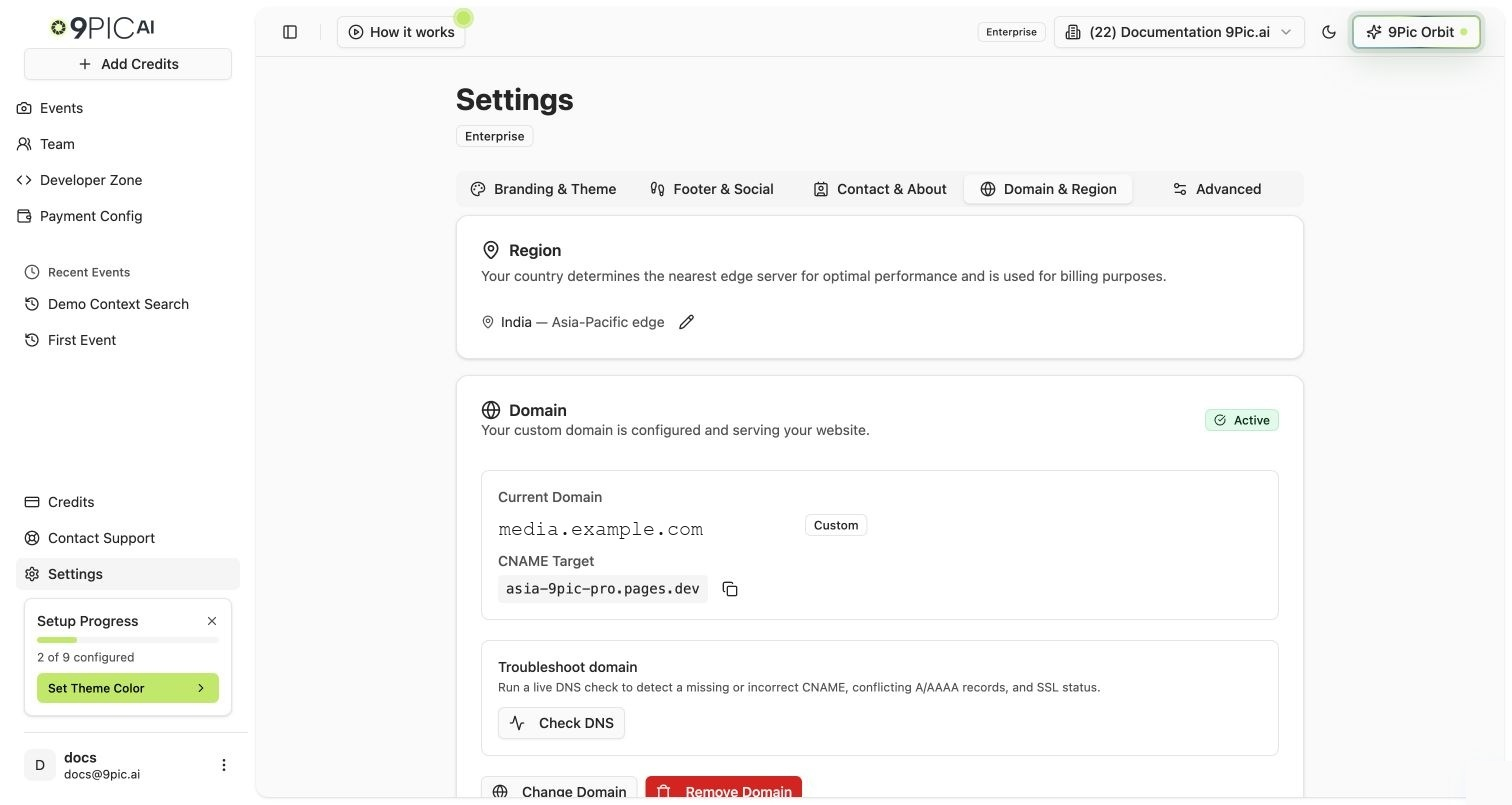
Set your organisation region and manage your gallery website domain.
Overview
The Domain & Region tab controls two parts of your public gallery website:
Region — your organisation’s country, used for billing and to pick the nearest website edge.
Domain — the public web address visitors use to open your gallery website.
Plan availability:
Feature
Trial
Pay As You Go
Pro, Business, Enterprise
View the current domain
View only
View only
Available
Edit Region
Available
Available
Available
Use a yourname.9pic.ai platform subdomain
Not included
Not included
Available
Connect a custom domain (photos.yourbrand.com)
Not included
Not included
Available
Verify DNS, change, or remove a managed domain
Not included
Not included
Available
On Trial and Pay As You Go, the Domain card is read-only, but Region is still editable. Upgrade to Pro or Business from Credits & Billing to connect a platform subdomain or custom domain.
Domain & Region settings
How to Open
1
Go to Settings
Click Settings in the sidebar.
2
Select Domain & Region
Click the Domain & Region tab.
You can also open it directly at /settings?tab=domain.
Region
Your region starts with the country you selected during onboarding. It is used for billing and helps 9Pic pick the nearest website edge for better performance.When a region is detected, the Region card shows the country name followed by the edge label — Europe edge, Americas edge, or Asia-Pacific edge.
1
Edit the country
In the Region card, click the pencil icon next to the current country.
2
Search and select
Search for your country and pick it from the dropdown.
3
Save
Click Save changes at the bottom of the page.
If no country has been set yet, the card says Not set — nearest edge server will be auto-detected.
Region edge selection
Domain — Trial and Pay As You Go (Read-Only)
Trial and Pay As You Go plans show the Domain card as read-only.
What you see
What it means
Domain
The current website address assigned to your organisation. Trial organisations usually see trial.9pic.ai; Pay As You Go organisations see app.9pic.ai.
CNAME Target
A DNS target value, shown only when one already exists for the organisation. The copy icon next to it copies the value to your clipboard.
To switch to a platform subdomain or connect a custom domain, upgrade to Pro or Business.
Domain — Pro, Business and Enterprise
On Pro, Business and Enterprise plans, the Domain card shows the current domain, status badge, and action buttons.
Domain Types
Domain type
Example
Best for
Platform Subdomain
yourname.9pic.ai
You want a branded 9Pic subdomain without DNS setup.
Custom Domain
photos.yourbrand.com
You own a domain and want participants to visit your own brand’s address.
Domain Statuses
Status
Meaning
Active
The domain is ready and serving traffic.
Pending Verification
DNS or SSL setup is still being checked.
Initializing
9Pic is preparing the domain.
Failed
Verification did not complete. Check the DNS instructions and try again.
The status appears as a coloured badge in the top right of the Domain card.
Available Actions
The action buttons depend on whether a domain is configured and what its current status is.
Button
When it appears
What it does
Add Custom Domain
No custom domain configured yet.
Opens a guided choice: “I have a domain” or “I don’t have a domain”.
Verify DNS
A domain is configured but is not Active.
Re-checks DNS and SSL status.
Change Domain
A domain is already configured.
Opens the setup form to switch to a different domain or subdomain, with a risk-acknowledge checkbox.
Remove Domain
A domain is already configured.
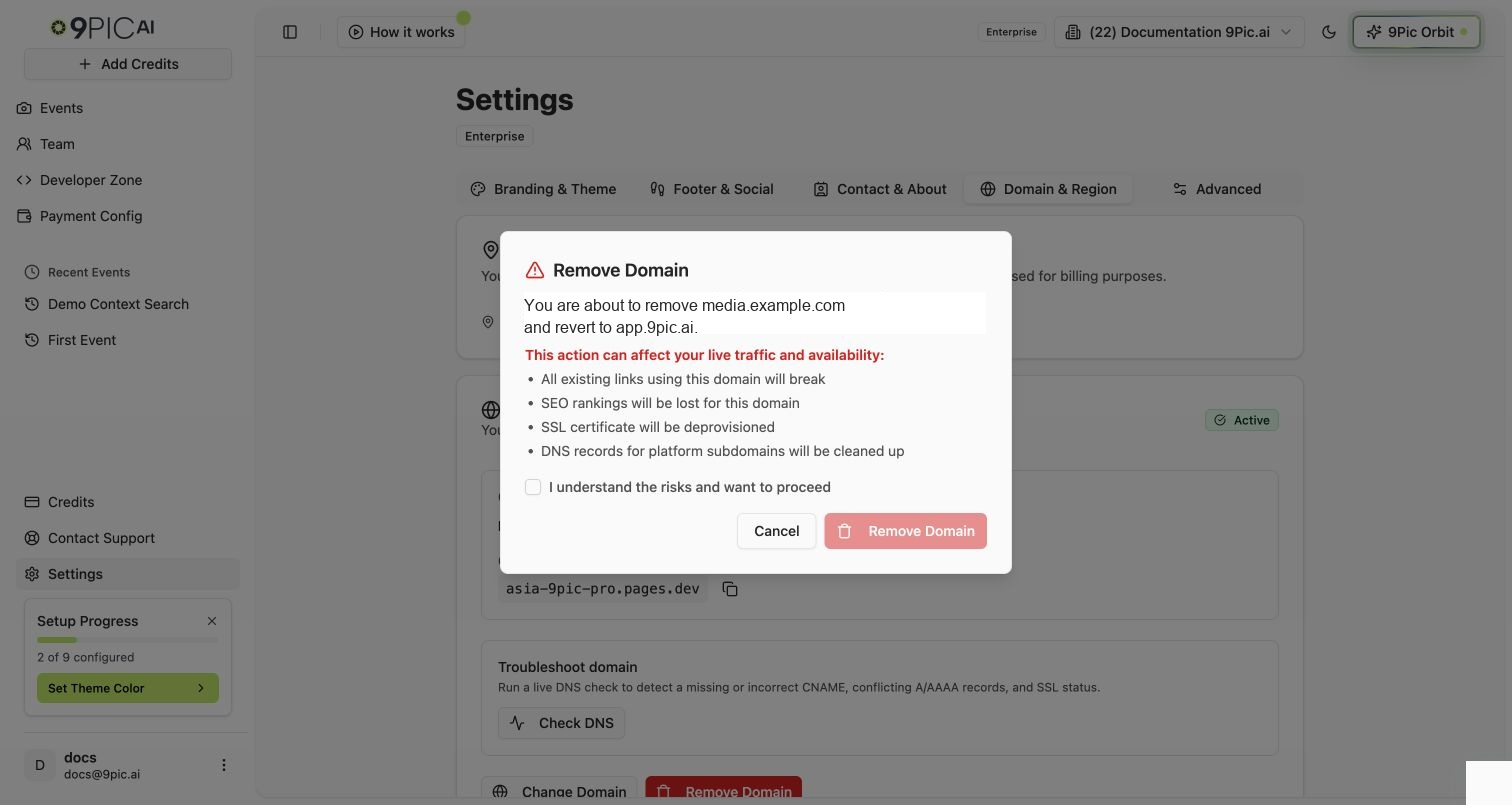
Opens a confirmation dialog with a risk-acknowledge checkbox. Reverts to app.9pic.ai after removal.
Add a Domain
1
Open the guided setup
In the Domain card, click Add Custom Domain. A guided choice card appears with the recommendation.
2
Choose an option
Click I have a domain to connect your own domain, or I don’t have a domain to use a free yourname.9pic.ai subdomain.
3
Enter the domain or slug
For a custom domain, enter a full address such as photos.yourcompany.com.
For a platform subdomain, enter only the slug, e.g. your-org-name. The dashboard appends .9pic.ai. The slug must be lowercase letters, numbers, or hyphens, 3–63 characters.
4
Check availability
Click Check. A green message confirms the value is available; a red message tells you to pick a different one.
5
Review the preview
The preview block shows your current domain crossed out next to the new domain so you can confirm the change before saving.
6
Configure the domain
Click Configure Domain. A toast confirms the domain has been set up. If it is a custom domain, the toast asks you to verify DNS next.
Platform subdomains are the fastest option. 9Pic manages DNS automatically and your subdomain is usually active within a few minutes.
Connect a Custom Domain (CNAME)
For a custom domain, you must update DNS at the place where your domain is managed.
1
Add the domain in 9Pic
Follow Add a Domain above and choose I have a domain, then enter your domain (e.g. photos.yourcompany.com) and click Configure Domain.
2
Copy the CNAME Target
The CNAME Target appears in the Domain card. Click the copy icon next to it.
3
Add the CNAME at your DNS provider
Sign in to the place where you manage DNS for your domain and add a CNAME record that points your custom domain (or subdomain) to the copied CNAME Target. For photos.yourcompany.com, the record’s name or host is photos and its value or target is the CNAME Target; leave the TTL at its default. 9Pic links to short guides for GoDaddy, Wix, Hostinger, Namecheap, Google Domains, and Cloudflare from the Domain card.
4
Wait for DNS and SSL
DNS propagation and SSL provisioning can take up to 48 hours.
5
Verify the domain
Return to Settings → Domain & Region and click Verify DNS. A toast tells you whether the domain is now Active, still pending, or failed.
Changing DNS can affect live traffic for any other service on that domain. If you are not sure which record to edit, ask the person who manages your domain before making changes.
Change a Domain
When a domain is already configured and you click Change Domain, the setup form opens with a risk-acknowledge alert.
1
Click Change Domain
In the Domain card, click Change Domain.
2
Choose the new type and value
Pick Platform Subdomain or Custom Domain from the Domain Type dropdown and enter the new value. The preview shows the change from your current domain to the new one.
3
Acknowledge the risk
A yellow warning lists the risks (broken links, SEO impact, downtime up to 48 hours, SSL re-provisioning). Tick I understand the risks and want to proceed to enable the update button.
4
Update the domain
Click Update Domain. A toast confirms the change and asks you to verify DNS if needed.
Changing your domain can break existing event links, affect search rankings, and cause temporary downtime while DNS and SSL update.
Remove a Domain
1
Click Remove Domain
In the Domain card, click Remove Domain (red button).
2
Review the warning
The dialog shows the domain you are about to remove and explains the impact — broken links, lost SEO rankings, SSL deprovisioning, and DNS cleanup for platform subdomains.
3
Acknowledge the risk
Tick I understand the risks and want to proceed. The Remove Domain button stays disabled until you do.
4
Confirm removal
Click Remove Domain in the dialog. The website returns to the default app.9pic.ai domain and a toast confirms the change.
Removing a domain is permanent for that domain. Existing links using the old domain will break, and SSL for it will be deprovisioned.
Remove Domain confirmation
Common Questions
Which plans can manage domains?
Connecting a platform subdomain or custom domain is available on Pro, Business and Enterprise plans. Trial and Pay As You Go plans see the Domain card as read-only — but Region is editable on every plan.
What is the difference between a platform subdomain and a custom domain?
A platform subdomain uses yourname.9pic.ai and does not require DNS setup. A custom domain uses an address you own, such as photos.yourbrand.com, and requires you to add a CNAME record at your DNS provider.
Why is my custom domain not Active yet?
DNS propagation and SSL provisioning can take up to 48 hours. Check that your CNAME record points to the exact target shown in the Domain card (no typos or extra dots), then click Verify DNS. If it’s still not Active after 48 hours, email support@9pic.ai with your domain and the CNAME target.
Can one organisation have more than one domain?
No. An organisation has one domain at a time. To run separate brands on separate domains, use a separate organisation for each.
What happens to my domain if I move to a lower plan?
A domain you already set up keeps working, but your website shows 9Pic AI branding instead of yours until you’re back on Pro or above. The Domain card still lets you manage or remove it. An organisation without a custom domain can’t add one on Trial or Pay As You Go.
What are the slug rules for a platform subdomain?
Lowercase letters, numbers, and hyphens only, 3–63 characters. The slug picker strips invalid characters as you type.
Can I update my region without changing my domain?
Yes — Region is editable on every plan. Edit the country in the Region card and click Save changes. Domain actions are separate and don’t depend on the Save button.
What happens after I remove my custom domain?
Your website returns to app.9pic.ai. The CNAME you had pointing to 9Pic will return errors until you remove or repoint it at your DNS provider.
Next Steps
Advanced Settings
Configure Google Tag Manager once your domain is live.
Settings Overview
Back to all settings.
{"docsConfig":{"theme":"mint","$schema":"https://mintlify.com/docs.json","name":"9Pic AI Documentation","colors":{"primary":"#155DFC","light":"#3080FF","dark":"#0B4AD2"},"logo":{"light":"https://mintcdn.com/9picai/S5EcjfSqjwpORHEo/logo/light.png?fit=max\u0026auto=format\u0026n=S5EcjfSqjwpORHEo\u0026q=85\u0026s=a14647e1552cad86363bd3dfe32ec208","dark":"https://mintcdn.com/9picai/S5EcjfSqjwpORHEo/logo/dark.png?fit=max\u0026auto=format\u0026n=S5EcjfSqjwpORHEo\u0026q=85\u0026s=025984d2e88c0cccd1a0567ad7488357"},"favicon":"https://mintcdn.com/9picai/S5EcjfSqjwpORHEo/favicon.svg?fit=max\u0026auto=format\u0026n=S5EcjfSqjwpORHEo\u0026q=85\u0026s=65125317ce120b5f2cb637eaa6cde837","navbar":{"links":[{"href":"mailto:support@9pic.ai","label":"Support"}]},"footer":{"socials":{"x":"https://x.com/9picai","linkedin":"https://linkedin.com/company/9pic-ai"}},"integrations":{"clarity":{"projectId":"vahau6obj9"}},"contextual":{"options":["copy","view","chatgpt","claude"],"display":"header"},"styling":{"latex":false},"navigation":{"global":{},"pages":[]}},"deployment":{"deploymentMetadataValue":{"subdomain":"9picai","hasAudioNarration":false,"actualSubdomain":"9picai","customDomains":["docs.9pic.ai"],"gitSource":{"type":"github","owner":"theargofactory","repo":"bhaago_india","deployBranch":"master","contentDirectory":"9pic-docs","isPrivate":true,"mountPath":"","label":""},"entitlements":{},"buildId":"6afd4d39edadaaf94a621dad","clientVersion":"0.0.4177","searchFilterCounts":[{"language":"default","tag":"API Reference","count":37},{"language":"default","tag":"Products","count":37},{"language":"default","tag":"Account \u0026 Billing","count":31},{"language":"default","tag":"Get Started","count":23},{"language":"default","tag":"Troubleshooting","count":14},{"language":"default","tag":"Events","count":12},{"language":"default","tag":"AI \u0026 Automation","count":11},{"language":"default","tag":"Events \u0026 Photos","count":11},{"language":"default","tag":"Plans","count":8},{"language":"default","tag":"AI Assistants","count":8}]},"assistantConfig":{"enableAskAiButton":false,"enableStarterQuestions":false,"enableAskAiSearchBar":true},"basePath":"","hasChatPermissions":false,"hasWebMcpPermissions":false,"toggles":[{"name":"kill-isr","enabled":true,"variant":{"name":"disabled","enabled":false,"feature_enabled":true},"impressionData":false},{"name":"custom-rbac-roles","enabled":true,"variant":{"name":"disabled","enabled":false,"feature_enabled":true},"impressionData":false},{"name":"agent-mintlify-slack","enabled":true,"variant":{"name":"disabled","enabled":false,"feature_enabled":true},"impressionData":false},{"name":"agent-integrations-settings","enabled":true,"variant":{"name":"disabled","enabled":false,"feature_enabled":true},"impressionData":false},{"name":"rbac-expansion","enabled":true,"variant":{"name":"disabled","enabled":false,"feature_enabled":true},"impressionData":false},{"name":"automations-pr-grouping","enabled":true,"variant":{"name":"disabled","enabled":false,"feature_enabled":true},"impressionData":false},{"name":"custom-prefix","enabled":true,"variant":{"name":"disabled","enabled":false,"feature_enabled":true},"impressionData":false},{"name":"analytics-v7","enabled":true,"variant":{"name":"disabled","enabled":false,"feature_enabled":true},"impressionData":false},{"name":"user-flows-analytics","enabled":true,"variant":{"name":"disabled","enabled":false,"feature_enabled":true},"impressionData":false},{"name":"no-publish-flow","enabled":true,"variant":{"name":"disabled","enabled":false,"feature_enabled":true},"impressionData":false},{"name":"workos-onboarding","enabled":true,"variant":{"name":"disabled","enabled":false,"feature_enabled":true},"impressionData":false},{"name":"snapshot-serving-live","enabled":true,"variant":{"name":"disabled","enabled":false,"feature_enabled":true},"impressionData":false},{"name":"stripTemperatureMiddleware","enabled":true,"variant":{"name":"disabled","enabled":false,"feature_enabled":true},"impressionData":false},{"name":"support-platform-pylon-zendesk","enabled":true,"variant":{"name":"disabled","enabled":false,"feature_enabled":true},"impressionData":false},{"name":"snapshot-serving","enabled":true,"variant":{"name":"disabled","enabled":false,"feature_enabled":true},"impressionData":false},{"name":"instant-rollback","enabled":true,"variant":{"name":"disabled","enabled":false,"feature_enabled":true},"impressionData":false},{"name":"granular-notifications-server","enabled":true,"variant":{"name":"disabled","enabled":false,"feature_enabled":true},"impressionData":false},{"name":"granular-notifications","enabled":true,"variant":{"name":"disabled","enabled":false,"feature_enabled":true},"impressionData":false},{"name":"automations-fable","enabled":true,"variant":{"name":"disabled","enabled":false,"feature_enabled":true},"impressionData":false},{"name":"fixed-ai-action-pricing","enabled":true,"variant":{"name":"disabled","enabled":false,"feature_enabled":true},"impressionData":false},{"name":"automation-resolve-merge-conflict","enabled":true,"variant":{"name":"disabled","enabled":false,"feature_enabled":true},"impressionData":false},{"name":"scoped-publishing","enabled":true,"variant":{"name":"disabled","enabled":false,"feature_enabled":true},"impressionData":false},{"name":"mintql","enabled":true,"variant":{"name":"disabled","enabled":false,"feature_enabled":true},"impressionData":false},{"name":"page-level-analytics","enabled":true,"variant":{"name":"disabled","enabled":false,"feature_enabled":true},"impressionData":false},{"name":"editor-version-history-v2","enabled":true,"variant":{"name":"disabled","enabled":false,"feature_enabled":true},"impressionData":false},{"name":"billing-page-v2","enabled":true,"variant":{"name":"disabled","enabled":false,"feature_enabled":true},"impressionData":false},{"name":"full-page-search","enabled":true,"variant":{"name":"disabled","enabled":false,"feature_enabled":true},"impressionData":false},{"name":"workspace-projects","enabled":true,"variant":{"name":"disabled","enabled":false,"feature_enabled":true},"impressionData":false},{"name":"assistant-v5","enabled":true,"variant":{"name":"disabled","enabled":false,"feature_enabled":true},"impressionData":false},{"name":"fork-pr-previews","enabled":true,"variant":{"name":"disabled","enabled":false,"feature_enabled":true},"impressionData":false},{"name":"revalidation-jwt","enabled":true,"variant":{"name":"disabled","enabled":false,"feature_enabled":true},"impressionData":false},{"name":"workos-sso-scim","enabled":true,"variant":{"name":"disabled","enabled":false,"feature_enabled":true},"impressionData":false},{"name":"hobby-abuse-scan","enabled":true,"variant":{"name":"disabled","enabled":false,"feature_enabled":true},"impressionData":false},{"name":"dashboard-inbox","enabled":true,"variant":{"name":"disabled","enabled":false,"feature_enabled":true},"impressionData":false},{"name":"workos-signup","enabled":true,"variant":{"name":"disabled","enabled":false,"feature_enabled":true},"impressionData":false},{"name":"turbopuffer-dual-write","enabled":true,"variant":{"name":"disabled","enabled":false,"feature_enabled":true},"impressionData":false},{"name":"workos-enabled","enabled":true,"variant":{"name":"disabled","enabled":false,"feature_enabled":true},"impressionData":false},{"name":"approve-review-flow","enabled":true,"variant":{"name":"disabled","enabled":false,"feature_enabled":true},"impressionData":false},{"name":"editor-metadata","enabled":true,"variant":{"name":"disabled","enabled":false,"feature_enabled":true},"impressionData":false},{"name":"sso-setup-deadline-banner","enabled":true,"variant":{"name":"disabled","enabled":false,"feature_enabled":true},"impressionData":false},{"name":"turbopuffer-serve","enabled":true,"variant":{"name":"disabled","enabled":false,"feature_enabled":true},"impressionData":false},{"name":"live-agents","enabled":true,"variant":{"name":"disabled","enabled":false,"feature_enabled":true},"impressionData":false},{"name":"starter-pricing","enabled":true,"variant":{"name":"treatment","enabled":true,"payload":{"type":"string","value":"treatment"},"feature_enabled":true},"impressionData":false},{"name":"llms-txt-v2","enabled":true,"variant":{"name":"disabled","enabled":false,"feature_enabled":true},"impressionData":false},{"name":"wildcard-email-auth","enabled":true,"variant":{"name":"disabled","enabled":false,"feature_enabled":true},"impressionData":false}],"googleFontsInlined":false},"customCss":[],"page":{"pagePath":"account/site/domain","slug":"/account/site/domain","pageMetadata":{"title":"Domain \u0026 Region","description":"Set your organisation region and manage your gallery website domain.","icon":"globe","href":"/account/site/domain"},"description":{"compiledSource":"\"use strict\";\nconst {jsx: _jsx} = arguments[0];\nconst {useMDXComponents: _provideComponents} = arguments[0];\nfunction _createMdxContent(props) {\n const _components = {\n p: \"p\",\n ..._provideComponents(),\n ...props.components\n };\n return _jsx(_components.p, {\n children: \"Set your organisation region and manage your gallery website domain.\"\n });\n}\nfunction MDXContent(props = {}) {\n const {wrapper: MDXLayout} = {\n ..._provideComponents(),\n ...props.components\n };\n return MDXLayout ? _jsx(MDXLayout, {\n ...props,\n children: _jsx(_createMdxContent, {\n ...props\n })\n }) : _createMdxContent(props);\n}\nreturn {\n default: MDXContent\n};\n","frontmatter":{},"scope":{}},"pageType":"default","mdx":{"mdxSource":{"compiledSource":"\"use strict\";const{Fragment:_Fragment,jsx:_jsx,jsxs:_jsxs}=arguments[0];const{useMDXComponents:_provideComponents}=arguments[0];function _createMdxContent(props){const _components={a:`a`,code:`code`,hr:`hr`,li:`li`,p:`p`,strong:`strong`,tbody:`tbody`,td:`td`,th:`th`,thead:`thead`,tr:`tr`,ul:`ul`,..._provideComponents(),...props.components},{Accordion,AccordionGroup,Card,CardGroup,Frame,Heading,Note,OptimizedImage,Step,Steps,Table,Tip,Warning}=_components;if(!Accordion)_missingMdxReference(`Accordion`,true);if(!AccordionGroup)_missingMdxReference(`AccordionGroup`,true);if(!Card)_missingMdxReference(`Card`,true);if(!CardGroup)_missingMdxReference(`CardGroup`,true);if(!Frame)_missingMdxReference(`Frame`,true);if(!Heading)_missingMdxReference(`Heading`,true);if(!Note)_missingMdxReference(`Note`,true);if(!OptimizedImage)_missingMdxReference(`OptimizedImage`,true);if(!Step)_missingMdxReference(`Step`,true);if(!Steps)_missingMdxReference(`Steps`,true);if(!Table)_missingMdxReference(`Table`,true);if(!Tip)_missingMdxReference(`Tip`,true);if(!Warning)_missingMdxReference(`Warning`,true);return _jsxs(_Fragment,{children:[_jsx(Heading,{level:`2`,id:`overview`,children:`Overview`}),`\n`,_jsxs(_components.p,{children:[`The `,_jsx(_components.strong,{children:`Domain \u0026 Region`}),` tab controls two parts of your public gallery website:`]}),`\n`,_jsxs(_components.ul,{children:[`\n`,_jsxs(_components.li,{children:[_jsx(_components.strong,{children:`Region`}),` — your organisation’s country, used for billing and to pick the nearest website edge.`]}),`\n`,_jsxs(_components.li,{children:[_jsx(_components.strong,{children:`Domain`}),` — the public web address visitors use to open your gallery website.`]}),`\n`]}),`\n`,_jsx(_components.p,{children:_jsx(_components.strong,{children:`Plan availability:`})}),`\n`,_jsxs(Table,{children:[_jsx(_components.thead,{children:_jsxs(_components.tr,{children:[_jsx(_components.th,{style:{textAlign:`left`},children:`Feature`}),_jsx(_components.th,{style:{textAlign:`left`},children:`Trial`}),_jsx(_components.th,{style:{textAlign:`left`},children:`Pay As You Go`}),_jsx(_components.th,{style:{textAlign:`left`},children:`Pro, Business, Enterprise`})]})}),_jsxs(_components.tbody,{children:[_jsxs(_components.tr,{children:[_jsx(_components.td,{style:{textAlign:`left`},children:`View the current domain`}),_jsx(_components.td,{style:{textAlign:`left`},children:`View only`}),_jsx(_components.td,{style:{textAlign:`left`},children:`View only`}),_jsx(_components.td,{style:{textAlign:`left`},children:`Available`})]}),_jsxs(_components.tr,{children:[_jsx(_components.td,{style:{textAlign:`left`},children:`Edit Region`}),_jsx(_components.td,{style:{textAlign:`left`},children:`Available`}),_jsx(_components.td,{style:{textAlign:`left`},children:`Available`}),_jsx(_components.td,{style:{textAlign:`left`},children:`Available`})]}),_jsxs(_components.tr,{children:[_jsxs(_components.td,{style:{textAlign:`left`},children:[`Use a `,_jsx(_components.code,{children:`yourname.9pic.ai`}),` platform subdomain`]}),_jsx(_components.td,{style:{textAlign:`left`},children:`Not included`}),_jsx(_components.td,{style:{textAlign:`left`},children:`Not included`}),_jsx(_components.td,{style:{textAlign:`left`},children:`Available`})]}),_jsxs(_components.tr,{children:[_jsxs(_components.td,{style:{textAlign:`left`},children:[`Connect a custom domain (`,_jsx(_components.code,{children:`photos.yourbrand.com`}),`)`]}),_jsx(_components.td,{style:{textAlign:`left`},children:`Not included`}),_jsx(_components.td,{style:{textAlign:`left`},children:`Not included`}),_jsx(_components.td,{style:{textAlign:`left`},children:`Available`})]}),_jsxs(_components.tr,{children:[_jsx(_components.td,{style:{textAlign:`left`},children:`Verify DNS, change, or remove a managed domain`}),_jsx(_components.td,{style:{textAlign:`left`},children:`Not included`}),_jsx(_components.td,{style:{textAlign:`left`},children:`Not included`}),_jsx(_components.td,{style:{textAlign:`left`},children:`Available`})]})]})]}),`\n`,_jsx(Note,{children:_jsxs(_components.p,{children:[`On Trial and Pay As You Go, the `,_jsx(_components.strong,{children:`Domain`}),` card is read-only, but `,_jsx(_components.strong,{children:`Region`}),` is still editable. Upgrade to Pro or Business from `,_jsx(_components.a,{href:`/account/credits/overview`,children:`Credits \u0026 Billing`}),` to connect a platform subdomain or custom domain.`]})}),`\n`,_jsx(Frame,{caption:`Domain \u0026 Region settings`,children:_jsx(OptimizedImage,{src:`https://assets.9pic.ai/docs/dashboard-guide/settings/domain-region.webp`,alt:`Domain and Region settings on an Enterprise organisation showing the selected country edge, active custom domain, CNAME target, and domain action buttons`})}),`\n`,_jsx(Heading,{level:`2`,id:`how-to-open`,children:`How to Open`}),`\n`,_jsxs(Steps,{children:[_jsx(Step,{title:`Go to Settings`,children:_jsxs(_components.p,{children:[`Click `,_jsx(_components.strong,{children:`Settings`}),` in the sidebar.`]})}),_jsx(Step,{title:`Select Domain \u0026 Region`,children:_jsxs(_components.p,{children:[`Click the `,_jsx(_components.strong,{children:`Domain \u0026 Region`}),` tab.`]})})]}),`\n`,_jsxs(_components.p,{children:[`You can also open it directly at `,_jsx(_components.code,{children:`/settings?tab=domain`}),`.`]}),`\n`,_jsx(_components.hr,{}),`\n`,_jsx(Heading,{level:`2`,id:`region`,children:`Region`}),`\n`,_jsx(_components.p,{children:`Your region starts with the country you selected during onboarding. It is used for billing and helps 9Pic pick the nearest website edge for better performance.`}),`\n`,_jsxs(_components.p,{children:[`When a region is detected, the Region card shows the country name followed by the edge label — `,_jsx(_components.strong,{children:`Europe edge`}),`, `,_jsx(_components.strong,{children:`Americas edge`}),`, or `,_jsx(_components.strong,{children:`Asia-Pacific edge`}),`.`]}),`\n`,_jsxs(Steps,{children:[_jsx(Step,{title:`Edit the country`,children:_jsxs(_components.p,{children:[`In the `,_jsx(_components.strong,{children:`Region`}),` card, click the pencil icon next to the current country.`]})}),_jsx(Step,{title:`Search and select`,children:_jsx(_components.p,{children:`Search for your country and pick it from the dropdown.`})}),_jsx(Step,{title:`Save`,children:_jsxs(_components.p,{children:[`Click `,_jsx(_components.strong,{children:`Save changes`}),` at the bottom of the page.`]})})]}),`\n`,_jsx(Note,{children:_jsxs(_components.p,{children:[`If no country has been set yet, the card says `,_jsx(_components.strong,{children:`Not set — nearest edge server will be auto-detected`}),`.`]})}),`\n`,_jsx(Frame,{caption:`Region edge selection`,children:_jsx(OptimizedImage,{src:`https://assets.9pic.ai/docs/dashboard-guide/settings/domain-region.webp`,alt:`Region card showing India selected with the Asia-Pacific edge label above the active domain card`})}),`\n`,_jsx(_components.hr,{}),`\n`,_jsx(Heading,{level:`2`,id:`domain-—-trial-and-pay-as-you-go-read-only`,children:`Domain — Trial and Pay As You Go (Read-Only)`}),`\n`,_jsx(_components.p,{children:`Trial and Pay As You Go plans show the Domain card as read-only.`}),`\n`,_jsxs(Table,{children:[_jsx(_components.thead,{children:_jsxs(_components.tr,{children:[_jsx(_components.th,{style:{textAlign:`left`},children:`What you see`}),_jsx(_components.th,{style:{textAlign:`left`},children:`What it means`})]})}),_jsxs(_components.tbody,{children:[_jsxs(_components.tr,{children:[_jsx(_components.td,{style:{textAlign:`left`},children:_jsx(_components.strong,{children:`Domain`})}),_jsxs(_components.td,{style:{textAlign:`left`},children:[`The current website address assigned to your organisation. Trial organisations usually see `,_jsx(_components.code,{children:`trial.9pic.ai`}),`; Pay As You Go organisations see `,_jsx(_components.code,{children:`app.9pic.ai`}),`.`]})]}),_jsxs(_components.tr,{children:[_jsx(_components.td,{style:{textAlign:`left`},children:_jsx(_components.strong,{children:`CNAME Target`})}),_jsx(_components.td,{style:{textAlign:`left`},children:`A DNS target value, shown only when one already exists for the organisation. The copy icon next to it copies the value to your clipboard.`})]})]})]}),`\n`,_jsxs(_components.p,{children:[`To switch to a platform subdomain or connect a custom domain, upgrade to `,_jsx(_components.strong,{children:`Pro`}),` or `,_jsx(_components.strong,{children:`Business`}),`.`]}),`\n`,_jsx(_components.hr,{}),`\n`,_jsx(Heading,{level:`2`,id:`domain-—-pro-business-and-enterprise`,children:`Domain — Pro, Business and Enterprise`}),`\n`,_jsx(_components.p,{children:`On Pro, Business and Enterprise plans, the Domain card shows the current domain, status badge, and action buttons.`}),`\n`,_jsx(Heading,{level:`3`,id:`domain-types`,children:`Domain Types`}),`\n`,_jsxs(Table,{children:[_jsx(_components.thead,{children:_jsxs(_components.tr,{children:[_jsx(_components.th,{style:{textAlign:`left`},children:`Domain type`}),_jsx(_components.th,{style:{textAlign:`left`},children:`Example`}),_jsx(_components.th,{style:{textAlign:`left`},children:`Best for`})]})}),_jsxs(_components.tbody,{children:[_jsxs(_components.tr,{children:[_jsx(_components.td,{style:{textAlign:`left`},children:_jsx(_components.strong,{children:`Platform Subdomain`})}),_jsx(_components.td,{style:{textAlign:`left`},children:_jsx(_components.code,{children:`yourname.9pic.ai`})}),_jsx(_components.td,{style:{textAlign:`left`},children:`You want a branded 9Pic subdomain without DNS setup.`})]}),_jsxs(_components.tr,{children:[_jsx(_components.td,{style:{textAlign:`left`},children:_jsx(_components.strong,{children:`Custom Domain`})}),_jsx(_components.td,{style:{textAlign:`left`},children:_jsx(_components.code,{children:`photos.yourbrand.com`})}),_jsx(_components.td,{style:{textAlign:`left`},children:`You own a domain and want participants to visit your own brand’s address.`})]})]})]}),`\n`,_jsx(Heading,{level:`3`,id:`domain-statuses`,children:`Domain Statuses`}),`\n`,_jsxs(Table,{children:[_jsx(_components.thead,{children:_jsxs(_components.tr,{children:[_jsx(_components.th,{style:{textAlign:`left`},children:`Status`}),_jsx(_components.th,{style:{textAlign:`left`},children:`Meaning`})]})}),_jsxs(_components.tbody,{children:[_jsxs(_components.tr,{children:[_jsx(_components.td,{style:{textAlign:`left`},children:_jsx(_components.strong,{children:`Active`})}),_jsx(_components.td,{style:{textAlign:`left`},children:`The domain is ready and serving traffic.`})]}),_jsxs(_components.tr,{children:[_jsx(_components.td,{style:{textAlign:`left`},children:_jsx(_components.strong,{children:`Pending Verification`})}),_jsx(_components.td,{style:{textAlign:`left`},children:`DNS or SSL setup is still being checked.`})]}),_jsxs(_components.tr,{children:[_jsx(_components.td,{style:{textAlign:`left`},children:_jsx(_components.strong,{children:`Initializing`})}),_jsx(_components.td,{style:{textAlign:`left`},children:`9Pic is preparing the domain.`})]}),_jsxs(_components.tr,{children:[_jsx(_components.td,{style:{textAlign:`left`},children:_jsx(_components.strong,{children:`Failed`})}),_jsx(_components.td,{style:{textAlign:`left`},children:`Verification did not complete. Check the DNS instructions and try again.`})]})]})]}),`\n`,_jsx(_components.p,{children:`The status appears as a coloured badge in the top right of the Domain card.`}),`\n`,_jsx(Heading,{level:`3`,id:`available-actions`,children:`Available Actions`}),`\n`,_jsx(_components.p,{children:`The action buttons depend on whether a domain is configured and what its current status is.`}),`\n`,_jsxs(Table,{children:[_jsx(_components.thead,{children:_jsxs(_components.tr,{children:[_jsx(_components.th,{style:{textAlign:`left`},children:`Button`}),_jsx(_components.th,{style:{textAlign:`left`},children:`When it appears`}),_jsx(_components.th,{style:{textAlign:`left`},children:`What it does`})]})}),_jsxs(_components.tbody,{children:[_jsxs(_components.tr,{children:[_jsx(_components.td,{style:{textAlign:`left`},children:_jsx(_components.strong,{children:`Add Custom Domain`})}),_jsx(_components.td,{style:{textAlign:`left`},children:`No custom domain configured yet.`}),_jsx(_components.td,{style:{textAlign:`left`},children:`Opens a guided choice: “I have a domain” or “I don’t have a domain”.`})]}),_jsxs(_components.tr,{children:[_jsx(_components.td,{style:{textAlign:`left`},children:_jsx(_components.strong,{children:`Verify DNS`})}),_jsx(_components.td,{style:{textAlign:`left`},children:`A domain is configured but is not Active.`}),_jsx(_components.td,{style:{textAlign:`left`},children:`Re-checks DNS and SSL status.`})]}),_jsxs(_components.tr,{children:[_jsx(_components.td,{style:{textAlign:`left`},children:_jsx(_components.strong,{children:`Change Domain`})}),_jsx(_components.td,{style:{textAlign:`left`},children:`A domain is already configured.`}),_jsx(_components.td,{style:{textAlign:`left`},children:`Opens the setup form to switch to a different domain or subdomain, with a risk-acknowledge checkbox.`})]}),_jsxs(_components.tr,{children:[_jsx(_components.td,{style:{textAlign:`left`},children:_jsx(_components.strong,{children:`Remove Domain`})}),_jsx(_components.td,{style:{textAlign:`left`},children:`A domain is already configured.`}),_jsxs(_components.td,{style:{textAlign:`left`},children:[`Opens a confirmation dialog with a risk-acknowledge checkbox. Reverts to `,_jsx(_components.code,{children:`app.9pic.ai`}),` after removal.`]})]})]})]}),`\n`,_jsx(_components.hr,{}),`\n`,_jsx(Heading,{level:`2`,id:`add-a-domain`,children:`Add a Domain`}),`\n`,_jsxs(Steps,{children:[_jsx(Step,{title:`Open the guided setup`,children:_jsxs(_components.p,{children:[`In the `,_jsx(_components.strong,{children:`Domain`}),` card, click `,_jsx(_components.strong,{children:`Add Custom Domain`}),`. A guided choice card appears with the recommendation.`]})}),_jsx(Step,{title:`Choose an option`,children:_jsxs(_components.p,{children:[`Click `,_jsx(_components.strong,{children:`I have a domain`}),` to connect your own domain, or `,_jsx(_components.strong,{children:`I don’t have a domain`}),` to use a free `,_jsx(_components.code,{children:`yourname.9pic.ai`}),` subdomain.`]})}),_jsx(Step,{title:`Enter the domain or slug`,children:_jsxs(_components.ul,{children:[`\n`,_jsxs(_components.li,{children:[`For a `,_jsx(_components.strong,{children:`custom domain`}),`, enter a full address such as `,_jsx(_components.code,{children:`photos.yourcompany.com`}),`.`]}),`\n`,_jsxs(_components.li,{children:[`For a `,_jsx(_components.strong,{children:`platform subdomain`}),`, enter only the slug, e.g. `,_jsx(_components.code,{children:`your-org-name`}),`. The dashboard appends `,_jsx(_components.code,{children:`.9pic.ai`}),`. The slug must be lowercase letters, numbers, or hyphens, 3–63 characters.`]}),`\n`]})}),_jsx(Step,{title:`Check availability`,children:_jsxs(_components.p,{children:[`Click `,_jsx(_components.strong,{children:`Check`}),`. A green message confirms the value is available; a red message tells you to pick a different one.`]})}),_jsx(Step,{title:`Review the preview`,children:_jsx(_components.p,{children:`The preview block shows your current domain crossed out next to the new domain so you can confirm the change before saving.`})}),_jsx(Step,{title:`Configure the domain`,children:_jsxs(_components.p,{children:[`Click `,_jsx(_components.strong,{children:`Configure Domain`}),`. A toast confirms the domain has been set up. If it is a custom domain, the toast asks you to verify DNS next.`]})})]}),`\n`,_jsx(Tip,{children:_jsx(_components.p,{children:`Platform subdomains are the fastest option. 9Pic manages DNS automatically and your subdomain is usually active within a few minutes.`})}),`\n`,_jsx(_components.hr,{}),`\n`,_jsx(Heading,{level:`2`,id:`connect-a-custom-domain-cname`,children:`Connect a Custom Domain (CNAME)`}),`\n`,_jsx(_components.p,{children:`For a custom domain, you must update DNS at the place where your domain is managed.`}),`\n`,_jsxs(Steps,{children:[_jsx(Step,{title:`Add the domain in 9Pic`,children:_jsxs(_components.p,{children:[`Follow `,_jsx(_components.strong,{children:`Add a Domain`}),` above and choose `,_jsx(_components.strong,{children:`I have a domain`}),`, then enter your domain (e.g. `,_jsx(_components.code,{children:`photos.yourcompany.com`}),`) and click `,_jsx(_components.strong,{children:`Configure Domain`}),`.`]})}),_jsx(Step,{title:`Copy the CNAME Target`,children:_jsxs(_components.p,{children:[`The `,_jsx(_components.strong,{children:`CNAME Target`}),` appears in the Domain card. Click the copy icon next to it.`]})}),_jsx(Step,{title:`Add the CNAME at your DNS provider`,children:_jsxs(_components.p,{children:[`Sign in to the place where you manage DNS for your domain and add a `,_jsx(_components.strong,{children:`CNAME record`}),` that points your custom domain (or subdomain) to the copied CNAME Target. For `,_jsx(_components.code,{children:`photos.yourcompany.com`}),`, the record’s name or host is `,_jsx(_components.code,{children:`photos`}),` and its value or target is the CNAME Target; leave the TTL at its default. 9Pic links to short guides for GoDaddy, Wix, Hostinger, Namecheap, Google Domains, and Cloudflare from the Domain card.`]})}),_jsx(Step,{title:`Wait for DNS and SSL`,children:_jsxs(_components.p,{children:[`DNS propagation and SSL provisioning can take up to `,_jsx(_components.strong,{children:`48 hours`}),`.`]})}),_jsx(Step,{title:`Verify the domain`,children:_jsxs(_components.p,{children:[`Return to `,_jsx(_components.strong,{children:`Settings → Domain \u0026 Region`}),` and click `,_jsx(_components.strong,{children:`Verify DNS`}),`. A toast tells you whether the domain is now Active, still pending, or failed.`]})})]}),`\n`,_jsx(Warning,{children:_jsx(_components.p,{children:`Changing DNS can affect live traffic for any other service on that domain. If you are not sure which record to edit, ask the person who manages your domain before making changes.`})}),`\n`,_jsx(_components.hr,{}),`\n`,_jsx(Heading,{level:`2`,id:`change-a-domain`,children:`Change a Domain`}),`\n`,_jsxs(_components.p,{children:[`When a domain is already configured and you click `,_jsx(_components.strong,{children:`Change Domain`}),`, the setup form opens with a risk-acknowledge alert.`]}),`\n`,_jsxs(Steps,{children:[_jsx(Step,{title:`Click Change Domain`,children:_jsxs(_components.p,{children:[`In the `,_jsx(_components.strong,{children:`Domain`}),` card, click `,_jsx(_components.strong,{children:`Change Domain`}),`.`]})}),_jsx(Step,{title:`Choose the new type and value`,children:_jsxs(_components.p,{children:[`Pick `,_jsx(_components.strong,{children:`Platform Subdomain`}),` or `,_jsx(_components.strong,{children:`Custom Domain`}),` from the `,_jsx(_components.strong,{children:`Domain Type`}),` dropdown and enter the new value. The preview shows the change from your current domain to the new one.`]})}),_jsx(Step,{title:`Acknowledge the risk`,children:_jsxs(_components.p,{children:[`A yellow warning lists the risks (broken links, SEO impact, downtime up to 48 hours, SSL re-provisioning). Tick `,_jsx(_components.strong,{children:`I understand the risks and want to proceed`}),` to enable the update button.`]})}),_jsx(Step,{title:`Update the domain`,children:_jsxs(_components.p,{children:[`Click `,_jsx(_components.strong,{children:`Update Domain`}),`. A toast confirms the change and asks you to verify DNS if needed.`]})})]}),`\n`,_jsx(Warning,{children:_jsx(_components.p,{children:`Changing your domain can break existing event links, affect search rankings, and cause temporary downtime while DNS and SSL update.`})}),`\n`,_jsx(_components.hr,{}),`\n`,_jsx(Heading,{level:`2`,id:`remove-a-domain`,children:`Remove a Domain`}),`\n`,_jsxs(Steps,{children:[_jsx(Step,{title:`Click Remove Domain`,children:_jsxs(_components.p,{children:[`In the `,_jsx(_components.strong,{children:`Domain`}),` card, click `,_jsx(_components.strong,{children:`Remove Domain`}),` (red button).`]})}),_jsx(Step,{title:`Review the warning`,children:_jsx(_components.p,{children:`The dialog shows the domain you are about to remove and explains the impact — broken links, lost SEO rankings, SSL deprovisioning, and DNS cleanup for platform subdomains.`})}),_jsx(Step,{title:`Acknowledge the risk`,children:_jsxs(_components.p,{children:[`Tick `,_jsx(_components.strong,{children:`I understand the risks and want to proceed`}),`. The `,_jsx(_components.strong,{children:`Remove Domain`}),` button stays disabled until you do.`]})}),_jsx(Step,{title:`Confirm removal`,children:_jsxs(_components.p,{children:[`Click `,_jsx(_components.strong,{children:`Remove Domain`}),` in the dialog. The website returns to the default `,_jsx(_components.code,{children:`app.9pic.ai`}),` domain and a toast confirms the change.`]})})]}),`\n`,_jsx(Warning,{children:_jsx(_components.p,{children:`Removing a domain is permanent for that domain. Existing links using the old domain will break, and SSL for it will be deprovisioned.`})}),`\n`,_jsx(Frame,{caption:`Remove Domain confirmation`,children:_jsx(OptimizedImage,{src:`https://assets.9pic.ai/docs/dashboard-guide/settings/remove-domain-dialog.webp`,alt:`Remove Domain confirmation dialog showing the impact list, risk acknowledgement checkbox, Cancel button, and disabled Remove Domain button`})}),`\n`,_jsx(_components.hr,{}),`\n`,_jsx(Heading,{level:`2`,id:`common-questions`,children:`Common Questions`}),`\n`,_jsxs(AccordionGroup,{children:[_jsx(Accordion,{title:`Which plans can manage domains?`,id:`which-plans-can-manage-domains`,children:_jsxs(_components.p,{children:[`Connecting a platform subdomain or custom domain is available on `,_jsx(_components.strong,{children:`Pro`}),`, `,_jsx(_components.strong,{children:`Business`}),` and `,_jsx(_components.strong,{children:`Enterprise`}),` plans. Trial and Pay As You Go plans see the Domain card as read-only — but `,_jsx(_components.strong,{children:`Region`}),` is editable on every plan.`]})}),_jsx(Accordion,{title:`What is the difference between a platform subdomain and a custom domain?`,id:`what-is-the-difference-between-a-platform-subdomain-and-a-custom-domain`,children:_jsxs(_components.p,{children:[`A platform subdomain uses `,_jsx(_components.code,{children:`yourname.9pic.ai`}),` and does not require DNS setup. A custom domain uses an address you own, such as `,_jsx(_components.code,{children:`photos.yourbrand.com`}),`, and requires you to add a CNAME record at your DNS provider.`]})}),_jsx(Accordion,{title:`Why is my custom domain not Active yet?`,id:`why-is-my-custom-domain-not-active-yet`,children:_jsxs(_components.p,{children:[`DNS propagation and SSL provisioning can take up to `,_jsx(_components.strong,{children:`48 hours`}),`. Check that your CNAME record points to the exact target shown in the Domain card (no typos or extra dots), then click `,_jsx(_components.strong,{children:`Verify DNS`}),`. If it’s still not Active after 48 hours, email `,_jsx(_components.a,{href:`mailto:support@9pic.ai`,children:`support@9pic.ai`}),` with your domain and the CNAME target.`]})}),_jsx(Accordion,{title:`Can one organisation have more than one domain?`,id:`can-one-organisation-have-more-than-one-domain`,children:_jsx(_components.p,{children:`No. An organisation has one domain at a time. To run separate brands on separate domains, use a separate organisation for each.`})}),_jsx(Accordion,{title:`What happens to my domain if I move to a lower plan?`,id:`what-happens-to-my-domain-if-i-move-to-a-lower-plan`,children:_jsx(_components.p,{children:`A domain you already set up keeps working, but your website shows 9Pic AI branding instead of yours until you’re back on Pro or above. The Domain card still lets you manage or remove it. An organisation without a custom domain can’t add one on Trial or Pay As You Go.`})}),_jsx(Accordion,{title:`What are the slug rules for a platform subdomain?`,id:`what-are-the-slug-rules-for-a-platform-subdomain`,children:_jsxs(_components.p,{children:[`Lowercase letters, numbers, and hyphens only, `,_jsx(_components.strong,{children:`3–63 characters`}),`. The slug picker strips invalid characters as you type.`]})}),_jsx(Accordion,{title:`Can I update my region without changing my domain?`,id:`can-i-update-my-region-without-changing-my-domain`,children:_jsxs(_components.p,{children:[`Yes — Region is editable on every plan. Edit the country in the `,_jsx(_components.strong,{children:`Region`}),` card and click `,_jsx(_components.strong,{children:`Save changes`}),`. Domain actions are separate and don’t depend on the Save button.`]})}),_jsx(Accordion,{title:`What happens after I remove my custom domain?`,id:`what-happens-after-i-remove-my-custom-domain`,children:_jsxs(_components.p,{children:[`Your website returns to `,_jsx(_components.code,{children:`app.9pic.ai`}),`. The CNAME you had pointing to 9Pic will return errors until you remove or repoint it at your DNS provider.`]})})]}),`\n`,_jsx(Heading,{level:`2`,id:`next-steps`,children:`Next Steps`}),`\n`,_jsxs(CardGroup,{cols:2,children:[_jsx(Card,{title:`Advanced Settings`,icon:`sliders`,href:`/account/site/advanced`,children:_jsx(_components.p,{children:`Configure Google Tag Manager once your domain is live.`})}),_jsx(Card,{title:`Settings Overview`,icon:`gear`,href:`/account/site`,children:_jsx(_components.p,{children:`Back to all settings.`})})]})]})}function MDXContent(props={}){const{wrapper:MDXLayout}={..._provideComponents(),...props.components};return MDXLayout?_jsx(MDXLayout,{...props,children:_jsx(_createMdxContent,{...props})}):_createMdxContent(props)}return{default:MDXContent};function _missingMdxReference(id,component){throw new Error(`Expected `+(component?`component`:`object`)+\" `\"+id+\"` to be defined: you likely forgot to import, pass, or provide it.\")}","frontmatter":{},"scope":{"config":{},"pageMetadata":{"title":"Domain \u0026 Region","description":"Set your organisation region and manage your gallery website domain.","icon":"globe","href":"/account/site/domain"}}},"mdxSourceWithNoJs":null},"mdxExtracts":{"tableOfContents":[{"title":"Overview","slug":"overview","depth":2,"children":[]},{"title":"How to Open","slug":"how-to-open","depth":2,"children":[]},{"title":"Region","slug":"region","depth":2,"children":[]},{"title":"Domain — Trial and Pay As You Go (Read-Only)","slug":"domain-—-trial-and-pay-as-you-go-read-only","depth":2,"children":[]},{"title":"Domain — Pro, Business and Enterprise","slug":"domain-—-pro-business-and-enterprise","depth":2,"children":[{"title":"Domain Types","slug":"domain-types","depth":3,"children":[]},{"title":"Domain Statuses","slug":"domain-statuses","depth":3,"children":[]},{"title":"Available Actions","slug":"available-actions","depth":3,"children":[]}]},{"title":"Add a Domain","slug":"add-a-domain","depth":2,"children":[]},{"title":"Connect a Custom Domain (CNAME)","slug":"connect-a-custom-domain-cname","depth":2,"children":[]},{"title":"Change a Domain","slug":"change-a-domain","depth":2,"children":[]},{"title":"Remove a Domain","slug":"remove-a-domain","depth":2,"children":[]},{"title":"Common Questions","slug":"common-questions","depth":2,"children":[]},{"title":"Next Steps","slug":"next-steps","depth":2,"children":[]}],"codeExamples":{}},"jsLinks":[],"subdomain":"9picai","siteName":"9Pic AI Documentation","title":"Domain \u0026 Region - 9Pic AI Documentation","navMaps":{"firstHrefInVersion":{},"firstHrefInLanguage":{}},"lastModified":"2026-11-17T19:15:49.302Z","originalFileLocation":"account/site/domain.mdx"},"headHtml":"\u003cscript data-mint-head>(function(){var d=document.documentElement,p=null;if(!p){try{p=localStorage.getItem(\"isDarkMode\")}catch(e){}if(p==='true')p='dark';else if(p==='false')p='light';if(p!=='light'\u0026\u0026p!=='dark'\u0026\u0026p!=='system')p=\"system\"}var r=p==='system'?(matchMedia(\"(prefers-color-scheme: dark)\").matches?'dark':'light'):p;d.classList.remove(r==='dark'?'light':'dark');d.classList.add(r);d.setAttribute(\"data-theme-preference\",p)})();\u003c/script>\u003cmeta data-mint-head name=\"description\" content=\"Set your organisation region and manage your gallery website domain.\">\u003cmeta data-mint-head name=\"application-name\" content=\"9Pic AI Documentation\">\u003cmeta data-mint-head name=\"generator\" content=\"Mintlify\">\u003clink data-mint-head rel=\"icon\" type=\"image/png\" sizes=\"192x192\" href=\"/mintlify-assets/_mintlify/favicons/9picai/9qO0Knt0dMOPX3DE/_generated/favicon/android-chrome-192x192.png\" media=\"(prefers-color-scheme: light)\">\u003clink data-mint-head rel=\"apple-touch-icon\" type=\"image/png\" sizes=\"180x180\" href=\"/mintlify-assets/_mintlify/favicons/9picai/9qO0Knt0dMOPX3DE/_generated/favicon/apple-touch-icon.png\">\u003clink data-mint-head rel=\"icon\" type=\"image/png\" sizes=\"16x16\" href=\"/mintlify-assets/_mintlify/favicons/9picai/9qO0Knt0dMOPX3DE/_generated/favicon/favicon-16x16.png\" media=\"(prefers-color-scheme: light)\">\u003clink data-mint-head rel=\"icon\" type=\"image/png\" sizes=\"32x32\" href=\"/mintlify-assets/_mintlify/favicons/9picai/9qO0Knt0dMOPX3DE/_generated/favicon/favicon-32x32.png\" media=\"(prefers-color-scheme: light)\">\u003clink data-mint-head rel=\"shortcut icon\" type=\"image/x-icon\" href=\"/mintlify-assets/_mintlify/favicons/9picai/9qO0Knt0dMOPX3DE/_generated/favicon/favicon.ico\" media=\"(prefers-color-scheme: light)\">\u003clink data-mint-head rel=\"icon\" type=\"image/png\" sizes=\"192x192\" href=\"/mintlify-assets/_mintlify/favicons/9picai/9qO0Knt0dMOPX3DE/_generated/favicon-dark/android-chrome-192x192.png\" media=\"(prefers-color-scheme: dark)\">\u003clink data-mint-head rel=\"icon\" type=\"image/png\" sizes=\"16x16\" href=\"/mintlify-assets/_mintlify/favicons/9picai/9qO0Knt0dMOPX3DE/_generated/favicon-dark/favicon-16x16.png\" media=\"(prefers-color-scheme: dark)\">\u003clink data-mint-head rel=\"icon\" type=\"image/png\" sizes=\"32x32\" href=\"/mintlify-assets/_mintlify/favicons/9picai/9qO0Knt0dMOPX3DE/_generated/favicon-dark/favicon-32x32.png\" media=\"(prefers-color-scheme: dark)\">\u003clink data-mint-head rel=\"shortcut icon\" type=\"image/x-icon\" href=\"/mintlify-assets/_mintlify/favicons/9picai/9qO0Knt0dMOPX3DE/_generated/favicon-dark/favicon.ico\" media=\"(prefers-color-scheme: dark)\">\u003cmeta data-mint-head property=\"og:title\" content=\"Domain \u0026amp; Region - 9Pic AI Documentation\">\u003cmeta data-mint-head property=\"og:description\" content=\"Set your organisation region and manage your gallery website domain.\">\u003cmeta data-mint-head property=\"og:site_name\" content=\"9Pic AI Documentation\">\u003cmeta data-mint-head property=\"og:url\" content=\"https://docs.9pic.ai/account/site/domain\">\u003cmeta data-mint-head property=\"og:type\" content=\"website\">\u003cmeta data-mint-head property=\"og:image\" content=\"https://9picai.mintlify.site/_mintlify/api/og/v2?division=Your+Site\u0026amp;title=Domain+%26+Region\u0026amp;description=Set+your+organisation+region+and+manage+your+gallery+website+domain.\u0026amp;theme=b5a7382b9996fec4070d7961\u0026amp;signature=d8efa276dbd23559fe6a0c63c3823ad2984d0cbf9fe0ebe43f9d83a8ea095286\">\u003cmeta data-mint-head property=\"og:image:width\" content=\"1200\">\u003cmeta data-mint-head property=\"og:image:height\" content=\"630\">\u003cmeta data-mint-head name=\"twitter:card\" content=\"summary_large_image\">\u003cmeta data-mint-head name=\"twitter:title\" content=\"Domain \u0026amp; Region - 9Pic AI Documentation\">\u003cmeta data-mint-head name=\"twitter:description\" content=\"Set your organisation region and manage your gallery website domain.\">\u003cmeta data-mint-head name=\"twitter:image\" content=\"https://9picai.mintlify.site/_mintlify/api/og/v2?division=Your+Site\u0026amp;title=Domain+%26+Region\u0026amp;description=Set+your+organisation+region+and+manage+your+gallery+website+domain.\u0026amp;theme=b5a7382b9996fec4070d7961\u0026amp;signature=d8efa276dbd23559fe6a0c63c3823ad2984d0cbf9fe0ebe43f9d83a8ea095286\">\u003cmeta data-mint-head name=\"twitter:image:width\" content=\"1200\">\u003cmeta data-mint-head name=\"twitter:image:height\" content=\"630\">\u003cmeta data-mint-head name=\"msapplication-config\" content=\"/mintlify-assets/_mintlify/favicons/9picai/9qO0Knt0dMOPX3DE/_generated/favicon/browserconfig.xml\">\u003cmeta data-mint-head name=\"apple-mobile-web-app-title\" content=\"9Pic AI Documentation\">\u003cmeta data-mint-head name=\"msapplication-TileColor\" content=\"#155DFC\">\u003clink data-mint-head rel=\"canonical\" href=\"https://docs.9pic.ai/account/site/domain\">\u003clink data-mint-head rel=\"alternate\" type=\"application/xml\" href=\"/sitemap.xml\">\u003clink data-mint-head rel=\"alternate\" type=\"text/markdown\" href=\"/account/site/domain.md\">\u003cscript data-mint-head type=\"application/ld+json\">{\"@context\":\"https://schema.org\",\"@graph\":[{\"@type\":\"Organization\",\"@id\":\"https://docs.9pic.ai/#organization\",\"name\":\"9Pic AI Documentation\",\"url\":\"https://docs.9pic.ai\",\"logo\":{\"@type\":\"ImageObject\",\"url\":\"https://mintcdn.com/9picai/S5EcjfSqjwpORHEo/logo/light.png?fit=max\u0026auto=format\u0026n=S5EcjfSqjwpORHEo\u0026q=85\u0026s=a14647e1552cad86363bd3dfe32ec208\"}},{\"@type\":\"WebSite\",\"@id\":\"https://docs.9pic.ai#website\",\"name\":\"9Pic AI Documentation\",\"url\":\"https://docs.9pic.ai\",\"publisher\":{\"@id\":\"https://docs.9pic.ai/#organization\"}},{\"@type\":\"WebPage\",\"@id\":\"https://docs.9pic.ai/account/site/domain#webpage\",\"url\":\"https://docs.9pic.ai/account/site/domain\",\"name\":\"Domain \u0026 Region\",\"description\":\"Set your organisation region and manage your gallery website domain.\",\"dateModified\":\"2026-11-17T19:15:49.302Z\",\"isPartOf\":{\"@id\":\"https://docs.9pic.ai#website\"},\"breadcrumb\":{\"@id\":\"https://docs.9pic.ai/account/site/domain#breadcrumb\"}},{\"@type\":\"BreadcrumbList\",\"@id\":\"https://docs.9pic.ai/account/site/domain#breadcrumb\",\"itemListElement\":[{\"@type\":\"ListItem\",\"position\":1,\"name\":\"Your Site\",\"item\":\"https://docs.9pic.ai/account/site\"},{\"@type\":\"ListItem\",\"position\":2,\"name\":\"Domain \u0026 Region\",\"item\":\"https://docs.9pic.ai/account/site/domain\"}]},{\"@type\":[\"Article\",\"TechArticle\"],\"@id\":\"https://docs.9pic.ai/account/site/domain#article\",\"headline\":\"Domain \u0026 Region\",\"name\":\"Domain \u0026 Region\",\"description\":\"Set your organisation region and manage your gallery website domain.\",\"url\":\"https://docs.9pic.ai/account/site/domain\",\"mainEntityOfPage\":{\"@id\":\"https://docs.9pic.ai/account/site/domain#webpage\"},\"dateModified\":\"2026-11-17T19:15:49.302Z\",\"publisher\":{\"@id\":\"https://docs.9pic.ai/#organization\"},\"isPartOf\":{\"@id\":\"https://docs.9pic.ai#website\"}}]}\u003c/script>\u003cscript data-mint-head type=\"application/ld+json\">{\"@context\":\"https://schema.org\",\"@type\":\"WebSite\",\"name\":\"9Pic AI Documentation\",\"publisher\":{\"@type\":\"Organization\",\"name\":\"9Pic AI Documentation\"},\"provider\":{\"@type\":\"Organization\",\"name\":\"Mintlify\",\"url\":\"https://mintlify.com\"}}\u003c/script>","agentPointerHref":"/account/site/domain.md","siteName":"9Pic AI Documentation","nav":{"global":{},"tabs":[{"tab":"Get Started","pages":[{"title":"Get Started","href":"/get-started"}]},{"tab":"Products","pages":[{"title":"Products","href":"/products/events/list"}]},{"tab":"Account \u0026 Billing","groups":[{"group":"Plans","pages":[{"title":"Compare Plans","icon":"scale-balanced","href":"/account/plans/compare"},{"title":"Trial","icon":"rocket","href":"/account/plans/trial"},{"title":"Pay As You Go","icon":"coins","href":"/account/plans/pay-as-you-go"},{"title":"Pro","icon":"crown","href":"/account/plans/pro"},{"title":"Business","icon":"briefcase","href":"/account/plans/business"},{"title":"Change Your Plan","icon":"arrow-up-right-from-square","href":"/account/plans/upgrade"},{"title":"Renewal","icon":"arrows-rotate","href":"/account/plans/renewal"},{"title":"Fair Usage Policy","icon":"scale-balanced","href":"/account/plans/fair-usage"}]},{"group":"Credits","pages":[{"title":"Credits \u0026 Billing","icon":"coins","href":"/account/credits/overview"},{"title":"Photo Processing Costs","icon":"gauge","href":"/account/credits/costs"},{"title":"Buy More Credits","icon":"cart-shopping","href":"/account/credits/buy"},{"title":"Invoices \u0026 Transactions","icon":"file-invoice","href":"/account/credits/invoices"},{"title":"Avoid Wasting Credits","icon":"triangle-exclamation","href":"/account/credits/avoid-waste"}]},{"group":"Your Site","pages":[{"title":"Settings Overview","icon":"gear","href":"/account/site/index"},{"title":"Run the Setup Wizard","icon":"wand-magic-sparkles","href":"/account/site/setup-wizard"},{"title":"Branding \u0026 Theme","description":"Set your theme colour, header style, header call-to-action, organisation name, logo, and favicon.","icon":"palette","href":"/account/site/branding"},{"title":"Domain \u0026 Region","icon":"globe","href":"/account/site/domain"},{"title":"Footer \u0026 Social","description":"Add custom footer text and social media icons to every page of your gallery website.","icon":"share-nodes","href":"/account/site/footer"},{"title":"Contact Us Page","icon":"address-card","href":"/account/site/contact"},{"title":"Advanced Settings","icon":"sliders","href":"/account/site/advanced"}]},{"group":"Team \u0026 Account","pages":[{"title":"Account","icon":"user","href":"/account/profile"},{"title":"Team","icon":"users","href":"/account/team"}]},{"group":"Payment Gateways","pages":[{"title":"Payment Configuration","icon":"wallet","href":"/account/payment-gateways/index"},{"title":"Stripe Key Setup","icon":"key","href":"/account/payment-gateways/stripe-restricted-key"},{"title":"Stripe Invoice Setup","icon":"file-invoice-dollar","href":"/account/payment-gateways/stripe-invoices"},{"title":"AFS Gateway Setup","icon":"credit-card","href":"/account/payment-gateways/afs-gateway"},{"title":"BENEFIT Setup","icon":"credit-card","href":"/account/payment-gateways/benefit-gateway"},{"title":"PayMongo Setup","icon":"credit-card","href":"/account/payment-gateways/paymongo"},{"title":"Xendit Setup","icon":"credit-card","href":"/account/payment-gateways/xendit"}]},{"group":"Get Help","pages":[{"title":"Contact Support","icon":"life-ring","href":"/account/support"},{"title":"Talk to Us","icon":"comments","href":"/account/talk-to-us"}]}]},{"tab":"Troubleshooting","pages":[{"title":"Troubleshooting","href":"/troubleshooting"}]},{"tab":"AI \u0026 Automation","pages":[{"title":"AI \u0026 Automation","href":"/integrations/ai-assistants"}]},{"tab":"API Reference","pages":[{"title":"API Reference","href":"/api-reference"}]}]},"basePath":"","title":"Domain \u0026 Region - 9Pic AI Documentation","deploymentId":"dpl_HhUetB7eHHDAmK9T1Teip38TgFx9","buildId":"dpl_HhUetB7eHHDAmK9T1Teip38TgFx9","dynamics":["07c022d89b","a74be98ba7","a9bb46feb3"],"chunks":["Frame-DevImLcx.js","DynamicMarkdown-BGHukeRM.js","zoom-image-lightbox-DQG3o8Eu.js","lightbox-handle-r17bVUz3.js","Markdown-Dj-na-_-.js","dist-C5gjFYHe.js","lib-DuNMoZ05.js","lib-B8HbPgcC.js","katex-YMM-FMeD.js","html-void-elements-mCSPHezU.js","marked.esm-CZWythHk.js","AssistantPageLink-DEBW87tT.js"]}