> ## Documentation Index
> Fetch the complete documentation index at: https://docs.9pic.ai/llms.txt
> Use this file to discover all available pages before exploring further.
# Contact Support
> Reach 9Pic support by email, book an enterprise demo, or open the full documentation.
## Overview
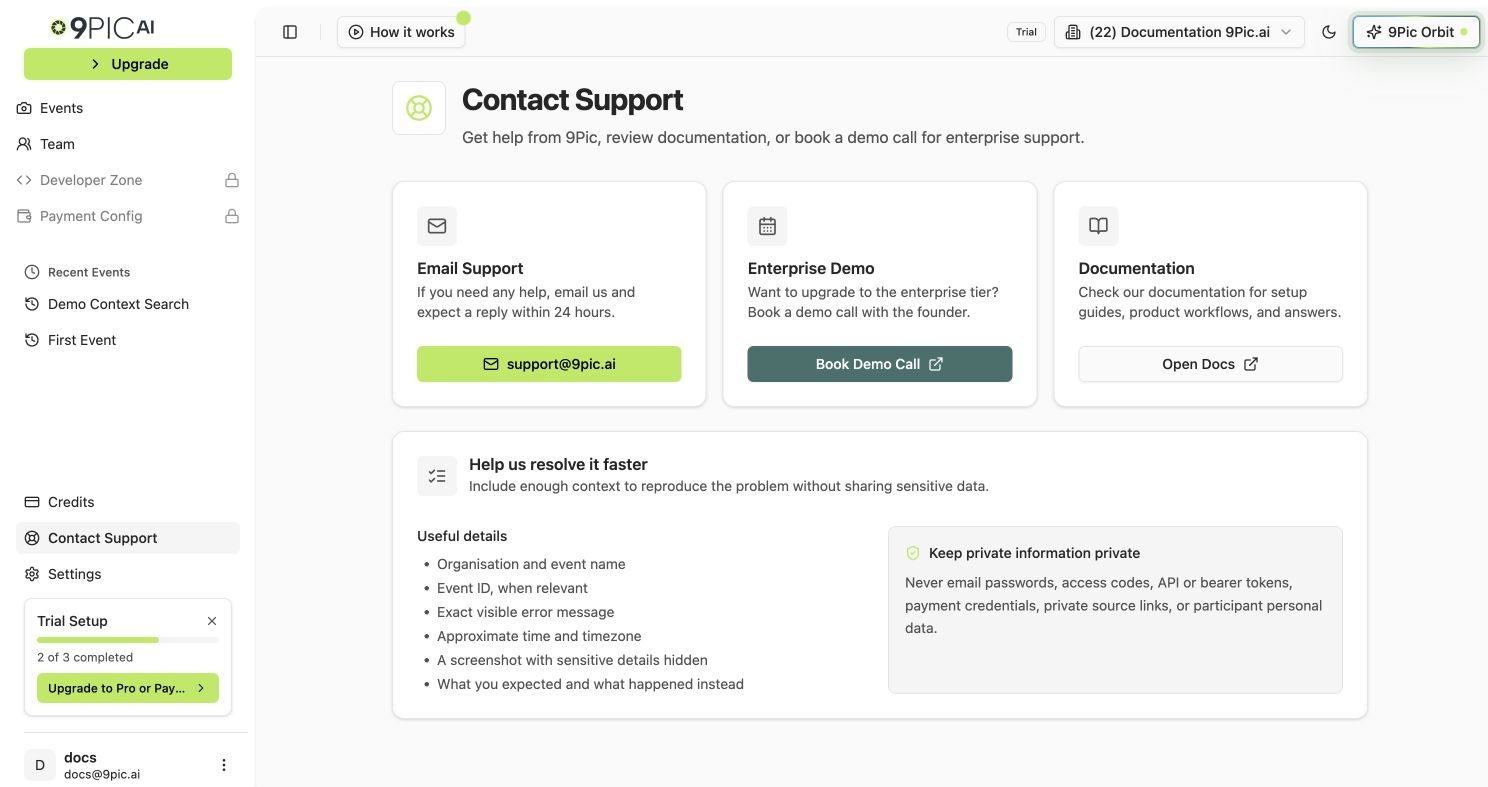
The **Contact Support** page in the dashboard collects all the ways to reach 9Pic into a single place. It has three cards: **Email Support**, **Enterprise Demo**, and **Documentation**.
 ## Open Contact Support
Log in to [admin.9pic.ai](https://admin.9pic.ai).
Click **Contact Support** in the sidebar.
Choose **Email Support**, **Enterprise Demo**, or **Documentation** based on what you need.
## Email Support
Email [support@9pic.ai](mailto:support@9pic.ai) for any help with the dashboard, events, payments, or your account. The in-app card promises a reply within **24 hours**.
Speed up the reply by including:
* Your organisation name as shown in the sidebar.
* The event name or event ID, if your question is about a specific event.
* The payment ID if you are asking about a payment, refund, or invoice.
* The teammate's email if you are asking about access.
* A short description of what you expected and what actually happened.
## Enterprise Demo
If you are evaluating 9Pic for a large organisation, click **Book Demo Call** on the Enterprise Demo card. The button opens [cal.com/arghya/9pic-ai](https://cal.com/arghya/9pic-ai) in a new tab so you can pick a time slot.
Use the demo call for:
* Enterprise pricing and plan upgrades.
* Custom workflows for very large events.
* Onboarding for a new team or organisation.
## Documentation
The **Open Docs** button opens [docs.9pic.ai](https://docs.9pic.ai/) in a new tab. The documentation site covers dashboard guides, trial guides, and reference material that you can search at any time.
## Common Questions
Use [support@9pic.ai](mailto:support@9pic.ai). Personal email addresses of 9Pic team members are not monitored as support inboxes.
Book a demo call when you want a live walkthrough, enterprise pricing, or onboarding for a new organisation. For all other questions, email is usually faster.
It is in the sidebar. The same page is also linked from the **Need Help?** card on the dashboard home.
The in-app card states a reply within **24 hours**. Reply times can vary based on volume and timezone.
## Related Guides
Check balances, payments, and invoices before contacting support.
Manage invites, roles, and access for your organisation.
## Open Contact Support
Log in to [admin.9pic.ai](https://admin.9pic.ai).
Click **Contact Support** in the sidebar.
Choose **Email Support**, **Enterprise Demo**, or **Documentation** based on what you need.
## Email Support
Email [support@9pic.ai](mailto:support@9pic.ai) for any help with the dashboard, events, payments, or your account. The in-app card promises a reply within **24 hours**.
Speed up the reply by including:
* Your organisation name as shown in the sidebar.
* The event name or event ID, if your question is about a specific event.
* The payment ID if you are asking about a payment, refund, or invoice.
* The teammate's email if you are asking about access.
* A short description of what you expected and what actually happened.
## Enterprise Demo
If you are evaluating 9Pic for a large organisation, click **Book Demo Call** on the Enterprise Demo card. The button opens [cal.com/arghya/9pic-ai](https://cal.com/arghya/9pic-ai) in a new tab so you can pick a time slot.
Use the demo call for:
* Enterprise pricing and plan upgrades.
* Custom workflows for very large events.
* Onboarding for a new team or organisation.
## Documentation
The **Open Docs** button opens [docs.9pic.ai](https://docs.9pic.ai/) in a new tab. The documentation site covers dashboard guides, trial guides, and reference material that you can search at any time.
## Common Questions
Use [support@9pic.ai](mailto:support@9pic.ai). Personal email addresses of 9Pic team members are not monitored as support inboxes.
Book a demo call when you want a live walkthrough, enterprise pricing, or onboarding for a new organisation. For all other questions, email is usually faster.
It is in the sidebar. The same page is also linked from the **Need Help?** card on the dashboard home.
The in-app card states a reply within **24 hours**. Reply times can vary based on volume and timezone.
## Related Guides
Check balances, payments, and invoices before contacting support.
Manage invites, roles, and access for your organisation.