> ## Documentation Index
> Fetch the complete documentation index at: https://docs.9pic.ai/llms.txt
> Use this file to discover all available pages before exploring further.
# 9Pic Certify
> Generate and distribute personalized participant certificates from event and timing data.
9Pic Certify is a **Pro plan** feature (available on Pro and Enterprise). On Trial and Pay-as-you-go plans it shows a lock in the event product nav. If it stays locked after upgrading, email [support@9pic.ai](mailto:support@9pic.ai) to switch it on for your organisation.
## Overview
9Pic Certify generates personalized certificates for participants — finisher certificates, participation certificates, and similar — and distributes them alongside event photos. Certificates can pull in dynamic fields like name, event, category, and finish time from a connected data source.
Open it from an event's product navigation: **9pic Certify**.
 ## How Certify Is Organised
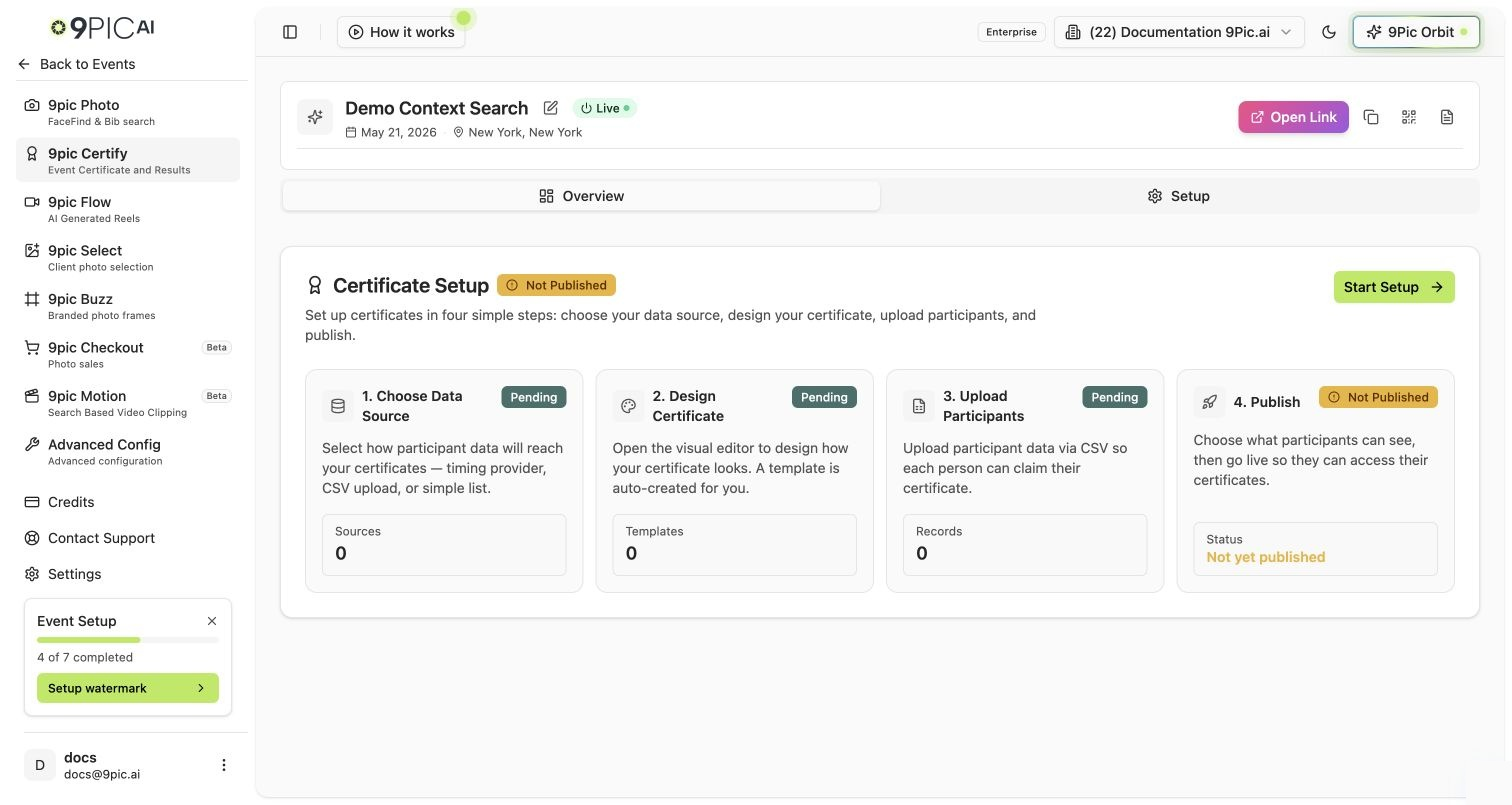
Certify uses **progressive disclosure** — the tabs you see depend on how far you've set it up:
| Stage | Tabs shown |
| ------------------------------- | ------------------------------------------------------- |
| Before initial setup | **Overview**, **Setup** |
| After initial setup is complete | **Overview**, **Certificate**, **Records**, **Publish** |
"Initial setup complete" means you have at least one data **source**, one certificate **template**, and one participant **record**. Until then, the **Setup** wizard guides you through those three things. Once done, the Setup tab is replaced by the three working tabs.
| Tab | What it's for |
| --------------- | ----------------------------------------------------------------------------------------- |
| **Overview** | A summary of your certificate setup and status |
| **Setup** | A guided wizard to connect a source, design a template, and add records (first-time only) |
| **Certificate** | Manage data sources and design certificate templates |
| **Records** | Manage participant records and upload result CSVs |
| **Publish** | Distribute certificates to participants |
## Getting Started
Certify needs the Pro plan or above. Upgrade from [Credits](/dashboard-guide/credits) if it's locked.
Open the **Setup** tab and follow the wizard — connect a data source, design your certificate, and add records. See [Certify Setup](/dashboard-guide/certify/setup).
Once setup is complete, use **Certificate**, **Records**, and **Publish** to refine templates, manage records, and distribute.
## Common Questions
Only if your certificate template includes fields like finish time or category. For a simple participation certificate, a participant list is enough.
They appear only after initial setup is complete (a source, a template, and at least one record). Finish the **Setup** wizard first.
Yes. Update the template or records and re-publish.
## Next Steps
The first-time wizard: source, template, records.
Data sources and certificate templates.
Participant records and result CSV uploads.
Distribute certificates to participants.
## How Certify Is Organised
Certify uses **progressive disclosure** — the tabs you see depend on how far you've set it up:
| Stage | Tabs shown |
| ------------------------------- | ------------------------------------------------------- |
| Before initial setup | **Overview**, **Setup** |
| After initial setup is complete | **Overview**, **Certificate**, **Records**, **Publish** |
"Initial setup complete" means you have at least one data **source**, one certificate **template**, and one participant **record**. Until then, the **Setup** wizard guides you through those three things. Once done, the Setup tab is replaced by the three working tabs.
| Tab | What it's for |
| --------------- | ----------------------------------------------------------------------------------------- |
| **Overview** | A summary of your certificate setup and status |
| **Setup** | A guided wizard to connect a source, design a template, and add records (first-time only) |
| **Certificate** | Manage data sources and design certificate templates |
| **Records** | Manage participant records and upload result CSVs |
| **Publish** | Distribute certificates to participants |
## Getting Started
Certify needs the Pro plan or above. Upgrade from [Credits](/dashboard-guide/credits) if it's locked.
Open the **Setup** tab and follow the wizard — connect a data source, design your certificate, and add records. See [Certify Setup](/dashboard-guide/certify/setup).
Once setup is complete, use **Certificate**, **Records**, and **Publish** to refine templates, manage records, and distribute.
## Common Questions
Only if your certificate template includes fields like finish time or category. For a simple participation certificate, a participant list is enough.
They appear only after initial setup is complete (a source, a template, and at least one record). Finish the **Setup** wizard first.
Yes. Update the template or records and re-publish.
## Next Steps
The first-time wizard: source, template, records.
Data sources and certificate templates.
Participant records and result CSV uploads.
Distribute certificates to participants.